
MCP server · Developer tools
Codebase Memory MCP server
by DeusData
Lets your AI map your whole code project so it can answer questions about how the code fits together.
This is a helper that reads your code project and builds a map of it: which functions and classes exist, what calls what, and where things connect. It is made for people who work with code and use an AI assistant like Claude Code or Codex. Once it is set up, you can just ask your AI questions about the project instead of digging through files yourself.
What is an MCP server? The 30-second version
On its own, your AI can only chat with you. It cannot see your files or your project unless something connects it. An MCP server is a small helper program that gives your AI a new skill or a connection to something. This one connects your AI to your code project, so it can look up how the code is built and answer questions about it when you ask.
What this MCP server does
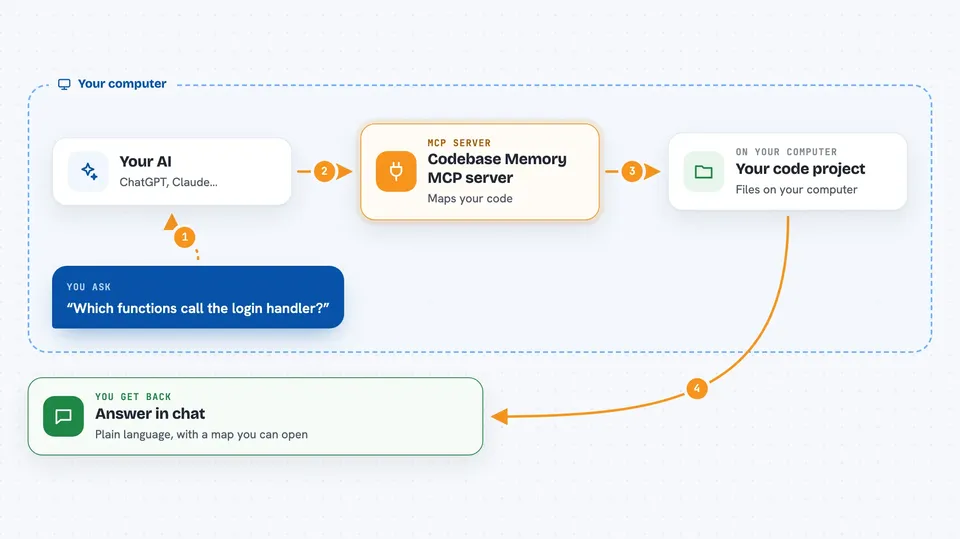
You ask your AI a question about your project, like which functions call a certain piece of code. The AI passes that question to this helper. The helper reads your project, builds a map of functions, classes, calls, and links between services, and stores it on your computer. Then it sends back the answer, and your AI explains it to you in the chat. Everything stays on your machine.
 Click to zoom
What you can do with it
- Index a project so your AI knows its structure
- Find where a function or class is defined and used
- Trace which functions call which other functions
- Get a high-level overview of how a project is built
- See what would be affected if you change a piece of code
- Find code that is never used anywhere
- Link HTTP routes across different services
Try asking your AI
- “Index this project so you can answer questions about it”
- “Which functions call the login handler?”
- “Give me an overview of how this codebase is structured”
- “What would break if I changed this class?”
What it gives back to you
You get answers in the chat, written in plain language by your AI. Those answers can be lists of functions, call chains, an architecture summary, or a list of unused code. If you turn on the graph view, you can also open a page in your browser that shows the map as an interactive picture.
Before you start
What you need
- A computer running macOS, Linux, or Windows
- A coding agent like Claude Code or Codex that you already use
- Permission to run a downloaded program on your computer
Good to know
This tool reads your code project and writes to your coding agent's settings files, so only run it on projects and machines you are comfortable with it looking at.
Install it with your AI
Add Codebase Memory MCP server to your AI, no technical skills needed
You don't install anything by hand. You copy one prompt, paste it into an AI that can work on your computer, and it checks, installs and connects the server for you, asking you when it needs something.
Sign in to get the install prompt
Members get a ready-made prompt that lets the Claude desktop app check Codebase Memory MCP server, install it and connect it for them, step by step. You don't need any technical skills: you copy, paste and answer a few questions. Your connected AI can also find and install any of the 4,609 MCP servers here for you.
Who it's for
Developers and anyone who works with a code project and wants their AI assistant to understand it without reading files one by one.




