
MCP server · Developer tools
MockHero MCP server
by dinosaur24
Let your AI create realistic fake test data for your database, in JSON, CSV or SQL.
MockHero is a service that makes fake but realistic test data for databases. This MCP server lets your AI assistant create that data for you, just by asking in plain words. It is handy if you build or test software and need sample users, orders or products without typing them by hand.
What is an MCP server? The 30-second version
On its own, your AI can only chat with you. An MCP server is a small helper that gives your AI a new skill or a connection to another service. This helper connects your AI to MockHero, so when you ask for test data, the AI can actually go and generate it for you. You do not need to write any code or call anything yourself.
What this MCP server does
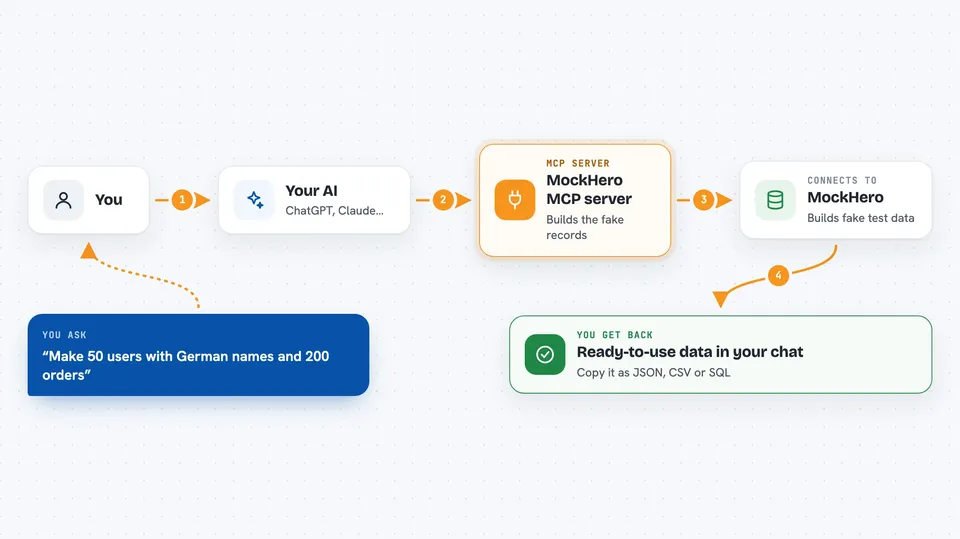
You tell your AI what kind of data you need, for example 50 users with German names and 200 orders linked to them. The AI passes that request to this helper. The helper talks to MockHero, which builds the records and links them together properly. The result comes back to your chat as ready-to-use data in JSON, CSV or SQL. You can then copy it into your project or database.
 Click to zoom
What you can do with it
- Generate fake users, orders, products and other records
- Detect a schema from your SQL or JSON and fill it with data
- Use ready-made templates like ecommerce, blog, saas or social
- Match names, emails and phones to a chosen country
- Get the same data again by reusing the same seed
- Export the result as JSON, CSV or SQL
Try asking your AI
- “Make 50 users with German names and 200 orders linked to them”
- “Detect the schema from this SQL and generate 100 rows for each table”
- “Use the ecommerce template with scale 2 and locale de”
- “Give me 500 products as CSV with realistic prices”
What it gives back to you
You get back a set of records, either as JSON, CSV or SQL text, ready to copy. If you asked for linked tables, the links are already filled in correctly. You also see a short summary of what was generated, like how many rows per table. It is text in the chat, not a file you have to download.
Before you start
What you need
- A MockHero account (the free plan gives you 500 records a day)
- A MockHero API key, which is a kind of password the site gives you
- An AI app that supports MCP, like Claude Desktop or Cursor
Good to know
Generating data uses up your daily record allowance, and paid plans can cost money, so check the estimate before running a big request.
Install it with your AI
Add MockHero MCP server to your AI, no technical skills needed
You don't install anything by hand. You copy one prompt, paste it into an AI that can work on your computer, and it checks, installs and connects the server for you, asking you when it needs something.
Sign in to get the install prompt
Members get a ready-made prompt that lets the Claude desktop app check MockHero MCP server, install it and connect it for them, step by step. You don't need any technical skills: you copy, paste and answer a few questions. Your connected AI can also find and install any of the 4,609 MCP servers here for you.
Who it's for
Developers, testers and anyone who needs sample data for a project without making it by hand.



