MCP server · Customer communication
PM Copilot MCP server
by dkships
Turn support tickets, feature requests and AI chat logs into a ranked list of what to build next.
PM Copilot is a helper for product managers who need to decide what to build next. It gathers customer support tickets, feature requests and AI support chat logs, then groups them into themes and ranks them. It is handy if you already collect feedback in Help Scout, ProductLift or Chatbase and want your AI to make sense of it.
What is an MCP server? The 30-second version
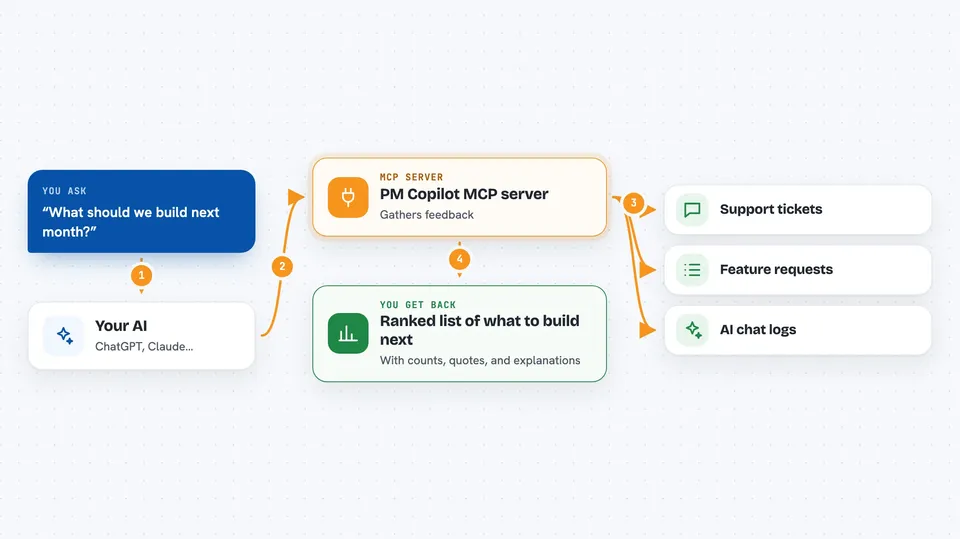
On its own, your AI can only chat with you. It cannot see your support inbox or your feature request board. An MCP server is a small helper program that gives your AI a new skill or a connection to an app. This one connects your AI to Help Scout, ProductLift and Chatbase, so when you ask a question, the AI can go look things up there and bring answers back.
What this MCP server does
You ask your AI something like what should we build next. The AI passes your request to PM Copilot. PM Copilot then reads your support tickets, feature requests and AI chat logs for the time window you chose. It groups them into themes, checks which themes show up in more than one place, and scores each theme. You get back a ranked list with counts, quotes and a short explanation for each theme.
 Click to zoom
What you can do with it
- Rank product themes by priority across tickets, feature requests and AI chats
- Spot themes that appear in both support tickets and feature requests
- See which questions your AI support agent handled without a ticket being filed
- Drill into one theme to see the tickets, requests and chats behind it
- Pull raw feature requests from ProductLift with vote counts and links
- Check which mailboxes, portals and chat agents are connected
- Blend churn or traffic numbers from other tools into the ranking
Try asking your AI
- “What should we build next month based on the last 30 days of feedback?”
- “Show me the top 5 themes from support tickets and feature requests.”
- “Which themes show up in both tickets and feature requests?”
- “Give me the tickets and requests behind the booking and scheduling theme.”
What it gives back to you
You get a ranked list of themes, each with a priority score, counts from each source, and a few short customer quotes. You can also ask for a ready-to-read brief in plain text instead of structured data. If you drill into one theme, you get the individual tickets, requests and chats behind it, newest first, with links and dates. Every response also tells you whether personal details were scrubbed.
Before you start
What you need
- Node.js 20 or newer
- The Claude desktop app or Claude Code
- At least one connected source: Help Scout, ProductLift or Chatbase credentials
- A Chatbase Standard plan or higher if you want the AI chat signal
Good to know
It reads your customer support tickets and chat logs, so only connect accounts you are allowed to share with your AI, and check the scrubbing notice in each response.
Install it with your AI
Add PM Copilot MCP server to your AI, no technical skills needed
You don't install anything by hand. You copy one prompt, paste it into an AI that can work on your computer, and it checks, installs and connects the server for you, asking you when it needs something.
Sign in to get the install prompt
Members get a ready-made prompt that lets the Claude desktop app check PM Copilot MCP server, install it and connect it for them, step by step. You don't need any technical skills: you copy, paste and answer a few questions. Your connected AI can also find and install any of the 4,609 MCP servers here for you.
Who it's for
Product managers and product teams who collect customer feedback in Help Scout, ProductLift or Chatbase and want help deciding what to build next.