MCP server · Notes · official
Workfile MCP server
by illodev · official
Lets your AI keep project cards, docs, changelog and notes as Markdown files in your code repository.
Workfile is a helper that keeps your project's to-do cards, documents, changelog and team notes as simple Markdown files inside your code repository. It is made for teams where people and AI assistants both work on the same project and need one shared place to write things down. If you already use ChatGPT or Claude for planning and writing, this connects that work to files your team can actually read and review.
What is an MCP server? The 30-second version
On its own, your AI can only chat with you. An MCP server is a small helper program that gives your AI a new skill or a connection to an app or service. This one connects your AI to Workfile, which stores project cards, docs, changelog entries and notes as Markdown files in your repository. Once connected, your AI can look up a card, add a note, or update a document when you ask, and the result lands in files your team can see.
What this MCP server does
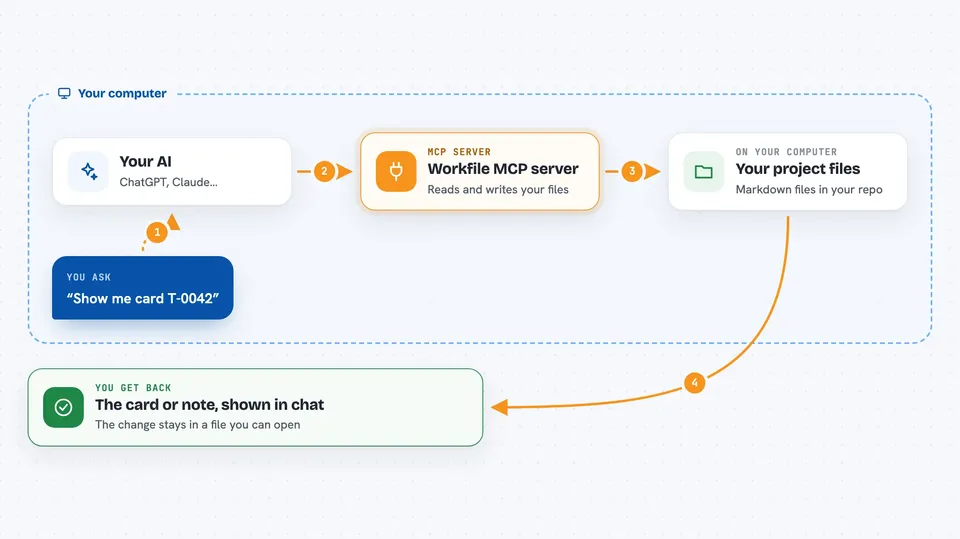
You ask your AI something like "show me card T-0042" or "add a learning about our release process". The AI passes that request to the Workfile helper running on your computer. The helper reads or writes the matching Markdown file in your repository's .project folder. Then it sends the answer back, and your AI shows it to you in the chat. Because everything is stored as files, your team can review changes in a normal pull request.
 Click to zoom
What you can do with it
- List and search project cards, docs, changelog entries and memory notes
- Create a new card, document or learning note with a title and area
- Claim a card so two AI helpers do not edit the same one at once
- Move a card through statuses like backlog, doing, review and done
- Add a changelog fragment for an upcoming release
- Look up decisions, incidents and conventions recorded by the team
- Check the workspace for broken links or missing information
Try asking your AI
- “List all cards in the infra area that are still in progress”
- “Create a card titled Update billing docs in the docs area”
- “Show me the last three decisions we recorded about our database”
- “Add a changelog entry for the new search feature”
What it gives back to you
You get back plain answers in the chat: lists of cards, the full text of a document, search results, or a short confirmation that a file was created or updated. When your AI changes something, it tells you which record it touched, like card T-0042 or decision ADR-0009. The actual change lives in a Markdown file in your repository, so you can open it and read it yourself.
Before you start
What you need
- Node.js 22 or newer installed on your computer
- The Workfile package added to your project, usually with pnpm add -D @illodev/workfile
- A project folder that has been set up with workfile init
- Your AI app configured to run this MCP server
Good to know
It can create and change files in your repository, so review the changes it makes before committing them.
Install it with your AI
Add Workfile MCP server to your AI, no technical skills needed
You don't install anything by hand. You copy one prompt, paste it into an AI that can work on your computer, and it checks, installs and connects the server for you, asking you when it needs something.
Sign in to get the install prompt
Members get a ready-made prompt that lets the Claude desktop app check Workfile MCP server, install it and connect it for them, step by step. You don't need any technical skills: you copy, paste and answer a few questions. Your connected AI can also find and install any of the 4,361 MCP servers here for you.
Who it's for
Product managers, team leads and developers who plan work in a code repository and want their AI assistant to read and write those same project files.