MCP server · Productivity · official
Loupe MCP server
by mohamed-ashraf-elsaed · official
Turn pinned visual feedback on your product into a backlog your AI can read and work through.
Loupe is a tool for pinning comments onto a live product page. You click an element, leave a note, and it saves a screenshot and the details of that element. This MCP server lets your AI read those comments and work through them like a to-do list.
What is an MCP server? The 30-second version
On its own, your AI can only chat with you. An MCP server is a small helper program that gives your AI a new skill or a connection to another app. This one connects your AI to Loupe, so it can look up your pinned comments and their details. When you ask, the AI uses this helper to fetch the feedback and act on it.
What this MCP server does
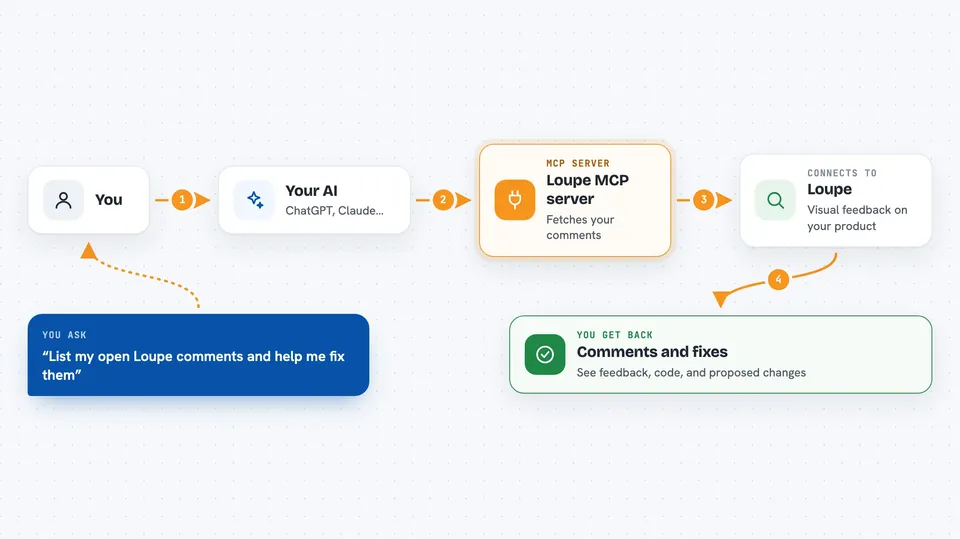
You ask your AI to look at your Loupe comments. The AI uses this helper to ask your Loupe setup for the list of open comments. For each one, it pulls the written note, the HTML of the element, the styles applied to it, and the screenshot as an image. The AI can then suggest or write a fix, send that change back to Loupe, and mark the comment as done.
 Click to zoom
What you can do with it
- List all open Loupe comments for your project
- Read one comment in full, including the element's HTML and styles
- See the screenshot attached to a comment
- Propose a change with modified HTML and CSS
- Update a comment's status as you work through it
- Work through your feedback backlog one item at a time
Try asking your AI
- “List the open Loupe comments and work through them.”
- “Show me the details of the comment about the checkout button.”
- “What does the screenshot on the newest comment look like?”
- “Fix the styling issue in that comment and propose the change.”
What it gives back to you
You get back a list of comments with their notes and status. When you open one, you see the written feedback, the element's HTML, its computed styles, and the screenshot as an image in the chat. If the AI proposes a change, that modified HTML and CSS is sent back to Loupe for your team to review.
Before you start
What you need
- A running Loupe setup (the local server, or Loupe for Laravel inside your own app)
- The admin key printed when you run the seed command
- The project key for your Loupe project
- The Claude desktop app or Claude Code
Good to know
This helper can change your comments and their status, so check what it did before you rely on it.
Install it with your AI
Add Loupe MCP server to your AI, no technical skills needed
You don't install anything by hand. You copy one prompt, paste it into an AI that can work on your computer, and it checks, installs and connects the server for you, asking you when it needs something.
Sign in to get the install prompt
Members get a ready-made prompt that lets the Claude desktop app check Loupe MCP server, install it and connect it for them, step by step. You don't need any technical skills: you copy, paste and answer a few questions. Your connected AI can also find and install any of the 4,361 MCP servers here for you.
Who it's for
Product managers, designers, and developers who collect visual feedback on a product and want their AI to help clear that backlog.