
MCP server · Productivity
jobctl MCP server
by DmytroRybka
Let your AI keep your job application tracker up to date while you focus on interviews.
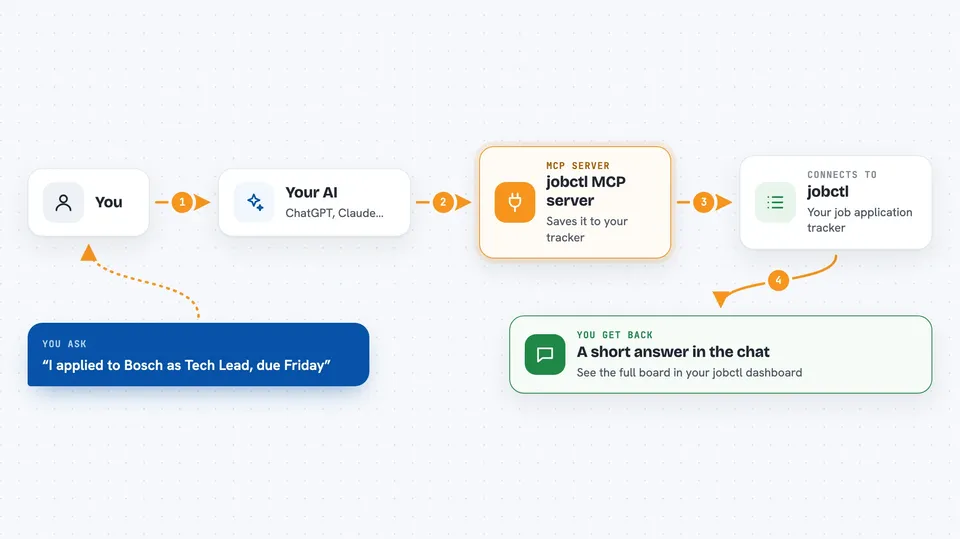
jobctl is a job application tracker that your AI assistant can write to for you. You tell it what happened in your job search, and it records applications, interviews, statuses, salaries and next actions. Then you review everything in a clean dashboard at jobctl.app.
What is an MCP server? The 30-second version
On its own, your AI can only chat. An MCP server is a small helper that gives your AI a new skill or a connection to an app. This one connects your AI to jobctl, your job application tracker. So when you say "I applied to Bosch as Tech Lead, prio A, due Friday", the AI can actually save that into your tracker for you.
What this MCP server does
You talk to your AI in plain words about your job search. The AI uses this helper to talk to jobctl. The helper creates or updates your applications, notes, interviews and next actions. You then open the jobctl dashboard to see your pipeline board, analytics and interview timeline. Everything stays in your own account, and every change is logged.
 Click to zoom
What you can do with it
- Add a new job application with company, role, priority and due date
- List your applications filtered by status, priority or a search word
- Update the status, salary or next action on an application
- Log an interview with attendees, links and a debrief
- See what is overdue or coming up next
- Get an agenda for today, tomorrow or this week
- Attach your CV or cover letter to an application
Try asking your AI
- “I applied to Bosch as Tech Lead, prio A, due friday”
- “Show me all my applications that are still in the interview stage”
- “Log my interview with Siemens tomorrow at 2pm, interviewer Anna, video call link in the calendar”
- “What is overdue this week?”
What it gives back to you
You get back short answers in the chat, like a confirmation that an application was saved, or a list of your applications matching a filter. For details, it can show the timeline, contacts, interviews and attachments of one application. For planning, it gives you a list of overdue and upcoming next actions, or an agenda for today, tomorrow or this week. The full visual view is in the jobctl dashboard.
Before you start
What you need
- A jobctl account (free to create at jobctl.app)
- A jobctl token (a kind of password for apps; you create one at app.jobctl.app/settings)
- An AI client that supports MCP, such as Claude Code or the Claude desktop app
Good to know
This server can change and add things in your jobctl account, so check the dashboard now and then to make sure everything looks right.
Install it with your AI
Add jobctl MCP server to your AI, no technical skills needed
You don't install anything by hand. You copy one prompt, paste it into an AI that can work on your computer, and it checks, installs and connects the server for you, asking you when it needs something.
Sign in to get the install prompt
Members get a ready-made prompt that lets the Claude desktop app check jobctl MCP server, install it and connect it for them, step by step. You don't need any technical skills: you copy, paste and answer a few questions. Your connected AI can also find and install any of the 4,609 MCP servers here for you.
Who it's for
Job seekers, especially developers and tech professionals who want their AI assistant to keep their job search organized.





