
MCP server · Notes
Ossian document search and memory server
by dockndevai
Let your AI answer questions from your team's own documents with real sources, and keep notes across chats.
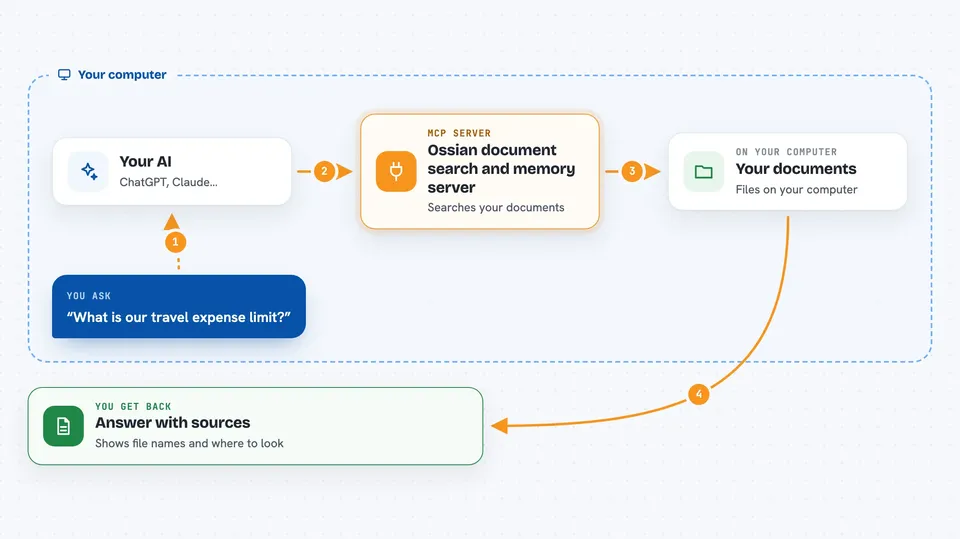
This connects your AI assistant to Ossian, a place where your organization keeps its documents. Once hooked up, your AI can hunt through those documents to answer your work questions and show you the actual lines it used. It also remembers useful facts between conversations. If your job involves looking things up in internal docs all day, this saves you time.
What is an MCP server? The 30-second version
On its own, your AI can only talk based on whatever it learned during training. This little helper sits quietly next to it and opens a door to something else. Here, that something else is Ossian, your group's collection of documents. When you ask a question, your AI sends it through this helper to Ossian, gets the matching pieces back, and turns them into an answer for you.
What this MCP server does
When you connect this, your AI gains extra abilities called tools. Four come switched on right away because they just read things. Ask a question and your AI calls ask_documents, which goes off to Ossian and brings back the parts of your documents that fit best, along with where each part lives so you can check it yourself. There are helpers too for seeing which collections exist and whether any uploads have finished yet. Another one lets your AI jot down preferences or decisions so future sessions know about them.
 Click to zoom
What you can do with it
- Ask questions answered straight from your own uploaded documents, with links showing where each bit came from
- Get a clear I don't know instead of a guess whenever nothing matches well enough
- Look up which groups of documents exist and roughly how big each one is
- Check what has been added already versus what is still being processed
- Bring past details forward again later since remembered items stick around after the chat ends
- Pull a web address into the pile so everyone benefits going ahead
Try asking your AI
- “What is our current travel expense limit? Point me to the section that says it.”
- “Show me everything we decided last month regarding supplier terms.”
- “Which folders hold information related to onboarding procedures?”
- “Remember that my preferred tone for reports stays formal.”
What it gives back to you
For document queries expect quoted chunks lifted directly from wherever matched strongest alongside labels naming file and spot inside it. Sometimes zero results appear plainly stated leaving room open for follow-up wording tweak. Listing commands produce compact tables covering names counts statuses while recollection replies arrive trimmed according freshness weight significance combined together neatly ordered within normal message flow visible immediately upon typing send button press moment arrives naturally thereafter continuing onward seamlessly throughout remainder exchange duration fully intact end finally concluding stop.
Install it with your AI
Add Ossian document search and memory server to your AI, no technical skills needed
You don't install anything by hand. You copy one prompt, paste it into an AI that can work on your computer, and it checks, installs and connects the server for you, asking you when it needs something.
Sign in to get the install prompt
Members get a ready-made prompt that lets the Claude desktop app check Ossian document search and memory server, install it and connect it for them, step by step. You don't need any technical skills: you copy, paste and answer a few questions. Your connected AI can also find and install any of the 4,361 MCP servers here for you.





