
MCP server · Developer tools
agentmako MCP server
by drhalto
Lets your AI read and understand your code project before it changes anything.
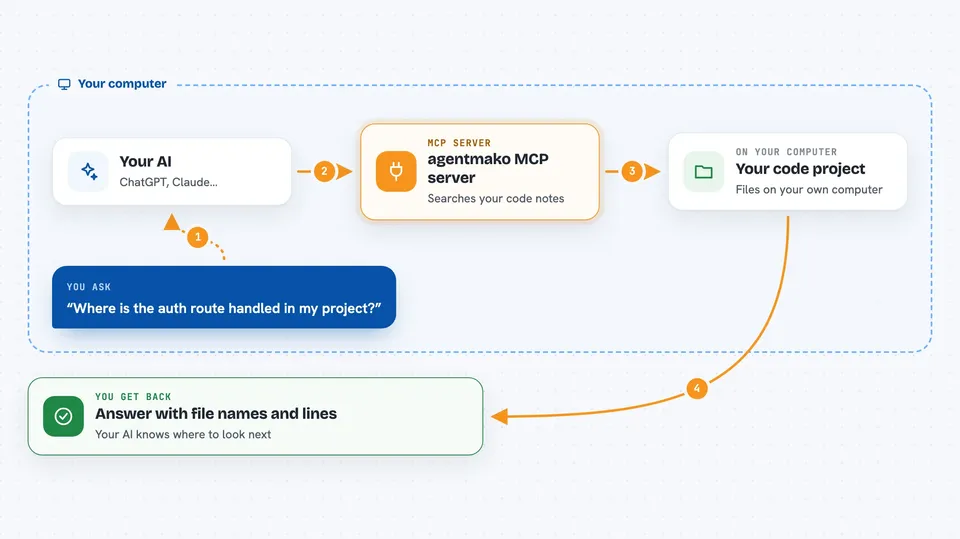
agentmako is a helper that gives your AI coding assistant a map of your project. Instead of guessing or searching blindly, the AI can ask it what files matter, which routes or tables are involved, and what to read next. It is handy if you use tools like Claude Code, Cursor, or Codex on a real codebase and want fewer wrong turns.
What is an MCP server? The 30-second version
On its own, your AI can only chat with you. An MCP server is a small helper program that gives your AI a new skill or a connection to something else. This one connects your AI to a local index of your code project, so it can look things up and answer questions about your files, routes, and database. Everything runs on your own computer, not on someone else's service.
What this MCP server does
You ask your AI a question about your project, like where a certain route is handled. The AI sends that question to agentmako, which has already indexed your code into a small local database. agentmako searches its notes and facts, then sends back an answer with evidence, like which files and lines to look at. Your AI reads that and continues working, now knowing where to look instead of guessing.
 Click to zoom
What you can do with it
- Ask which files and routes matter for a task before editing
- Get a context packet that lists what to read next
- Check diagnostics and lint findings for changed files
- Look up database tables, schema facts, and review notes
- See what other files a change might affect
- Search the current files on disk with exact text or patterns
- Run a completion check before calling a task done
Try asking your AI
- “Where should I inspect auth route state in this project?”
- “Give me a context packet for fixing the broken auth callback route.”
- “What files and tables are involved in the signup flow?”
- “Show me the diagnostics and lint findings for the files I just changed.”
What it gives back to you
You get back short, evidence-backed answers in the chat, usually with file names, routes, or table names that matter. It can also return lists of findings, diagnostics, or suggested next steps. Sometimes it hands back a context packet, which is a small bundle of facts and pointers for the AI to read. You will not see raw database dumps; you see plain answers your AI can act on.
Before you start
What you need
- Node.js 20 or newer installed on your computer
- The agentmako tool installed (npm install -g agentmako)
- Your project attached and indexed with agentmako connect
- An MCP client like Claude Code, Cursor, or Codex
Good to know
It reads your local project files and can change local state like review notes, so only point it at projects you are comfortable indexing.
Install it with your AI
Add agentmako MCP server to your AI, no technical skills needed
You don't install anything by hand. You copy one prompt, paste it into an AI that can work on your computer, and it checks, installs and connects the server for you, asking you when it needs something.
Sign in to get the install prompt
Members get a ready-made prompt that lets the Claude desktop app check agentmako MCP server, install it and connect it for them, step by step. You don't need any technical skills: you copy, paste and answer a few questions. Your connected AI can also find and install any of the 4,609 MCP servers here for you.
Who it's for
Developers and technical teams who use AI coding assistants on real projects and want them to understand the codebase before making changes.




