
MCP server · Research
Zotero MCP server
by dvdsosa
Let your AI search, read, and update your own Zotero library on your computer, even offline.
This is a small helper that connects your AI assistant to Zotero, the program many people use to keep track of papers and books. Once it is set up, you can ask your AI to find a reference, read a PDF, or file a paper into a folder, and it will do it in your own Zotero library. It is handy for students, researchers, and anyone who keeps a growing pile of references.
What is an MCP server? The 30-second version
On its own, your AI can only chat with you. An MCP server is a small helper program that gives your AI a new skill or a connection to an app. This one connects your AI to Zotero on your own computer, so it can look things up and make changes there when you ask. Nothing goes through the internet, and you do not need a Zotero account or any special password.
What this MCP server does
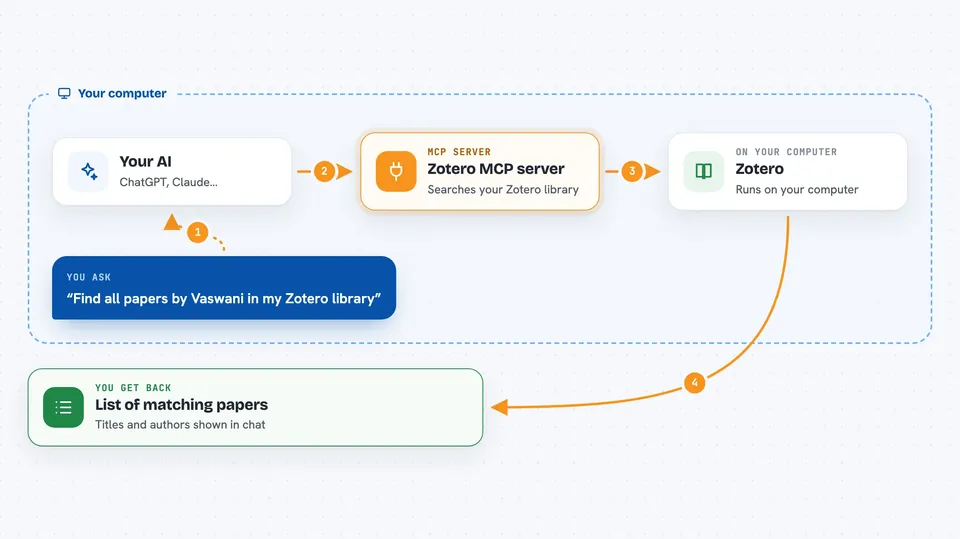
You ask your AI something about your Zotero library, like finding a paper or adding a new one. The AI passes your request to this helper program. The helper talks to Zotero running on your own computer. Zotero does the work, and the result comes back to your AI, which tells you what happened in plain words. For example, you can say to file a paper under a folder and attach a PDF, and the AI will create the folder, add the reference, and attach the file.
 Click to zoom
What you can do with it
- Search your Zotero library for items by title, author, or other details
- Read the full text of a PDF attached to an item
- Create new collections (folders) and add references to them
- Add new references to your library
- Attach a PDF from your computer to an existing item
- Export references as BibTeX or CSL for use in other tools
- List your tags and run your saved searches
Try asking your AI
- “Find all papers by Vaswani in my Zotero library”
- “Create a collection called Methods under Thesis and add the paper Attention Is All You Need to it”
- “Attach the PDF I just downloaded to that paper”
- “Show me the full text of the first page of the transformer paper”
What it gives back to you
You get back plain answers in the chat, like a list of matching papers with their titles and authors, or a short confirmation that a collection was created or a file was attached. If you ask for full text, the AI shows you the text it read. If you ask for an export, you get the BibTeX or CSL text you can copy.
Before you start
What you need
- Zotero 10 or newer, running on your computer
- In Zotero, go to Settings, then Advanced, and turn on Allow other applications on this computer to communicate with Zotero
- Node.js 22 or newer installed on your computer
Good to know
This server can change or delete items in your Zotero library, and permanent deletions cannot be undone, so back up your library first and be careful with delete requests.
Install it with your AI
Add Zotero MCP server to your AI, no technical skills needed
You don't install anything by hand. You copy one prompt, paste it into an AI that can work on your computer, and it checks, installs and connects the server for you, asking you when it needs something.
Sign in to get the install prompt
Members get a ready-made prompt that lets the Claude desktop app check Zotero MCP server, install it and connect it for them, step by step. You don't need any technical skills: you copy, paste and answer a few questions. Your connected AI can also find and install any of the 4,361 MCP servers here for you.
Who it's for
Students, researchers, and anyone who uses Zotero to manage references and wants their AI assistant to help with filing, searching, and reading papers.





