
MCP server · Research
CanYouGrab domain checker
by einiba
Your AI can check if a domain name is available and show who owns it, with a clear confidence rating.
This is a small helper that lets your AI assistant check whether a website name (a domain) is still free to register. It looks up real records on the internet instead of guessing, and tells you how sure it is about each answer. It is handy if you are picking a name for a project, a shop, or a side business.
What is an MCP server? The 30-second version
On its own, your AI can only chat with you. It cannot go and check something on the internet unless you give it a helper. An MCP server is exactly that: a small program that gives your AI one new skill. This one connects your AI to CanYouGrab.it, a domain checking service, so when you ask about a website name, the AI can look it up for you.
What this MCP server does
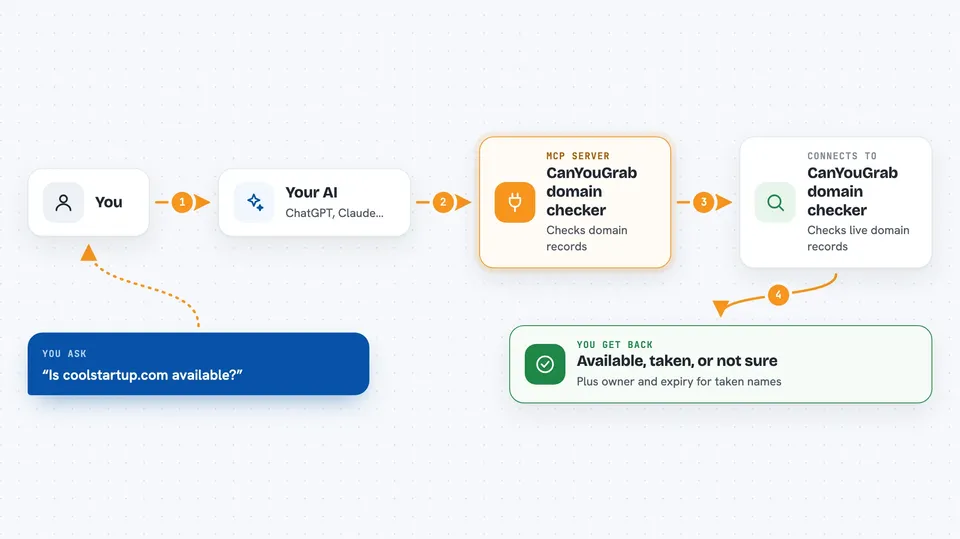
You ask your AI something like whether a certain name is taken. The AI sends that name to this helper, and the helper asks the CanYouGrab.it service. The service checks live DNS and WHOIS records, which are the public listings behind every domain. The answer comes back with a simple yes, no, or not sure, plus a confidence level and, for taken names, who registered it and when it expires.
 Click to zoom
What you can do with it
- Check if a single domain is available
- Check up to 100 domains in one go
- Compare the same name across different endings like .io, .co, or .dev
- See who registered a domain and when it expires
- See the nameservers and status codes for a domain
- Check how many lookups you have left this month
Try asking your AI
- “Is coolstartup.com available?”
- “Check if grabify.io, grabify.co, grabify.dev and grabify.app are free”
- “Who owns example.com and when does it expire?”
- “How many domain lookups do I have left this month?”
What it gives back to you
You get a short answer in the chat, usually a list of the names you asked about with available, taken, or not sure next to each one. For taken names, you also see the registrar, the creation date, and the expiry date. Each result comes with a confidence label so you know how much to trust it. If a lookup fails, the AI will tell you it could not be sure and suggest trying again.
Before you start
What you need
- A CanYouGrab.it account and API key (a kind of password for apps; you get one free at portal.canyougrab.it)
- The uvx tool installed on your computer (comes with the uv Python tool)
- An AI app that supports MCP servers, like Claude Desktop, Claude Code, VS Code, or Cursor
Good to know
The results are read-only and safe, but a domain can be registered by someone else moments after you check, so always confirm on a registrar site before you count on a name.
Install it with your AI
Add CanYouGrab domain checker to your AI, no technical skills needed
You don't install anything by hand. You copy one prompt, paste it into an AI that can work on your computer, and it checks, installs and connects the server for you, asking you when it needs something.
Sign in to get the install prompt
Members get a ready-made prompt that lets the Claude desktop app check CanYouGrab domain checker, install it and connect it for them, step by step. You don't need any technical skills: you copy, paste and answer a few questions. Your connected AI can also find and install any of the 4,609 MCP servers here for you.
Who it's for
Anyone picking a domain name, such as founders, marketers, freelancers, and small business owners who want a quick, honest answer instead of a guess.


