
MCP server · Coding
Ejentum MCP server
by ejentum
Gives your AI step-by-step thinking plans for hard tasks, code, tricky claims, and memory work.
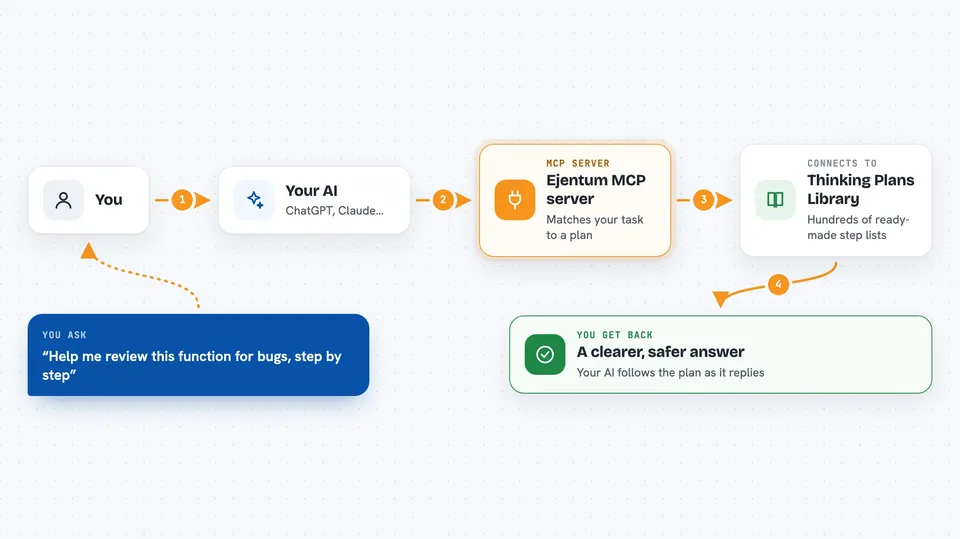
Ejentum is a helper that hands your AI a ready-made thinking plan before it answers. You describe a hard task, and the AI picks up a structured procedure to follow instead of winging it. It is handy when a question has many steps, many rules, or needs careful checking.
What is an MCP server? The 30-second version
On its own, your AI can only chat with what it already knows. An MCP server is a small helper program that gives your AI a new skill or a connection to another service. This one connects your AI to Ejentum, a library of thinking procedures. When you ask something tricky, your AI quietly fetches a plan from Ejentum and follows it before replying.
What this MCP server does
You ask your AI a hard question, like planning a risky change or checking a claim. Your AI sends a short description of the task to this helper. The helper matches it to one of hundreds of stored thinking procedures. It sends back a numbered plan plus a small map of the steps, with checks and warnings. Your AI reads that plan and then writes its answer for you.
 Click to zoom
What you can do with it
- Get a step-by-step plan for a complex, multi-part question
- Follow a careful procedure when writing or reviewing code
- Spot shaky claims, flattery, or made-up facts before trusting them
- Use a filtering routine when sorting or judging lots of information
- Ask for a version of the plan rewritten with your own task details
- Check its own draft against a self-test before answering you
Try asking your AI
- “Help me plan a database change on a very large table without breaking things”
- “Walk me through reviewing this function for bugs, step by step”
- “Is this claim actually supported, or is it flattery?”
- “Give me a careful procedure for deciding which of these options to pick”
What it gives back to you
You get your AI's normal answer, but shaped by the plan it fetched. Sometimes you will see the steps it followed, or a short note about what it checked. The plan itself is plain text, so it blends into the conversation. You mostly notice that the answer is more careful and better organised.
Before you start
What you need
- An Ejentum API key (a kind of password; there is a 30-day free trial, no card needed)
- Node.js 18 or newer installed on your computer
- An app that supports MCP servers, like Claude Desktop, Cursor, or Windsurf
Good to know
The adaptive tools need a paid plan and take a few seconds longer, and the free trial only covers the four basic tools.
Install it with your AI
Add Ejentum MCP server to your AI, no technical skills needed
You don't install anything by hand. You copy one prompt, paste it into an AI that can work on your computer, and it checks, installs and connects the server for you, asking you when it needs something.
Sign in to get the install prompt
Members get a ready-made prompt that lets the Claude desktop app check Ejentum MCP server, install it and connect it for them, step by step. You don't need any technical skills: you copy, paste and answer a few questions. Your connected AI can also find and install any of the 4,609 MCP servers here for you.
Who it's for
People who ask their AI to plan, write code, or check tricky claims and want more careful, structured answers.



