
MCP server · Developer tools
ellmos CodeCommander MCP server
by ellmos-ai
Lets your AI check, clean up and repair code files, JSON and text on your own computer.
CodeCommander is a small helper program you connect to your AI assistant so it can look at and tidy up code files on your computer. It can read Python, JavaScript and TypeScript files, fix broken JSON, repair scrambled text, sort imports and compare two files. It is handy if you work with code or config files and want your AI to help without copying everything back and forth by hand.
What is an MCP server? The 30-second version
On its own, your AI can only chat. It cannot open files on your computer or change anything there. An MCP server is a small helper program that gives your AI one new skill, here the skill of working with code and text files on your machine. Once CodeCommander is connected, your AI can ask it to read a file, check it, repair it or compare two files, and you see the result right in the chat.
What this MCP server does
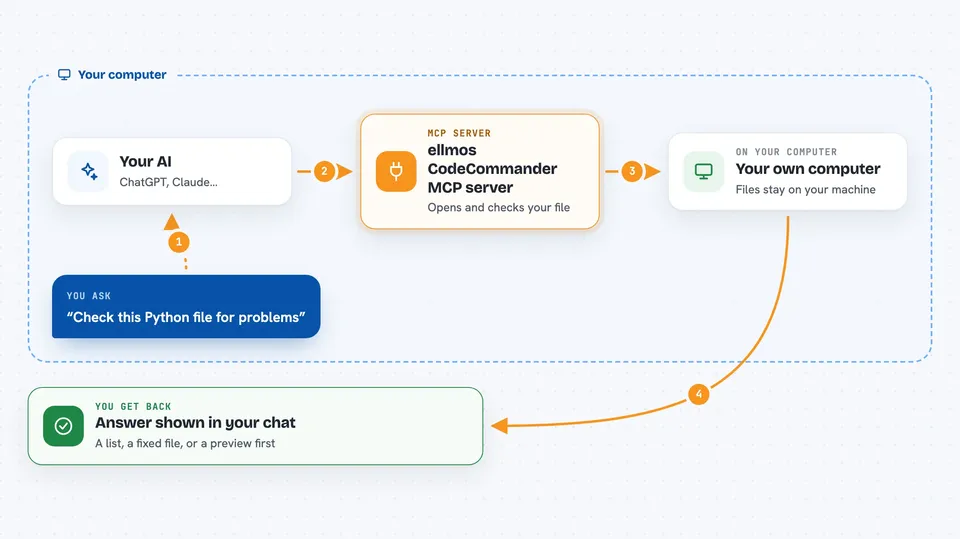
You ask your AI something like "check this Python file for problems" or "fix this broken JSON". Your AI passes that request to CodeCommander, which runs quietly on your own computer. CodeCommander opens the file, does the analysis or the repair, and hands the result back to your AI. Your AI then shows you the answer in plain language, for example a list of functions, a diff, or the fixed text. For changes to files, it can first show you a preview so nothing is written until you agree.
 Click to zoom
What you can do with it
- Analyze Python, JavaScript and TypeScript files and list classes, methods and functions
- Repair broken JSON such as trailing commas, single quotes or stray comments
- Fix scrambled text, Mojibake and broken German umlauts
- Sort and clean up Python imports following PEP 8
- Convert between JSON, CSV, INI, YAML, TOML, XML and TOON formats
- Compare two files and show a unified diff
- Test a regular expression and preview replacements
Try asking your AI
- “Analyze this Python file and list all classes and methods with their line numbers”
- “This JSON file is broken, can you repair it and show me what was wrong”
- “Fix the umlauts in this text file, they all look scrambled”
- “Compare these two config files and show me what changed”
What it gives back to you
You get answers in the chat, not files you have to hunt for. Depending on what you asked, that can be a list of functions with line numbers, a cleaned-up version of your JSON, a diff showing old and new lines, or a short report of what was fixed. For edits, it can show a preview first, and if you apply the change it also makes a backup copy of the original file.
Before you start
What you need
- Node.js 18 or newer installed on your computer
- An MCP client such as Claude Desktop, Claude Code, Cursor or Windsurf
- Access to the project folder you want your AI to look at
Good to know
Some tools can change files on your computer, so use the preview mode first and keep the automatic backups until you are sure the change is right.
Install it with your AI
Add ellmos CodeCommander MCP server to your AI, no technical skills needed
You don't install anything by hand. You copy one prompt, paste it into an AI that can work on your computer, and it checks, installs and connects the server for you, asking you when it needs something.
Sign in to get the install prompt
Members get a ready-made prompt that lets the Claude desktop app check ellmos CodeCommander MCP server, install it and connect it for them, step by step. You don't need any technical skills: you copy, paste and answer a few questions. Your connected AI can also find and install any of the 4,609 MCP servers here for you.
Who it's for
Developers and anyone who regularly works with code, config files or messy text and wants an AI to help clean them up locally.




