
MCP server · Notes
mem0 memory server (self-hosted)
by elvismdev
Give your AI a long-term memory that survives between chats, stored on your own computer.
This is a helper that gives Claude Code a memory. Normally, when you close a chat, everything you talked about is gone. With this connected, your AI can remember facts, preferences and project details and bring them back in later sessions.
What is an MCP server? The 30-second version
On its own, your AI can only chat with you in the moment. An MCP server is a small helper program that gives your AI a new skill or a connection to something. This one connects your AI to a memory store that runs on your own machine, so it can save things you tell it and look them up again later. Think of it as a notebook your AI can write in and read from, and you keep the notebook.
What this MCP server does
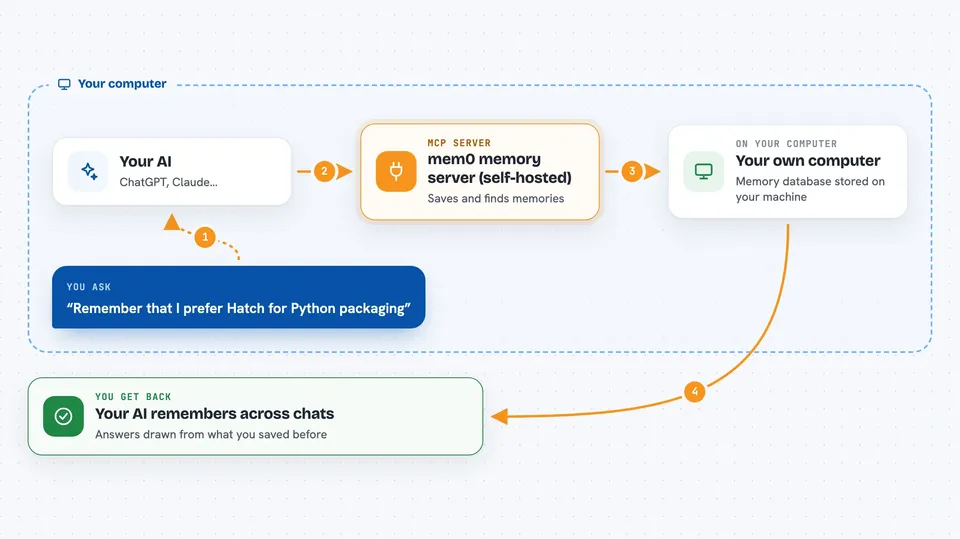
You tell your AI something worth remembering, like a coding preference or a project detail. Your AI passes that to this helper, which stores it in a memory database on your computer. Later, when you ask a question, your AI asks the helper to search those saved memories and gets the relevant ones back. The helper can also build a small map of how people, projects and things relate to each other. You see the results as normal answers in your chat, plus the AI quietly saving and recalling things in the background.
 Click to zoom
What you can do with it
- Save a fact, preference or decision so your AI remembers it next time
- Search your saved memories by meaning, not just exact words
- List everything your AI has stored for you
- Update or delete a single memory when something changes
- Wipe all memories for a user in one go
- Look up how entities in your knowledge graph are connected
- Automatically load relevant memories when a session starts and save a summary when it ends
Try asking your AI
- “Remember that I prefer Hatch for Python packaging”
- “Search my memories for TypeScript preferences”
- “Show me all entities in my knowledge graph”
- “What did we decide about the database setup last week”
What it gives back to you
You get answers in plain chat text, drawn from what was saved before. When you ask to list or search, you see a list of matching memories with short descriptions. When you save or delete something, the AI confirms what changed. Some setups also add a short block of remembered context at the start of a session, so you do not have to repeat yourself.
Before you start
What you need
- Python 3.10 or newer
- uv installed (a tool that runs Python programs)
- Qdrant running on your machine (the memory storage)
- Ollama running on your machine with the bge-m3 model (makes the search work)
Good to know
This tool can delete memories, including wiping everything for a user, so be careful with delete commands and keep backups if the memories matter to you.
Install it with your AI
Add mem0 memory server (self-hosted) to your AI, no technical skills needed
You don't install anything by hand. You copy one prompt, paste it into an AI that can work on your computer, and it checks, installs and connects the server for you, asking you when it needs something.
Sign in to get the install prompt
Members get a ready-made prompt that lets the Claude desktop app check mem0 memory server (self-hosted), install it and connect it for them, step by step. You don't need any technical skills: you copy, paste and answer a few questions. Your connected AI can also find and install any of the 4,609 MCP servers here for you.
Who it's for
Developers and technical users who use Claude Code daily and want their AI to remember project details across sessions without sending data to a cloud service.





