
MCP server · Research
Source Library MCP server
Lets your AI search, read, and quote 22,000+ rare old books with proper citations.
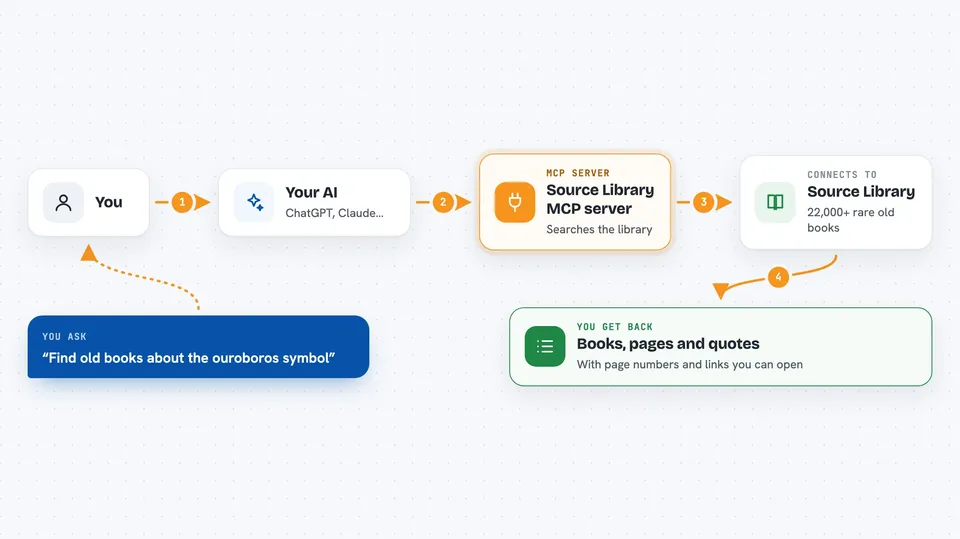
This is a helper for your AI that connects it to Source Library, a big online collection of rare old books about alchemy, Hermeticism, Renaissance philosophy, early science, and more. Many of these books have AI-made English translations, so you can read them even if the original is in Latin or German. It is handy for anyone curious about old texts who wants real quotes and links instead of made-up ones.
What is an MCP server? The 30-second version
On its own, your AI can only chat with you using what it already learned. An MCP server is a small helper program that gives your AI a new skill, in this case a connection to Source Library. Once it is connected, your AI can look things up in that library and bring back real passages and links when you ask. You do not need to install anything complicated, and no password or key is required.
What this MCP server does
You ask your AI a question about an old text or topic. The AI passes your request to this helper, which searches the Source Library collection. The helper finds matching books, pages, or images and sends them back. Your AI then shows you the results in the chat, with page numbers and citation links you can click. If you want an exact quote, the helper can pull the precise translated line for you.
 Click to zoom
What you can do with it
- Search across thousands of old books by keyword or topic
- Find passages about a concept even when the exact words differ
- Read a book chapter by chapter or in page ranges
- Get the exact translated text of a single page for quoting
- Browse illustrations and artworks from the collection
- Check whether a book is already in the library before adding it
- Send feedback or share your findings with the library team
Try asking your AI
- “Search for references to prima materia across the collection and tell me which authors discuss it”
- “Read the translation of Fludd's History of Both Worlds, pages 1 to 50, and summarize the cosmology”
- “Find alchemical emblems showing the ouroboros and tell me which books they come from”
- “What does Copernicus say about the Sun's centrality in De Revolutionibus? Give me the key passages with citation links”
What it gives back to you
You get back lists of matching books and pages, short snippets of text, full chapters when you ask to read, and exact quotes when you ask for one. Every result comes with a citation link like sourcelibrary.org/book/... so you can open the source yourself. Image searches return descriptions and links to illustrations or artworks. Feedback and shared findings are sent to the library team for review.
Before you start
What you need
- The Claude desktop app or Claude Code (or another AI tool that supports MCP servers)
- Node.js installed on your computer (the free program that runs this helper)
Good to know
The feedback and share_findings tools send your message and any name or email you include to the Source Library team, so do not put anything private in them.
Install it with your AI
Add Source Library MCP server to your AI, no technical skills needed
You don't install anything by hand. You copy one prompt, paste it into an AI that can work on your computer, and it checks, installs and connects the server for you, asking you when it needs something.
Sign in to get the install prompt
Members get a ready-made prompt that lets the Claude desktop app check Source Library MCP server, install it and connect it for them, step by step. You don't need any technical skills: you copy, paste and answer a few questions. Your connected AI can also find and install any of the 4,361 MCP servers here for you.
Who it's for
History buffs, students, writers, and researchers who work with old texts and want real quotes with proper citations.





