MCP server · Health and learning
Nutrients MCP server
Your AI can look up calories, macros, vitamins, minerals and allergens for any food, from a photo or a description.
This is a small helper that lets your AI assistant figure out what is in your food. You can give it a photo of a meal or just type what you ate, and it comes back with calories, protein, carbs, fat, vitamins, minerals and allergens. It is handy if you track what you eat, cook for people with allergies, or just want quick numbers without hunting through a food app.
What is an MCP server? The 30-second version
On its own, your AI can only chat with you. It cannot look anything up or check facts unless something gives it that ability. An MCP server is a small helper program that plugs a new skill into your AI. This one connects your AI to a nutrition service called TastyAPI, so when you ask about a food, the AI can actually go and fetch real nutrition numbers for you.
What this MCP server does
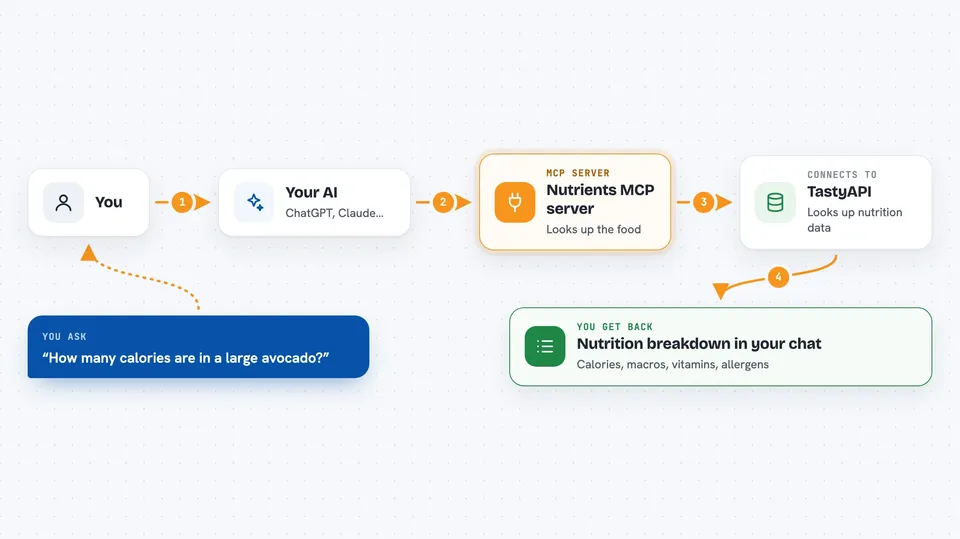
You ask your AI something about a food, like how many calories are in a large avocado. The AI passes your question to this helper program. The helper sends it to TastyAPI, which looks up the nutrition data. Then the answer comes back into your chat as a clean breakdown of calories, macros, vitamins, minerals and allergens. If you give it a link to a food photo instead, it reads the picture and does the same thing.
 Click to zoom
What you can do with it
- Get calories and macros for a food by name
- Analyze a food photo from a public web link
- Check vitamins and minerals in a meal
- See which allergens a dish likely contains
- Check if a food is vegan, vegetarian or gluten free
- Compare two foods side by side
- Estimate the nutrition of a home-cooked dish you describe
Try asking your AI
- “How many calories are in a large avocado?”
- “What are the macros in this meal? https://example.com/pasta.jpg”
- “Is oatmeal with banana, 1 cup, vegan and gluten free?”
- “How much protein and iron is in a bowl of lentil soup?”
What it gives back to you
You get a short nutrition breakdown right in the chat. It usually lists the food name, calories, protein, carbs, fat and fiber, plus some vitamins and minerals. It also tells you which allergens are likely present and whether the food fits vegan, vegetarian or gluten free diets.
Before you start
What you need
- Node.js 18 or newer installed on your computer
- A TastyAPI key (a kind of password for apps; you get one from tastyapi.com, and it costs money after a base fee)
Good to know
This service costs money per request and has a monthly base fee, so keep an eye on how often you use it.
Install it with your AI
Add Nutrients MCP server to your AI, no technical skills needed
You don't install anything by hand. You copy one prompt, paste it into an AI that can work on your computer, and it checks, installs and connects the server for you, asking you when it needs something.
Sign in to get the install prompt
Members get a ready-made prompt that lets the Claude desktop app check Nutrients MCP server, install it and connect it for them, step by step. You don't need any technical skills: you copy, paste and answer a few questions. Your connected AI can also find and install any of the 4,361 MCP servers here for you.
Who it's for
People who track what they eat, dietitians, fitness coaches, and anyone cooking for someone with allergies or dietary needs.