
MCP server · Research
Spectrawl MCP server
by FayAndXan
Lets your AI search the web, read full pages, and pull structured facts from any site.
Spectrawl is a helper that gives your AI a real connection to the web. It searches, opens pages, and pulls out the information you asked for. It is handy if you use ChatGPT or Claude for research and want it to read actual sources instead of guessing.
What is an MCP server? The 30-second version
On its own, your AI can only chat with what it already knows. An MCP server is a small helper program that gives your AI a new skill or a connection to an app or service. This one connects your AI to the web through Spectrawl, so it can search, open pages, and grab facts for you. You just ask in normal words, and the helper does the running around.
What this MCP server does
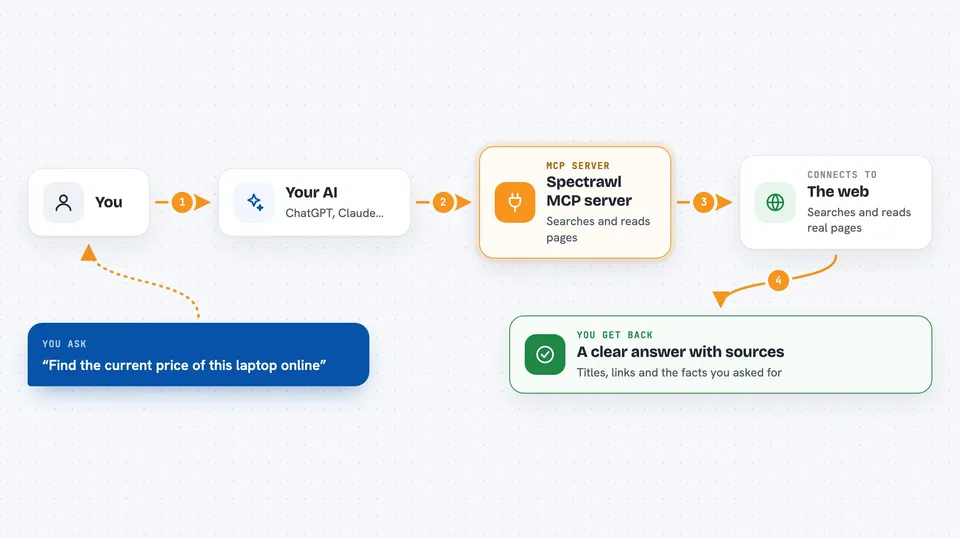
You ask your AI a question that needs current web information. The AI sends that request to Spectrawl, which searches using Google-quality results and opens the top pages. Spectrawl reads the full content of those pages and hands it back. Your AI then reads the sources and writes the answer for you. You can also ask it to pull specific facts, like prices or names, into a tidy list.
 Click to zoom
What you can do with it
- Search the web and get full page content, not just snippets
- Read a specific web page and turn it into clean text
- Pull structured facts from a page, like titles, prices, or contact details
- Take a screenshot of a page
- Crawl several pages of a site at once
- Solve simple image CAPTCHAs automatically
- Log into supported platforms with stored cookies to view content
Try asking your AI
- “Search the web for how to build an MCP server in Node.js and show me the sources”
- “Open this news page and pull out the top 3 story titles and their point counts”
- “Browse this product page and tell me the price and availability”
- “Take a screenshot of example.com and save it”
What it gives back to you
You get back a list of sources with their titles, links, and full page text. If you asked for specific facts, you get those as a neat list or table. Screenshots come back as image files. Your AI then turns all of that into a clear answer in the chat.
Before you start
What you need
- Node.js 18 or newer installed on your computer
- A free Gemini API key from aistudio.google.com (a kind of password for apps; the site gives you one for free)
- Optional: keys for Tavily or Brave if you want extra search engines
- Optional: a residential proxy if you need to browse LinkedIn
Good to know
It can log into platforms using stored cookies and post content, so be careful about which accounts you connect and what you ask it to do.
Install it with your AI
Add Spectrawl MCP server to your AI, no technical skills needed
You don't install anything by hand. You copy one prompt, paste it into an AI that can work on your computer, and it checks, installs and connects the server for you, asking you when it needs something.
Sign in to get the install prompt
Members get a ready-made prompt that lets the Claude desktop app check Spectrawl MCP server, install it and connect it for them, step by step. You don't need any technical skills: you copy, paste and answer a few questions. Your connected AI can also find and install any of the 4,361 MCP servers here for you.
Who it's for
Anyone who does research or fact-checking with an AI and wants it to read real web pages instead of relying on memory.


