MCP server · Browser automation
Prufa MCP server
by prufa-dev
Let your AI run a real-browser check of your web app and report broken flows, errors and accessibility issues.
Prufa is a checking service for websites. Point it at a web address and it opens the page in a real browser, clicks around, and tells you what is broken. This MCP server plugs that service into your AI assistant, so you can just ask your AI to run the check for you.
What is an MCP server? The 30-second version
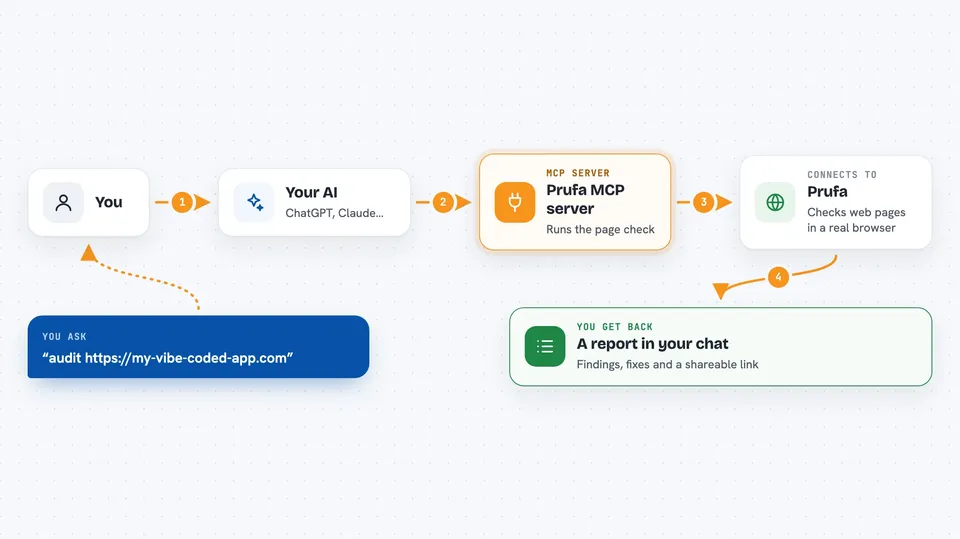
On its own, your AI can only chat. It cannot open a browser or visit a website. An MCP server is a small helper program that gives your AI a new skill. This one connects your AI to Prufa, so when you ask for an audit, your AI sends the request to Prufa and brings the results back into the chat.
What this MCP server does
You ask your AI to audit a web address. Your AI passes that request to this helper, which sends it to Prufa. Prufa opens the page in a real browser, loads it, and checks things like signup and login flows, console errors, tracking scripts, security headers, tap target sizes and accessibility. A short while later, the helper hands your AI a report, and your AI shows it to you in the chat.
 Click to zoom
What you can do with it
- Audit a public page and see critical, warning and info findings
- Check whether signup, login or checkout flows actually work
- Spot JavaScript console errors that happen during page load
- See if your analytics or tracking tags are firing
- Check security headers and consent banners
- Find buttons and links that are too small to tap on a phone
- Get a shareable link to an HTML version of the report
Try asking your AI
- “audit https://my-vibe-coded-app.com and show me the criticals”
- “run prufa on my staging deploy”
- “fetch the report for the audit I just ran”
- “check my checkout page for broken flows”
What it gives back to you
You get a report in the chat with a headline like "2 warnings found" and a count of critical, warning and info findings. Each finding has a short title, an explanation of why it matters, and often a fix hint. You also get a link to a shareable HTML version of the same report.
Before you start
What you need
- Python installed on your computer
- The prufa-mcp package installed with pipx or pip
- A free Prufa API key from prufa.dev (the first audit is free, no card needed)
- An AI app that supports MCP servers, like Claude Code or Cursor
Good to know
Some tools can change things on your site or spend credits, so check what your AI is about to do before you say yes.
Install it with your AI
Add Prufa MCP server to your AI, no technical skills needed
You don't install anything by hand. You copy one prompt, paste it into an AI that can work on your computer, and it checks, installs and connects the server for you, asking you when it needs something.
Sign in to get the install prompt
Members get a ready-made prompt that lets the Claude desktop app check Prufa MCP server, install it and connect it for them, step by step. You don't need any technical skills: you copy, paste and answer a few questions. Your connected AI can also find and install any of the 4,361 MCP servers here for you.
Who it's for
Developers and founders who ship web apps quickly and want a quick automated check before their users find the bugs.