
MCP server · Developer tools
CodebaseAgent MCP server
by FI-Mihej
Lets your AI study big code projects through a cheaper helper model, so your main assistant spends fewer tokens.
CodebaseAgent-MCP is a helper for people who use AI coding assistants on large projects. It hands the heavy reading of code and documentation to a separate, cheaper AI model, and gives your main assistant only the useful bits. It is handy if your token bills are getting big or your assistant keeps re-reading the same files.
What is an MCP server? The 30-second version
On its own, your AI assistant can only chat with you and read what fits in its memory. An MCP server is a small helper program that gives your assistant a new skill or a connection to something else. This one connects your assistant to a second, cheaper AI model that reads through your code for it. So when you ask a question about a big project, your main assistant asks this helper instead of reading everything itself.
What this MCP server does
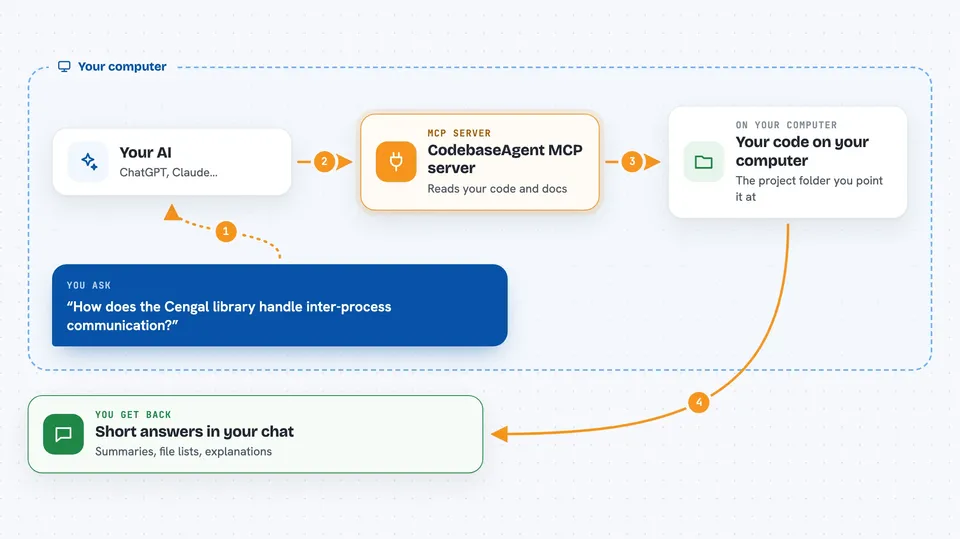
You ask your AI assistant something about your code, like how a library works or where a function lives. Your assistant passes that job to CodebaseAgent-MCP. CodebaseAgent-MCP then talks to a second, cheaper AI model that reads through the code and documentation you pointed it at. That helper model sends back only the findings your assistant needs. Your assistant uses those findings to answer you or write code, without having to load the whole project into its own memory.
 Click to zoom
What you can do with it
- Analyze a large codebase without filling up your main assistant's memory
- Look up how a library or dependency works
- Read through documentation trees and summarize what matters
- Run background analysis jobs and keep the results for later
- Connect extra MCP tools as plugins for the helper model to use
- Cache earlier lookups so repeat questions are faster
- Keep file access limited to folders you allow
Try asking your AI
- “Use skill libraries-analysis-skill. Show me how the Cengal library handles inter-process communication.”
- “Use skill libraries-analysis-skill. Find where in this project the async multiprocessing app starts up.”
- “Use skill libraries-analysis-skill. Summarize the main classes in the dependency library I added.”
- “Use skill libraries-analysis-skill. Which functions in this repo deal with the TUI?”
What it gives back to you
You get back answers in your normal chat with your assistant: short summaries, lists of files, classes or functions, and explanations of how pieces fit together. If the helper ran a background job, the results are stored and can be looked at later. You do not see the raw code dump, just the findings your assistant needed.
Before you start
What you need
- Python and the uv tool installed on your computer
- An OpenAI-compatible AI model, either running locally (like LM Studio or llama.cpp) or a cloud service (like OpenRouter)
- A config file created by running the setup command once
Good to know
It reads files from the folders you point it at, so only add codebases you are comfortable letting the helper model see, and remember the helper model may be a cloud service.
Install it with your AI
Add CodebaseAgent MCP server to your AI, no technical skills needed
You don't install anything by hand. You copy one prompt, paste it into an AI that can work on your computer, and it checks, installs and connects the server for you, asking you when it needs something.
Sign in to get the install prompt
Members get a ready-made prompt that lets the Claude desktop app check CodebaseAgent MCP server, install it and connect it for them, step by step. You don't need any technical skills: you copy, paste and answer a few questions. Your connected AI can also find and install any of the 4,609 MCP servers here for you.
Who it's for
Developers and technical teams who use AI coding assistants on large or fast-changing projects and want to keep token costs down.




