
MCP server · Productivity
Text File Read And Refactor MCP server
by FI-Mihej
Lets your AI read, search, and carefully edit text files while keeping their original encoding.
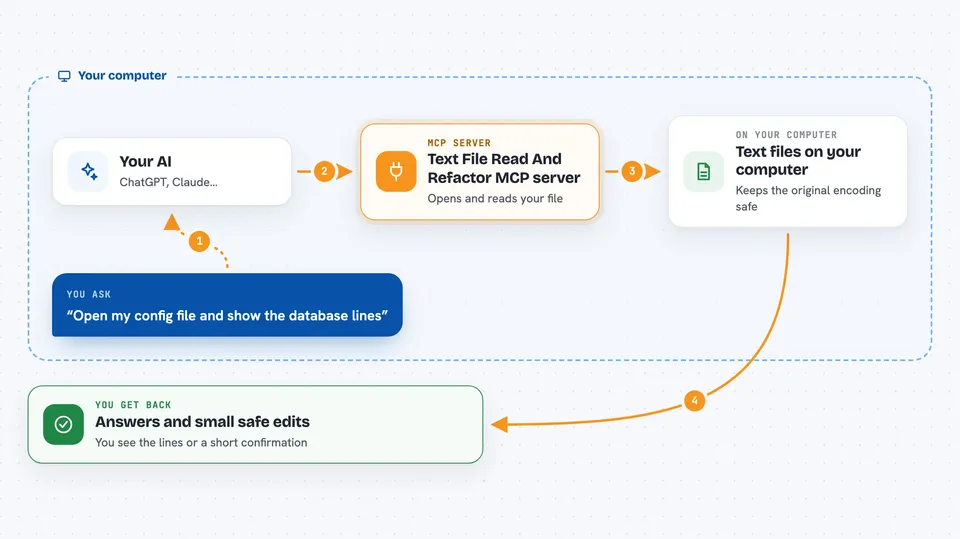
This is a small helper that lets your AI open text files on your computer, look inside them, and make careful edits. It is handy if you work with config files, scripts, or long text documents and want the AI to find and change small parts without rewriting the whole file. It also keeps each file's original encoding, so accented letters and special characters do not get messed up.
What is an MCP server? The 30-second version
On its own, your AI can only chat with you. An MCP server is a small helper program that gives your AI a new skill or a connection to something on your computer. This one gives your AI the ability to read and edit text files on your machine, but only inside folders you allow. When you ask your AI to look at a file or change a line, it uses this helper to do the actual work.
What this MCP server does
You tell your AI which file to look at, and the helper opens it for reading. Your AI can then search for a word, a phrase, or a pattern, and get back the exact spot where it appears. For edits, you describe the change, and the helper replaces just that small piece of text instead of rewriting the whole file. It also notices each file's encoding and byte-order mark, and saves the file back the same way it was, so nothing gets garbled.
 Click to zoom
What you can do with it
- List the folders your AI is allowed to read and edit
- Read a specific range of lines or characters from a file
- Search for a word, phrase, or pattern and see where it appears
- Find all places a piece of text shows up in a file
- Replace a small piece of text without touching the rest of the file
- Replace the text between two markers, like between a setting name and a semicolon
- Apply several small edits to a file in one go
Try asking your AI
- “Open my config file and show me the lines around the database setting”
- “Find every place the word timeout appears in this file and show me the lines”
- “Change the value after port: to 8080 in my settings file”
- “Replace the text between api_key: and the next semicolon with my new key”
What it gives back to you
You get back plain answers in the chat: the text of the lines you asked for, the line numbers where something was found, or a short confirmation that a change was made. For searches, it can show you each match with its position in the file. For edits, it tells you what it changed and saves the file with its original encoding.
Before you start
What you need
- The uv tool installed on your computer (a small free program that runs Python helpers)
- The Claude desktop app or another app that supports MCP servers
- A text file on your computer that you want the AI to look at
Good to know
This helper can change the files you point it at, so keep backups of anything important and check the changes it makes.
Install it with your AI
Add Text File Read And Refactor MCP server to your AI, no technical skills needed
You don't install anything by hand. You copy one prompt, paste it into an AI that can work on your computer, and it checks, installs and connects the server for you, asking you when it needs something.
Sign in to get the install prompt
Members get a ready-made prompt that lets the Claude desktop app check Text File Read And Refactor MCP server, install it and connect it for them, step by step. You don't need any technical skills: you copy, paste and answer a few questions. Your connected AI can also find and install any of the 4,361 MCP servers here for you.
Who it's for
People who work with config files, scripts, or long text documents and want an AI to help find and edit small parts without breaking the file.




