MCP server · Design tools
FlowZap MCP server
by flowzap-xyz
Turn plain descriptions into workflow, sequence, architecture, and mind map diagrams you can view and share.
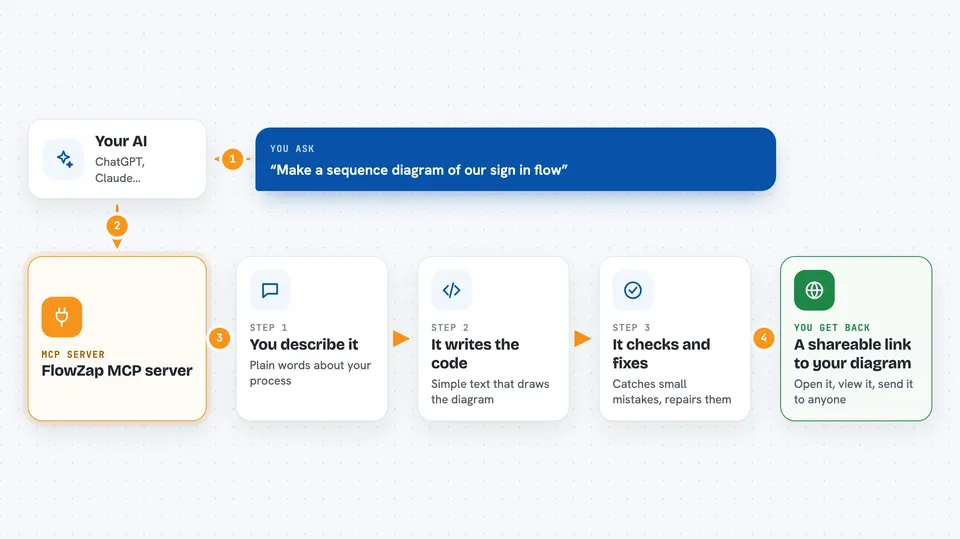
FlowZap is a diagramming tool that builds pictures from text. This MCP server connects your AI assistant to FlowZap, so you can describe a process in normal words and get a real diagram back. It is handy for anyone who needs to show how something works without drawing it by hand.
What is an MCP server? The 30-second version
On its own, your AI can only chat with you. An MCP server is a small helper program that gives your AI a new skill or a connection to another service. This one connects your AI to FlowZap, so the AI can write FlowZap Code, check it, and turn it into a diagram for you. You just ask in plain language, and the helper does the technical part behind the scenes.
What this MCP server does
You describe the process, system, or idea you want to see. Your AI writes it in FlowZap Code, which is FlowZap's own simple text language for diagrams. This helper checks that the code is valid and can repair small mistakes like numbering or label errors. Then it creates a shareable link where you can view the diagram. You get a picture of your workflow, sequence, architecture, or mind map, ready to look at or send to someone.
 Click to zoom
What you can do with it
- Create workflow diagrams from a short description
- Build sequence diagrams that show who talks to whom and in what order
- Draw architecture diagrams for systems and services
- Make mind maps from a topic or outline
- Check and repair FlowZap Code that has small errors
- Compare two versions of a diagram and see what changed
- Run a compliance check on a data flow diagram
Try asking your AI
- “Create a sequence diagram of our sign in flow”
- “Make an architecture diagram for a small online shop with a web app, an API, and a database”
- “Here are my server logs. Create a sequence diagram showing the request flow”
- “Create a mind map about how our support team handles tickets”
What it gives back to you
You get back a shareable link to your diagram, which opens in the FlowZap playground. Depending on what you asked, you may also get a short explanation, a list of validation problems, or a summary of what changed between two versions. The diagram itself is a picture you can view and send to others.
Before you start
What you need
- An AI tool that supports MCP, like Claude Desktop, Cursor, or Windsurf
- Node.js installed on your computer (the setup uses a tool called npx)
Good to know
The compliance check sends your diagram text to an outside service and is rate limited, so use it only when you are comfortable sharing that content.
Install it with your AI
Add FlowZap MCP server to your AI, no technical skills needed
You don't install anything by hand. You copy one prompt, paste it into an AI that can work on your computer, and it checks, installs and connects the server for you, asking you when it needs something.
Sign in to get the install prompt
Members get a ready-made prompt that lets the Claude desktop app check FlowZap MCP server, install it and connect it for them, step by step. You don't need any technical skills: you copy, paste and answer a few questions. Your connected AI can also find and install any of the 4,361 MCP servers here for you.
Who it's for
Anyone who needs to explain a process or system visually, like project managers, analysts, developers, and team leads.