
MCP server · Developer tools
Adobe Edge Delivery MCP server
by Focus-GTS
Lets your AI check, fix, and publish pages on your Adobe Edge Delivery site.
This is a helper that connects your AI assistant to an Adobe Edge Delivery Services (EDS) website. Once it is set up, you can ask your AI to look at your pages, spot problems, fix them, and publish the changes. It is handy for anyone who helps run an EDS site but does not want to click through every page by hand.
What is an MCP server? The 30-second version
On its own, your AI can only chat. An MCP server is a small helper program that gives your AI a new skill or a connection to an app or service. This one connects your AI to Adobe Edge Delivery Services, so it can read your site's pages, check them for issues, make edits, and publish them when you ask. You do not need to know how it works inside; you just talk to your AI like normal.
What this MCP server does
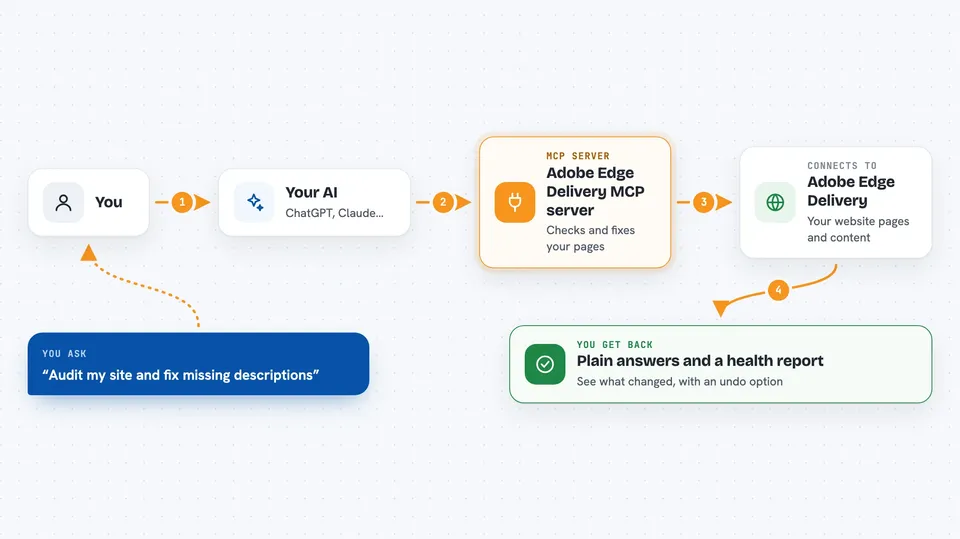
You ask your AI something like "audit my site" or "fix the missing descriptions." The AI passes that request to this helper. The helper then talks to Adobe's Edge Delivery services on your behalf, reading your content, checking things like page titles and images, and making changes if you asked for them. When it is done, it sends the results back to your AI, which shows them to you in the chat. Every change it makes can be previewed first and undone afterwards.
 Click to zoom
What you can do with it
- Preview and publish a single page or a whole batch of pages
- Audit your site for SEO, accessibility, and freshness problems
- Fix missing page titles, descriptions, and social share images
- Add redirect rules to fix broken links found in real visitor data
- Check Core Web Vitals and 404 errors from Adobe's own analytics
- Export a whole section of your authored content and push edits back in one go
- Undo a batch of changes with a single command
Try asking your AI
- “Audit the whole site and show me what's hurting SEO”
- “Fix the meta description on every page that's missing one, preview first, then publish”
- “Actually, undo that whole batch”
- “Preview and publish the homepage”
What it gives back to you
You get back plain answers in the chat: lists of pages, audit findings sorted by importance, health scores, and status messages like ok, degraded, or broken. When you ask for a report, it can produce a ready-to-share HTML page with scores and suggested fixes that you can save as a PDF. After a fix, it tells you exactly what changed and gives you an undo option. Nothing is hidden; you see the results of every action.
Before you start
What you need
- An Adobe Edge Delivery Services site you have access to
- The GitHub organization and repository name for that site
- An admin token from Adobe for anything that publishes or changes pages (the README explains how to get one)
- A Document Authoring token if you want to edit the source content directly
Good to know
It can publish, change, and delete pages on your live site, so preview changes first and keep the undo option in mind.
Install it with your AI
Add Adobe Edge Delivery MCP server to your AI, no technical skills needed
You don't install anything by hand. You copy one prompt, paste it into an AI that can work on your computer, and it checks, installs and connects the server for you, asking you when it needs something.
Sign in to get the install prompt
Members get a ready-made prompt that lets the Claude desktop app check Adobe Edge Delivery MCP server, install it and connect it for them, step by step. You don't need any technical skills: you copy, paste and answer a few questions. Your connected AI can also find and install any of the 4,361 MCP servers here for you.
Who it's for
Anyone who helps run an Adobe Edge Delivery Services website, like a content manager, marketer, or web editor who wants to check and fix pages without doing it all by hand.




