
MCP server · Coding
Foldwork MCP server
by foldwork-dev
Lets your AI read your codebase in a compact, indexed form so it answers with less guessing and lower cost.
Foldwork is a helper that reads your whole code project once, builds a local index, and then feeds your AI only the parts it needs. It is made for people who use AI to work on code and are tired of the AI forgetting files or inventing things. If you work in a big project with many files, this keeps answers shorter, cheaper, and more accurate.
What is an MCP server? The 30-second version
On its own, your AI can only chat with what you paste or what it can already see. An MCP server is a small helper program that gives your AI a new skill or a connection to something outside the chat. This one connects your AI to your local codebase, so it can look up files, functions, and structure on your machine. You ask a question in plain words, and the AI quietly uses this helper to fetch the right pieces.
What this MCP server does
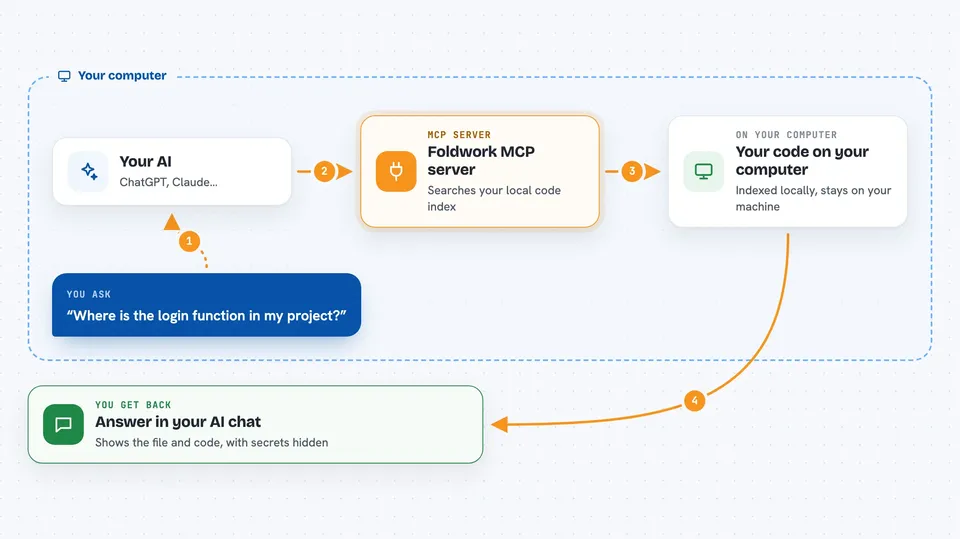
You ask your AI something about your project, like where a function lives or how login works. The AI calls Foldwork, which has already indexed your code into a local catalog on your computer. Foldwork sends back a compact view with function bodies folded away, plus the exact files or symbols you need. If the AI needs the full code, it asks again and Foldwork returns the uncompressed source. You get an answer in the chat, and your AI uses far fewer tokens along the way.
 Click to zoom
What you can do with it
- See a compressed map of your whole project structure
- Find where a function or symbol is defined
- Pull the full uncompressed source of a file when needed
- Trace what depends on a piece of code before you change it
- Generate a Mermaid diagram of a workflow
- Check recent commits and branch context
- Redact secrets like API keys before they reach the AI
Try asking your AI
- “Use get_project_map to show me the structure of this project”
- “Show me the full implementation of the login handler”
- “What would break if I change the UserService class?”
- “Find every place that calls the sendEmail function”
What it gives back to you
You get back short, structured answers in the chat: a compressed map of modules and entry points, a list of matching symbols, the full source of a file, or a Mermaid diagram. Some replies include counts, like how many secrets were redacted or how many files are indexed. If you ask for stats, you see your compression ratio and cache hit rate. Changes you make through the tool are written to your files on disk.
Before you start
What you need
- A code project on your computer
- The Foldwork installer (a one-line command from the README)
- An IDE or AI app that supports MCP, like Claude Desktop, Cursor, VS Code, Devin Desktop, or Antigravity
- For database inspection only: a PostgreSQL or MySQL connection string
Good to know
It reads your local code and can write files back, so make sure you have backups or version control before letting your AI edit code.
Install it with your AI
Add Foldwork MCP server to your AI, no technical skills needed
You don't install anything by hand. You copy one prompt, paste it into an AI that can work on your computer, and it checks, installs and connects the server for you, asking you when it needs something.
Sign in to get the install prompt
Members get a ready-made prompt that lets the Claude desktop app check Foldwork MCP server, install it and connect it for them, step by step. You don't need any technical skills: you copy, paste and answer a few questions. Your connected AI can also find and install any of the 4,609 MCP servers here for you.
Who it's for
Developers and anyone who uses an AI assistant to read, search, or change code in a medium to large project.



