
MCP server · Productivity
FoodBlock MCP server
Turn plain-English food descriptions into structured data blocks for ingredients, products, places and more.
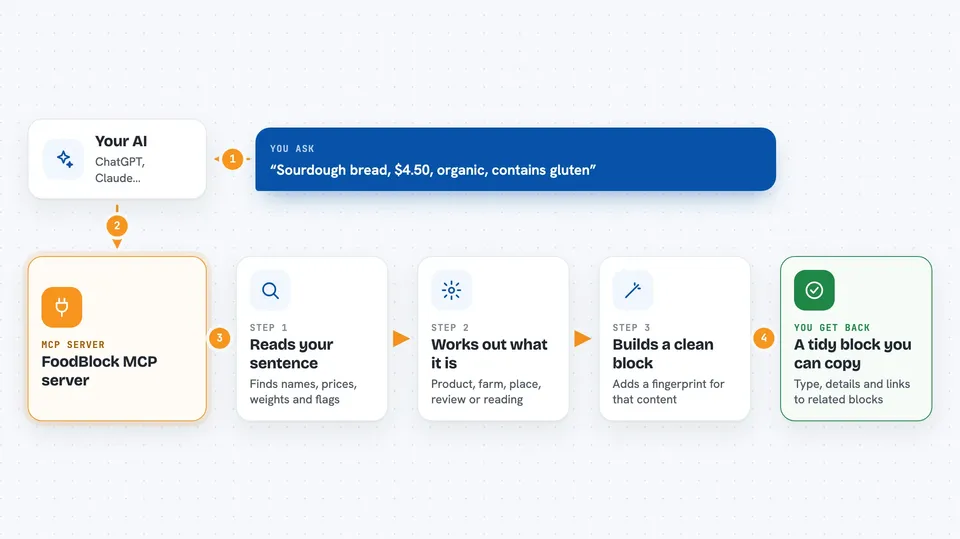
FoodBlock is a small helper that takes everyday food sentences and turns them into tidy, structured data. You describe something in plain words, like a product, a farm, an order or a review, and it gives back a clean block of information with a unique fingerprint. It is handy for anyone who works with food data but does not want to build a database by hand.
What is an MCP server? The 30-second version
On its own, your AI can only chat. An MCP server is a small helper program that gives your AI a new skill or a connection to an app or service. This one connects your AI to FoodBlock, a way of describing food data in a standard shape. So when you ask your AI to record a product or a review, it can use this helper to turn your words into a proper FoodBlock for you.
What this MCP server does
You type a normal sentence about food, like a product, a price, a farm or a review. Your AI passes that sentence to this helper. The helper reads it with built-in patterns, works out what kind of thing you are describing, and pulls out the details like names, prices, weights and flags. It then hands back one or more structured blocks, each with a unique fingerprint based on its content. You see the result in the chat as clean, organised data you can copy or keep.
 Click to zoom
What you can do with it
- Turn a plain-English product description into a structured block
- Create blocks for farms, places, ingredients and other food entities
- Record reviews, certifications and sensor readings as blocks
- Link blocks together so you can follow where something came from
- Update a block while keeping the old version for history
- Sign and check blocks so you can trust who made them
- Look up and filter blocks by type or by who they belong to
Try asking your AI
- “Sourdough bread, $4.50, organic, contains gluten”
- “Amazing pizza at Luigi's, 5 stars”
- “Green Acres Farm, 200 acres, organic wheat in Oregon”
- “Walk-in cooler temperature 4 celsius”
What it gives back to you
You get back structured blocks, each with a type, a state holding the details, and refs linking it to other blocks. Alongside that you get a unique hash, which is like a fingerprint for that exact content. In the chat this shows up as a small, readable chunk of data you can copy, save or pass on. When you ask for a history or a chain, you get a list of versions from newest to oldest.
Before you start
What you need
- Node.js 18 or newer if you want to run it yourself
- An MCP-compatible AI app such as Claude, Cursor, Windsurf or Gemini CLI
Good to know
Some actions can change or erase data, like updating a block or creating a tombstone for erasure, so be sure you mean it before you ask.
Install it with your AI
Add FoodBlock MCP server to your AI, no technical skills needed
You don't install anything by hand. You copy one prompt, paste it into an AI that can work on your computer, and it checks, installs and connects the server for you, asking you when it needs something.
Sign in to get the install prompt
Members get a ready-made prompt that lets the Claude desktop app check FoodBlock MCP server, install it and connect it for them, step by step. You don't need any technical skills: you copy, paste and answer a few questions. Your connected AI can also find and install any of the 4,361 MCP servers here for you.
Who it's for
People who work with food data, like farmers, restaurant staff, suppliers, inspectors and anyone who wants to record food information in a tidy, standard way.





