MCP server · Notes
Hicortex MCP server
by gamaze-labs
Give your AI a shared memory that remembers what you and your other agents worked on, and tidies itself up each night.

Hicortex is a shared memory for AI agents. It remembers the decisions, fixes and context from your work sessions, so your AI stops asking you to explain the same things again. It is handy if you use coding assistants like Claude Code and want them to remember your project across days and machines.
What is an MCP server? The 30-second version
On its own, your AI can only chat with what is in front of it right now. An MCP server is a small helper program that gives your AI a new skill or a connection to something outside the chat. This one connects your AI to a memory store called Hicortex, so it can look up what was decided before, save new notes, and pull relevant context into its answers. You do not need to understand how it works inside; you just install it once and your AI gains that memory.
What this MCP server does
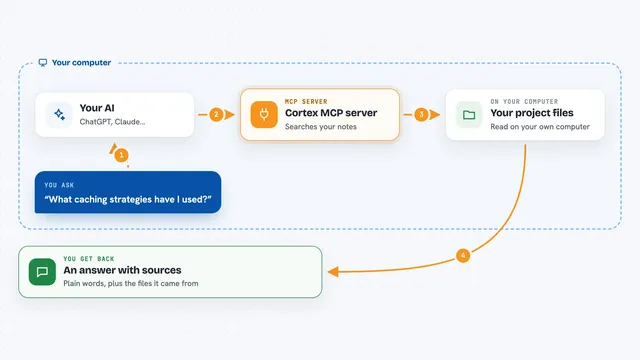
You ask your AI something, like what you decided about a file last week. The AI uses this helper to search the Hicortex memory store. Hicortex looks through saved sessions, notes and learnings, and finds the parts that match. The AI then answers you using that remembered context, and can save new learnings back for next time. Each night Hicortex also reads the day's sessions, cleans up stale facts and merges duplicates, so the memory stays useful.
 Click to zoom
What you can do with it
- Search your past sessions and notes for a topic
- Pull up the most recent memories from your work
- Save a new learning or note for later
- See a graph of how your memories are connected
- Update or delete a memory that is wrong or outdated
- Get a list of general lessons learned from your work
- Inject relevant memory into your coding agent's prompts automatically
Try asking your AI
- “What did we decide about the login flow last week?”
- “Save a learning: our staging server uses port 8080, not 3000.”
- “Show me the most recent memories from this project.”
- “What lessons have we learned about database migrations?”
What it gives back to you
You get answers in the chat, written in normal sentences, based on what Hicortex remembers. It can also show lists of memories, recent items, or lessons learned. When you save something, it confirms the memory was stored. There is also a dashboard and a graph view on your own machine if you want to browse the memory yourself.
Before you start
What you need
- Node.js 20 or newer installed on your computer
- A way for Hicortex to use a language model, such as Ollama running locally, the Claude CLI, or an API key from an OpenAI-compatible service
- The Claude desktop app or another MCP-compatible agent if you want the memory pushed into prompts
Good to know
It reads your past work sessions to build its memory, so on a shared or work machine check that you are comfortable with that, and note that commercial use needs a paid licence.
Install it with your AI
Add Hicortex MCP server to your AI, no technical skills needed
You don't install anything by hand. You copy one prompt, paste it into an AI that can work on your computer, and it checks, installs and connects the server for you, asking you when it needs something.
Sign in to get the install prompt
Members get a ready-made prompt that lets the Claude desktop app check Hicortex MCP server, install it and connect it for them, step by step. You don't need any technical skills: you copy, paste and answer a few questions. Your connected AI can also find and install any of the 4,609 MCP servers here for you.
Who it's for
People who use coding assistants like Claude Code every day and are tired of re-explaining their project, especially those working across several machines or agents.