MCP server · Browser automation
Atlassian Browser MCP server
by GeiserX
Lets your AI read and search Jira and Confluence using your own browser login, even behind company single sign-on.
This is a helper that connects your AI assistant to Jira and Confluence when your company uses a single sign-on page (like Okta or ADFS) and normal app passwords are not allowed. You log in once in a browser, and from then on your AI can look things up for you. It is handy if you work somewhere with strict login rules but still want AI help with tickets and pages.
What is an MCP server? The 30-second version
On its own, your AI can only chat. An MCP server is a small helper program that gives your AI a new skill or a connection to an app. This one connects your AI to your company's Jira and Confluence, using the same browser session you already signed in with. So when you ask about a ticket or a page, the AI can actually go and fetch it for you.
What this MCP server does
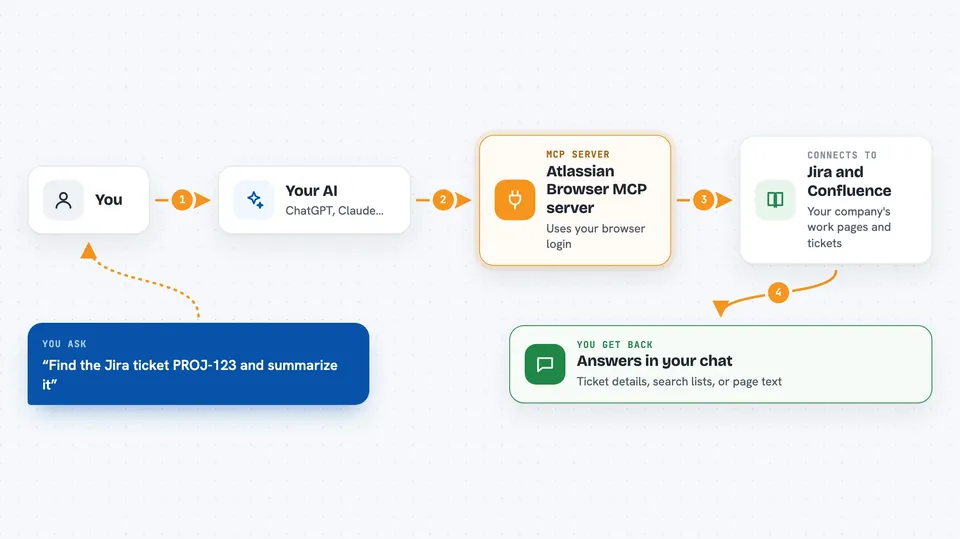
You ask your AI something about Jira or Confluence, like finding a ticket or reading a page. The AI passes your request to this helper. The helper uses the cookies saved from your one-time browser login to talk to your company's Jira or Confluence. It brings the answer back, and the AI shows it to you in the chat. If your login has expired, it tells you to log in again instead of guessing.
 Click to zoom
What you can do with it
- Look up a Jira issue by its key
- Search Jira issues with a query
- Read a Confluence page
- Search Confluence pages by text
- Use the same tools as the standard Atlassian MCP server, but with your browser login
- Run simple command-line lookups for scripts
Try asking your AI
- “Find the Jira ticket PROJ-123 and summarize it for me”
- “Search Jira for open bugs assigned to me this week”
- “Show me the Confluence page about our release process”
- “Search Confluence for pages mentioning the new onboarding checklist”
What it gives back to you
You get back plain answers in the chat: ticket details, search results as a list, or the text of a Confluence page. The AI may summarize or reformat what it found. If your session has expired, you get a message asking you to log in again. It does not change anything in Jira or Confluence unless you ask it to use a tool that does.
Before you start
What you need
- Python 3.11 or newer
- The uv tool installed
- Google Chrome and a screen for the one-time login
- The web address of your Jira and/or Confluence site
Good to know
It uses your saved browser cookies, so anyone with access to your computer could potentially reuse that session; log out or clear the cookies if you share the machine.
Install it with your AI
Add Atlassian Browser MCP server to your AI, no technical skills needed
You don't install anything by hand. You copy one prompt, paste it into an AI that can work on your computer, and it checks, installs and connects the server for you, asking you when it needs something.
Sign in to get the install prompt
Members get a ready-made prompt that lets the Claude desktop app check Atlassian Browser MCP server, install it and connect it for them, step by step. You don't need any technical skills: you copy, paste and answer a few questions. Your connected AI can also find and install any of the 4,361 MCP servers here for you.
Who it's for
Office workers at companies that use Jira and Confluence behind a single sign-on page, especially those who cannot get API tokens.