
MCP server · Developer tools
Spinnaker MCP server
by GeiserX
Lets your AI look at and manage Spinnaker apps, pipelines, and cloud infrastructure for you.
This is a helper that connects your AI assistant to Spinnaker, the tool many teams use to ship software to the cloud. Once it is set up, you can ask your AI questions about your apps and pipelines, or tell it to start or stop things, instead of clicking around the Spinnaker website. It is handy for anyone who works with deployments but does not want to memorize every screen.
What is an MCP server? The 30-second version
On its own, your AI can only chat. An MCP server is a small helper program that gives your AI a new skill or a connection to another service. This one connects your AI to your Spinnaker setup, so it can look things up there or do things for you when you ask. You set it up once, and after that your AI just uses it quietly in the background.
What this MCP server does
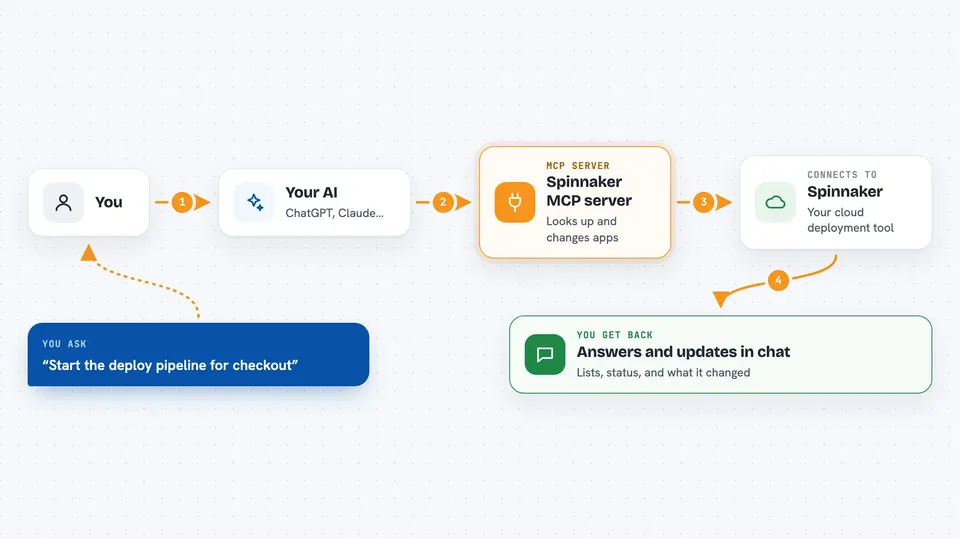
You ask your AI something about Spinnaker in normal words. The AI passes your request to this helper program. The helper then talks to Spinnaker's Gate API, which is the official doorway into Spinnaker. Spinnaker sends back the answer or makes the change, and the helper hands the result to your AI. Your AI then tells you what it found or what it did, right in the chat.
 Click to zoom
What you can do with it
- List your Spinnaker applications and their pipelines
- Start a pipeline and watch the execution
- Search past executions by status, time, or trigger
- Cancel, pause, or resume a running execution
- Look at server groups, clusters, and load balancers
- Check the status of a deployment or rollback task
- Save, update, or delete a pipeline
Try asking your AI
- “What applications do I have in Spinnaker?”
- “Show me the pipelines for the checkout app”
- “Start the deploy pipeline for checkout and tell me when it finishes”
- “Which executions failed in the last 24 hours?”
- “What server groups are running in the production cluster?”
What it gives back to you
You get answers in plain chat: lists of apps, pipelines, or executions, short summaries of what is running or failing, and status updates on tasks you started. When you ask it to change something, it tells you what it did. You can also ask for details like console output or the images and networks tied to a cluster.
Before you start
What you need
- A Spinnaker instance with its Gate API reachable
- The Gate URL (the web address of your Spinnaker Gate service)
- A way to log in to Gate: a bearer token, a username and password, or a client certificate
- Node.js 18 or newer if you use the npx option
Good to know
It can start, change, and delete pipelines and other Spinnaker resources, so be careful with requests that make changes and double-check before you say yes.
Install it with your AI
Add Spinnaker MCP server to your AI, no technical skills needed
You don't install anything by hand. You copy one prompt, paste it into an AI that can work on your computer, and it checks, installs and connects the server for you, asking you when it needs something.
Sign in to get the install prompt
Members get a ready-made prompt that lets the Claude desktop app check Spinnaker MCP server, install it and connect it for them, step by step. You don't need any technical skills: you copy, paste and answer a few questions. Your connected AI can also find and install any of the 4,609 MCP servers here for you.
Who it's for
Engineers, release managers, and anyone on a team that uses Spinnaker to deploy software and wants to check or run things without clicking through the web UI.



