
MCP server · Analytics
FortiMonitor MCP server
by gjenkins20
Ask your AI about your FortiMonitor servers, outages, maintenance windows and metrics in plain words.
This is a helper that connects your AI assistant to FortiMonitor, the tool many IT teams use to watch their servers and networks. Once it is set up, you can ask your AI questions about your monitoring instead of clicking around the FortiMonitor website. It is handy for IT admins, support engineers and anyone who looks after servers.
What is an MCP server? The 30-second version
On its own, your AI can only chat with you. An MCP server is a small helper program that gives your AI a new skill or a connection to another service. This one connects your AI to FortiMonitor, so the AI can look up your servers, outages and maintenance windows for you. You ask in normal words, and the helper does the actual talking to FortiMonitor.
What this MCP server does
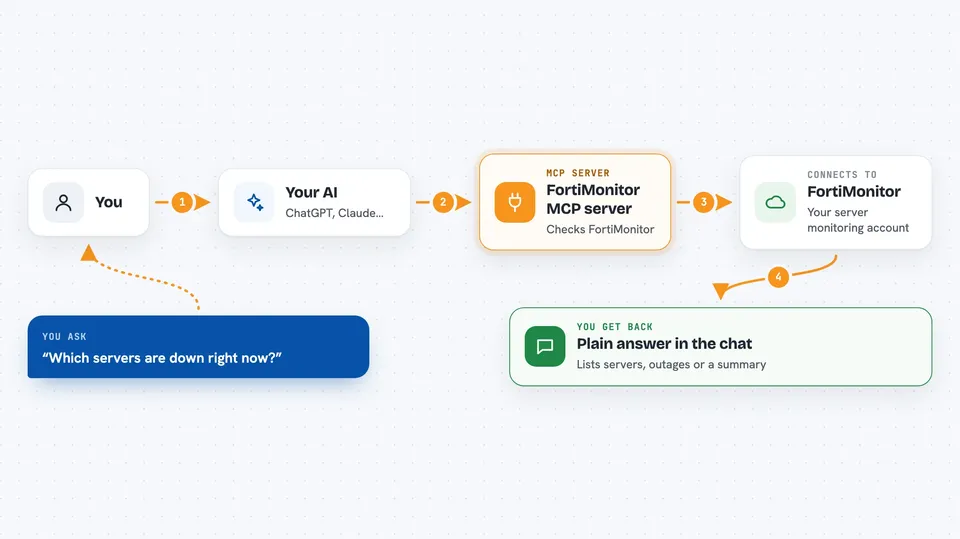
You ask your AI something like which servers are down right now. The AI sends that request to this helper program. The helper logs in to FortiMonitor with your API key and asks FortiMonitor for the answer. FortiMonitor sends back the details, and the helper passes them to your AI. Your AI then explains the result to you in the chat, in plain words.
 Click to zoom
What you can do with it
- List your servers and see their current status
- Check which outages are open right now
- Acknowledge or escalate an outage
- Create, pause or extend a maintenance window
- Look up metrics and resource details for a server
- See notification schedules and on-call contacts
- Pull a health summary or availability report
Try asking your AI
- “Which of my servers are currently in an outage?”
- “Show me all outages from the last 24 hours.”
- “Put server web-01 into maintenance for two hours starting now.”
- “Give me a health summary of my account for this week.”
What it gives back to you
You get answers written in normal language in the chat, based on what FortiMonitor knows. That can be a list of servers, a list of open outages, a summary of metrics, or a report with numbers. If you ask it to change something, like acknowledging an outage or creating a maintenance window, it tells you what it did.
Before you start
What you need
- A FortiMonitor account with access to the API
- A FortiMonitor API key (a kind of password for apps; you get it from your FortiMonitor account)
- Docker, or Python 3 installed on your computer, depending on which setup you choose
Good to know
It can change things in your FortiMonitor account, like acknowledging outages or creating maintenance windows, so be careful with requests that make changes and check what it did afterwards.
Install it with your AI
Add FortiMonitor MCP server to your AI, no technical skills needed
You don't install anything by hand. You copy one prompt, paste it into an AI that can work on your computer, and it checks, installs and connects the server for you, asking you when it needs something.
Sign in to get the install prompt
Members get a ready-made prompt that lets the Claude desktop app check FortiMonitor MCP server, install it and connect it for them, step by step. You don't need any technical skills: you copy, paste and answer a few questions. Your connected AI can also find and install any of the 4,609 MCP servers here for you.
Who it's for
IT admins, support engineers and anyone who monitors servers and networks with FortiMonitor.



