
MCP server · Analytics
Google Ads MCP server
by gomarble-ai
Lets your AI read your Google Ads accounts, run reports, and find keyword ideas for you.
This is a small helper program that connects your AI assistant to your Google Ads account. Once it is set up, you can just ask questions in plain English and the AI will fetch the numbers for you. It is handy for marketers, small business owners, and anyone who checks Google Ads data often.
What is an MCP server? The 30-second version
On its own, your AI can only chat with you. An MCP server is a small helper program that gives your AI a new skill or a connection to an app or service. This one connects your AI to Google Ads, so it can look up your accounts, pull campaign numbers, and suggest keywords when you ask. You do not need to know how it works inside; you just talk to your AI like usual.
What this MCP server does
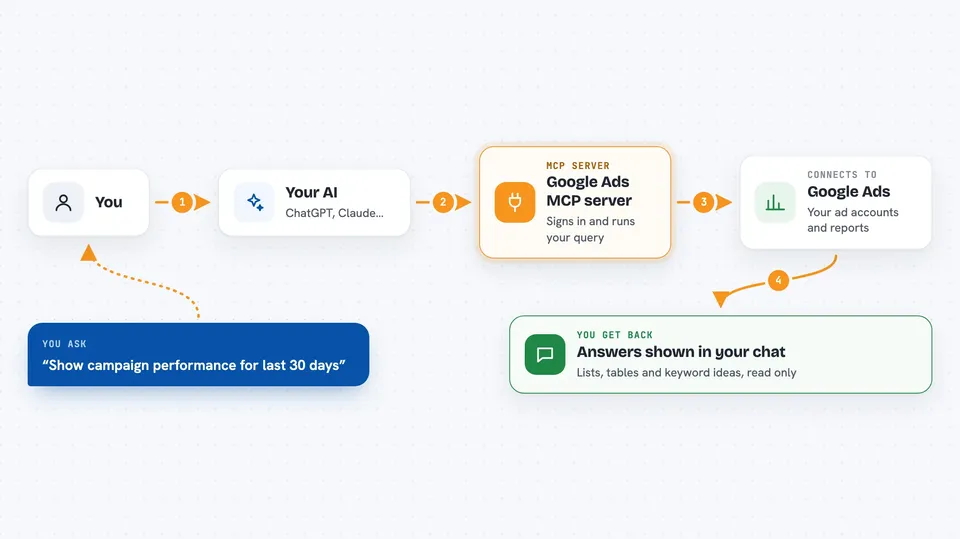
You type a question in your AI chat, like asking for campaign performance. The AI passes that request to this helper program. The helper signs in to Google Ads using your saved credentials and runs the query for you. Then it sends the results back, and the AI shows them to you in the chat as a list or a table. You never have to open the Google Ads website yourself.
 Click to zoom
What you can do with it
- List all your Google Ads accounts
- Run reports on campaign clicks, cost, and conversions
- Check keyword performance like click-through rate and average cost per click
- Generate new keyword ideas with search volume data
- Break down performance by device
- Look up data for a specific account by its customer ID
- Run custom queries written in Google Ads Query Language
Try asking your AI
- “List all my Google Ads accounts”
- “Show me campaign performance for account 1234567890 in the last 30 days”
- “Which campaigns have the highest cost per conversion?”
- “Generate keyword ideas for digital marketing using account 1234567890”
What it gives back to you
You get answers right in the chat: lists of accounts, tables of campaign numbers, keyword suggestions with search volume, or summaries of what it found. If you asked for a custom query, it shows the rows that matched. Nothing is changed in your Google Ads account; it only reads data and reports back.
Before you start
What you need
- Python 3.10 or newer installed on your computer
- A Google Cloud account (free to create) to set up sign-in credentials
- A Google Ads account with API access and a developer token (Google approves this, usually in 1 to 3 business days)
- The Claude desktop app if you want to use it there
Good to know
It only reads your Google Ads data, but it does need access to your account, so keep your credential files private and never share the token files with anyone.
Install it with your AI
Add Google Ads MCP server to your AI, no technical skills needed
You don't install anything by hand. You copy one prompt, paste it into an AI that can work on your computer, and it checks, installs and connects the server for you, asking you when it needs something.
Sign in to get the install prompt
Members get a ready-made prompt that lets the Claude desktop app check Google Ads MCP server, install it and connect it for them, step by step. You don't need any technical skills: you copy, paste and answer a few questions. Your connected AI can also find and install any of the 4,361 MCP servers here for you.
Who it's for
Marketers, small business owners, and agency folks who check Google Ads numbers often and would rather ask questions in chat than click around the Google Ads website.





