
MCP server · Developer tools
PT-Edge AI project tracker
by grahamrowe82
Lets your AI look up and compare open-source AI projects across GitHub, PyPI, npm, Docker Hub and Hugging Face.
PT-Edge is a big public directory of open-source AI projects. It keeps track of more than 220,000 projects across places like GitHub, PyPI, npm, Docker Hub, Hugging Face and Hacker News, scores them, and writes a page about each one. It is handy if you keep hearing about AI tools and want a quick, honest way to compare them.
What is an MCP server? The 30-second version
On its own, your AI can only chat with you using what it already learned. An MCP server is a small helper program that gives your AI a new skill or a connection to an outside service. This one connects your AI to PT-Edge, a directory of open-source AI projects. When you ask about a tool, your AI can look it up on PT-Edge and bring back real, current information instead of guessing.
What this MCP server does
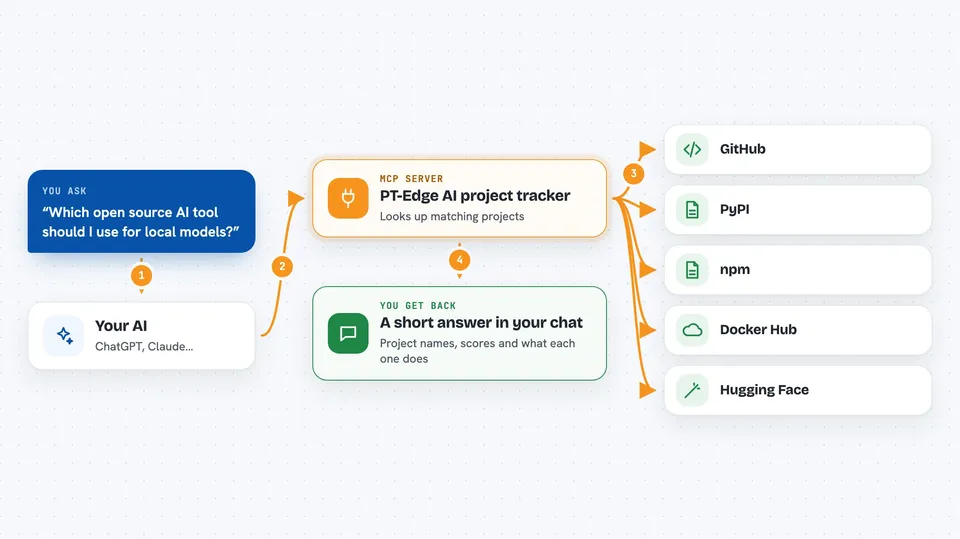
You ask your AI something like which AI tool to use for a job. Your AI passes the question to this helper. The helper looks through the PT-Edge directory, which is refreshed every day from GitHub, package sites and other sources. It finds the matching projects, their scores and their summaries. Then your AI shows you the answer in the chat, in plain words.
 Click to zoom
What you can do with it
- Look up an open-source AI project by name
- Compare two or three AI tools side by side
- See a quality score for a project, broken into maintenance, adoption, maturity and community
- Find popular AI projects in a category like chatbots or image models
- Check how active a project is by looking at recent commits and releases
- See download counts and star counts for a project
- Spot trends in what AI tools people are searching for
Try asking your AI
- “Find me a well-maintained open-source tool for running local AI models”
- “Compare LangChain and LlamaIndex using PT-Edge scores”
- “What are the most popular AI projects on Hugging Face this month”
- “Is this GitHub project still being updated, and what tier is it in”
What it gives back to you
You get back a short written answer with the project names, their scores and a summary of what each one does. If you asked to compare, you get the projects listed side by side with the reasons. The answer comes as normal chat text you can read and copy. Nothing on your computer or accounts is changed.
Before you start
Good to know
The README does not list the exact tools or permissions, so treat any answers as a starting point and double-check important decisions yourself.
Install it with your AI
Add PT-Edge AI project tracker to your AI, no technical skills needed
You don't install anything by hand. You copy one prompt, paste it into an AI that can work on your computer, and it checks, installs and connects the server for you, asking you when it needs something.
Sign in to get the install prompt
Members get a ready-made prompt that lets the Claude desktop app check PT-Edge AI project tracker, install it and connect it for them, step by step. You don't need any technical skills: you copy, paste and answer a few questions. Your connected AI can also find and install any of the 4,609 MCP servers here for you.
Who it's for
Anyone who has to pick an AI tool for work and wants a quick, plain-language comparison instead of reading dozens of project pages.



