
MCP server · Notes
3D Print Oracle MCP server
by gregario
Lets your AI look up 3D printing filaments, compare materials, and help fix print problems.
This is a helper for your AI that knows a lot about 3D printing filament. It holds details on over 7,000 filaments from 53 manufacturers, plus plain explanations of how different materials behave and how to print them. It is handy if you own a 3D printer, run a print farm, or just keep forgetting what temperature to use for PETG.
What is an MCP server? The 30-second version
On its own, your AI can only chat with you using what it already learned. An MCP server is a small helper program that gives your AI a new skill or a connection to something useful. This one connects your AI to a big library of 3D printing filament facts and material knowledge. So when you ask about a specific spool or a printing problem, your AI can look it up here instead of guessing.
What this MCP server does
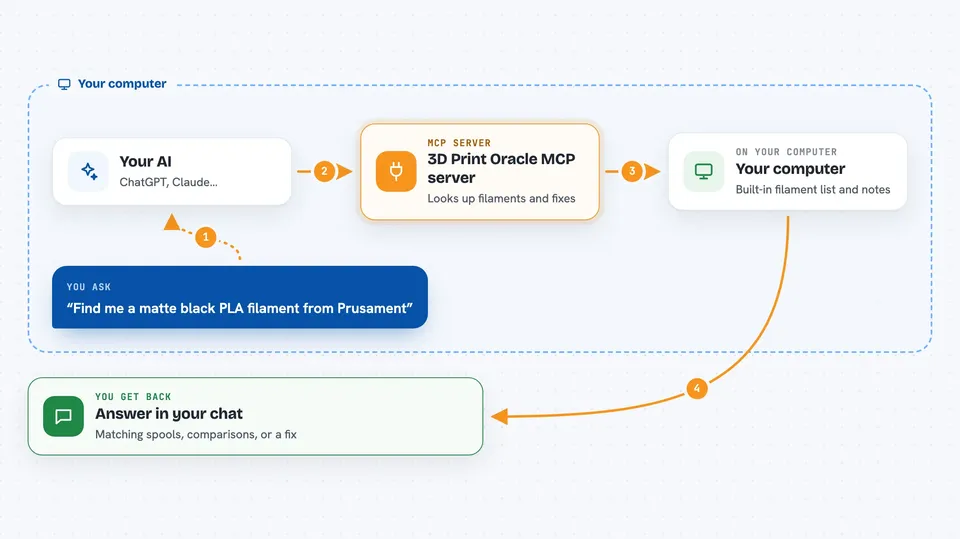
You ask your AI something about filament or printing. Your AI passes the question to this helper program running on your computer. The helper looks through its built-in list of filaments and its notes on materials, then sends the answer back. Your AI shows you the result in the chat, like a list of matching spools or a suggested fix. No internet connection is needed while it runs, because all the data is stored inside the helper.
 Click to zoom
What you can do with it
- Search filaments by name, material, manufacturer, or color
- Get full specs for one specific filament
- Browse all manufacturers and how many filaments each makes
- Browse material types like PLA, PETG, or ABS
- Compare two or three materials side by side
- Get ranked recommendations for what material fits your needs
- Diagnose a print issue and get material-specific fixes
Try asking your AI
- “Find me a matte black PLA filament from Prusament”
- “Compare PLA and PETG for outdoor use”
- “What temperature should I print this PETG at?”
- “My prints are warping on the corners, what should I try?”
What it gives back to you
You get answers written in the chat, like a list of filaments with their names and makers, or a table comparing two materials. For a print issue, you get a short explanation of likely causes and what to change. For a recommendation, you get a ranked shortlist with reasons. It does not change anything on your computer or your printer; it only reads and reports.
Before you start
What you need
- The Claude desktop app (or another app that supports MCP servers)
- Node.js installed on your computer
Install it with your AI
Add 3D Print Oracle MCP server to your AI, no technical skills needed
You don't install anything by hand. You copy one prompt, paste it into an AI that can work on your computer, and it checks, installs and connects the server for you, asking you when it needs something.
Sign in to get the install prompt
Members get a ready-made prompt that lets the Claude desktop app check 3D Print Oracle MCP server, install it and connect it for them, step by step. You don't need any technical skills: you copy, paste and answer a few questions. Your connected AI can also find and install any of the 4,361 MCP servers here for you.
Who it's for
People who own a 3D printer, run a small print shop, or work with filament and want quick, reliable answers instead of digging through forums.





