
MCP server · Research
Domain Availability MCP server
by gregm711
Let your AI check domain availability, brainstorm name ideas, and compare real prices without CAPTCHAs.
This is a small helper that lets your AI assistant check whether a web address (a domain, like yourname.com) is available to buy, and what it costs. It also helps you come up with name ideas and scores how good a name is. It is handy if you are naming a project, a small business, or a side project and want quick answers inside your chat.
What is an MCP server? The 30-second version
On its own, your AI can only chat with you. An MCP server is a small helper program that gives your AI a new skill or a connection to an app or service. This one connects your AI to AgentDomainService, a website that checks domains and prices. So when you ask about a name, your AI can look it up there and bring the answer back to you.
What this MCP server does
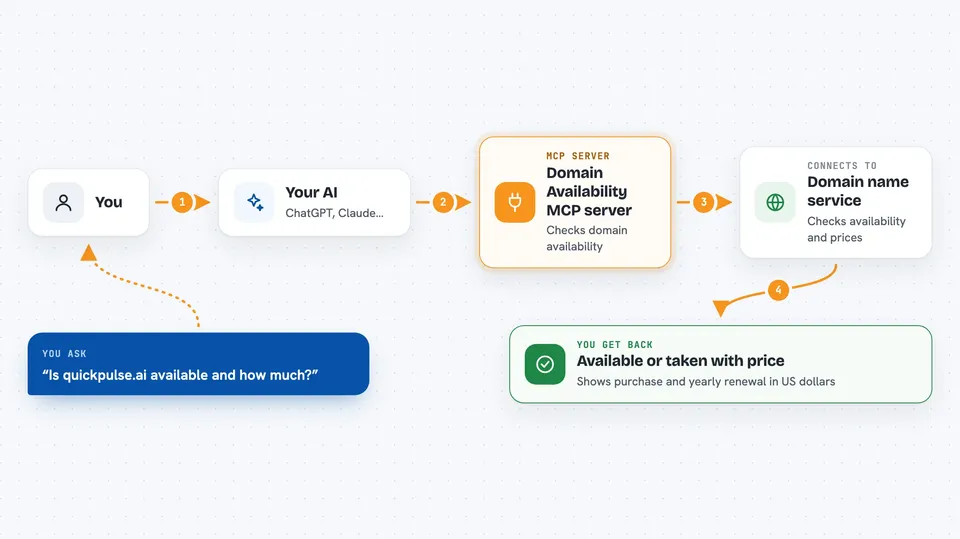
You ask your AI something like whether a domain is free or what names fit your idea. Your AI sends that question to this helper. The helper talks to AgentDomainService, which checks availability and prices through Name.com. Then the results come back into your chat as a clear list or answer. You never have to open a registrar website or solve a CAPTCHA yourself.
 Click to zoom
What you can do with it
- Check if a specific domain is available and see its price
- Explore one name across many endings like .com, .io, .ai, .co, .dev, .app, .net, .xyz, and .org
- Brainstorm domain ideas from a short description of your project
- Score a name for memorability, brandability, pronunciation, and SEO potential
- Search for available domains under a price limit or in a category
- List the categories of domains the service offers
Try asking your AI
- “Is quickpulse.ai available and how much does it cost?”
- “Brainstorm domain names for an app that helps remote teams do async standups”
- “Find me available domains under $15 for an AI startup”
- “Analyze coolstartup.com and tell me if it is a good name”
What it gives back to you
You get answers right in the chat. That can be a simple available or taken status with a price, a list of name ideas that are actually free to buy, or a score sheet with pros and cons for a name. Prices come as purchase and yearly renewal amounts in US dollars, and premium domains are flagged.
Before you start
What you need
- The Claude desktop app (or another AI assistant that supports MCP servers)
- Node.js installed on your computer (the free program that runs the helper)
Good to know
Prices and availability come from a third party and can change, so always double-check on the registrar site before you buy.
Install it with your AI
Add Domain Availability MCP server to your AI, no technical skills needed
You don't install anything by hand. You copy one prompt, paste it into an AI that can work on your computer, and it checks, installs and connects the server for you, asking you when it needs something.
Sign in to get the install prompt
Members get a ready-made prompt that lets the Claude desktop app check Domain Availability MCP server, install it and connect it for them, step by step. You don't need any technical skills: you copy, paste and answer a few questions. Your connected AI can also find and install any of the 4,609 MCP servers here for you.
Who it's for
Startup founders, small business owners, developers, brand managers, and anyone picking a name for a new project.


