
MCP server · Social media
Bluesky MCP server
by gwbischof
Lets your AI read and post on Bluesky for you, from your own account.
This is a small helper that connects your AI assistant to Bluesky, the social network. Once it is set up, you can ask your AI to check your feed, look up a profile, or write a post, and it will do it on Bluesky using your account. It is handy if you use Bluesky often and would rather type a request than click around the app.
What is an MCP server? The 30-second version
On its own, your AI can only chat with you. It cannot see your Bluesky account or do anything there. An MCP server is a small helper program that gives your AI a new skill, in this case a connection to Bluesky. You run this helper on your own computer, and it lets your AI look things up and take actions on Bluesky when you ask.
What this MCP server does
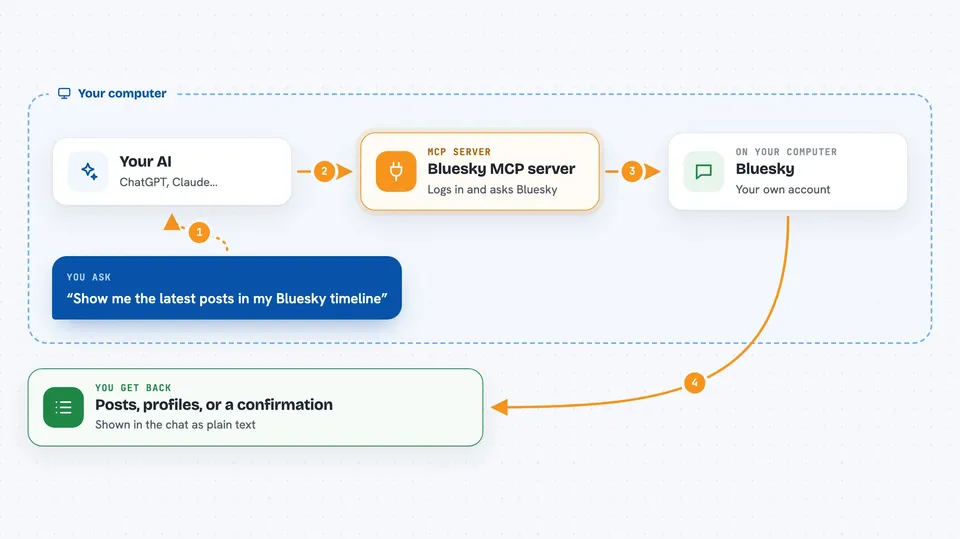
You type a request to your AI, like asking what is new in your timeline. Your AI passes that request to this helper program running on your computer. The helper logs in to Bluesky with your account details and asks Bluesky for what you wanted. Bluesky sends the answer back, and the helper hands it to your AI. Your AI then shows it to you in the chat, as a list of posts, a profile, or a short summary.
 Click to zoom
What you can do with it
- Read your home timeline and show you recent posts
- Look up any Bluesky profile and see who they follow or who follows them
- Follow, unfollow, mute, or unmute accounts
- Like, unlike, repost, or undo a repost
- Write and publish a new text post
- Post a photo or a video with your text
- Delete one of your own posts
Try asking your AI
- “Show me the latest posts in my Bluesky timeline”
- “What has alice.bsky.social been posting about this week”
- “Write a short post saying I just tried the new coffee place downtown and publish it”
- “Who liked my last post”
What it gives back to you
You get answers in the chat, in plain language. For example, a list of recent posts with the author and text, a profile summary, or a count of likes and reposts. If you asked it to post or follow someone, it tells you that the action was done. You do not get files or downloads, just text answers and confirmations.
Before you start
What you need
- A free Bluesky account
- An app password from Bluesky (a special password just for apps; you create one in your Bluesky settings)
- The uv tool installed on your computer (the README uses uvx to run it)
Good to know
It can post, follow, mute, and delete things on your Bluesky account, so check what your AI is about to do before you say yes.
Install it with your AI
Add Bluesky MCP server to your AI, no technical skills needed
You don't install anything by hand. You copy one prompt, paste it into an AI that can work on your computer, and it checks, installs and connects the server for you, asking you when it needs something.
Sign in to get the install prompt
Members get a ready-made prompt that lets the Claude desktop app check Bluesky MCP server, install it and connect it for them, step by step. You don't need any technical skills: you copy, paste and answer a few questions. Your connected AI can also find and install any of the 4,361 MCP servers here for you.
Who it's for
Bluesky users who want to check their feed, manage follows, or post without opening the app, and anyone who likes doing things by typing instead of clicking.





