
MCP server · Developer tools
Layout Doctor MCP server
Your AI can open an HTML page in a real browser and tell you what looks broken on screen.
Layout Doctor is a small helper that lets your AI actually look at an HTML page the way a browser would. You give it a file, and it tells you in plain numbers what is wrong: text sitting on top of other text, things sticking out of the screen, or leftover words like undefined. It is handy if you or your AI generate HTML pages or slides and you want to know whether they really look okay.
What is an MCP server? The 30-second version
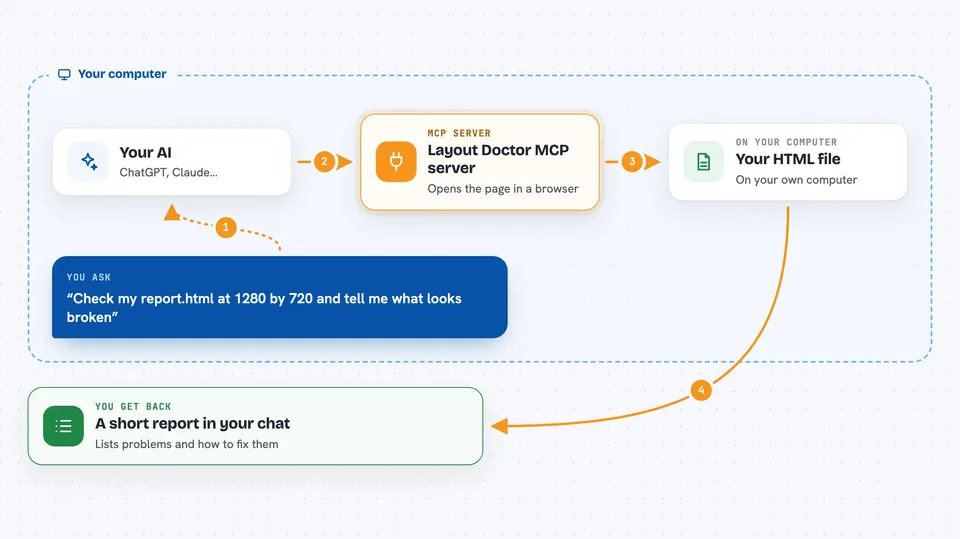
On its own, your AI can only chat. It cannot open a web page and see it. An MCP server is a small helper program that gives your AI one new skill. This helper gives your AI the skill of rendering HTML in a real browser and measuring the layout. So when you ask about a page, your AI sends the file to this helper, and the helper reports back what is broken.
What this MCP server does
You point your AI at an HTML file, or paste the HTML, and tell it the screen size to use. Your AI passes that to this helper. The helper opens the page in a real browser (Chromium) behind the scenes and measures where every element and every piece of text actually lands. It then compares those positions and reports problems like overlapping text, elements outside the screen, or placeholders that were never filled in. You get a short report back in the chat, with the exact elements and pixel sizes involved.
 Click to zoom
What you can do with it
- Check an HTML file for text that overlaps and becomes unreadable
- Find elements that stick out past the edge of the screen
- Spot leftover placeholders like undefined, NaN, or {{name}}
- Detect images, CSS, or scripts that point to files that do not exist
- See when content is clipped by overflow hidden and cannot be read
- Catch duplicate id values and invisible text
- Run the same check twice and get the same numbers both times
Try asking your AI
- “Check /Users/me/work/report.html at 1280 by 720 and tell me what is broken”
- “Here is my HTML for a pricing slide. Does any text overlap at 1280 by 800?”
- “Look at this page and list every placeholder that was not filled in”
- “Is anything sticking off the right side of the screen on this file?”
What it gives back to you
You get a short text report in the chat. It starts with a count of errors, warnings, and notes, then lists each problem with a short code, a plain sentence about what is wrong, the elements involved with their pixel positions, and a suggested fix. If you ask for JSON instead, it returns the same findings in a structured form your AI can work with.
Before you start
What you need
- Node.js 18 or newer
- The project cloned and built on your computer (npm install and npm run build)
- Chromium installed through Playwright, or an existing Chrome or Edge browser
- The Claude desktop app if you want to use it there
Good to know
It only reads and measures, it never changes or deletes your files, but it does open a real browser, so give it a moment and expect the numbers to shift by a few pixels depending on fonts.
Install it with your AI
Add Layout Doctor MCP server to your AI, no technical skills needed
You don't install anything by hand. You copy one prompt, paste it into an AI that can work on your computer, and it checks, installs and connects the server for you, asking you when it needs something.
Sign in to get the install prompt
Members get a ready-made prompt that lets the Claude desktop app check Layout Doctor MCP server, install it and connect it for them, step by step. You don't need any technical skills: you copy, paste and answer a few questions. Your connected AI can also find and install any of the 4,609 MCP servers here for you.
Who it's for
People who generate HTML pages or slides with AI and want a quick, honest check that the result actually looks right on screen.



