
MCP server · Developer tools
DocOrbit MCP server
Lets your AI read the right version of a library's docs and check its code before you run it.
DocOrbit is a helper for coding assistants. It finds the official documentation for the tools your project uses, matches it to the exact versions in your project, and feeds that to your AI. It is handy if you use Claude Code, Cursor, or similar assistants and keep getting code that works for the wrong version.
What is an MCP server? The 30-second version
On its own, your AI can only chat with you. An MCP server is a small helper program that gives your AI a new skill. This one connects your AI to documentation sources like llms.txt files, OpenAPI specs, and doc pages. So when you ask about a library, your AI can look up the correct docs for your project's version instead of guessing.
What this MCP server does
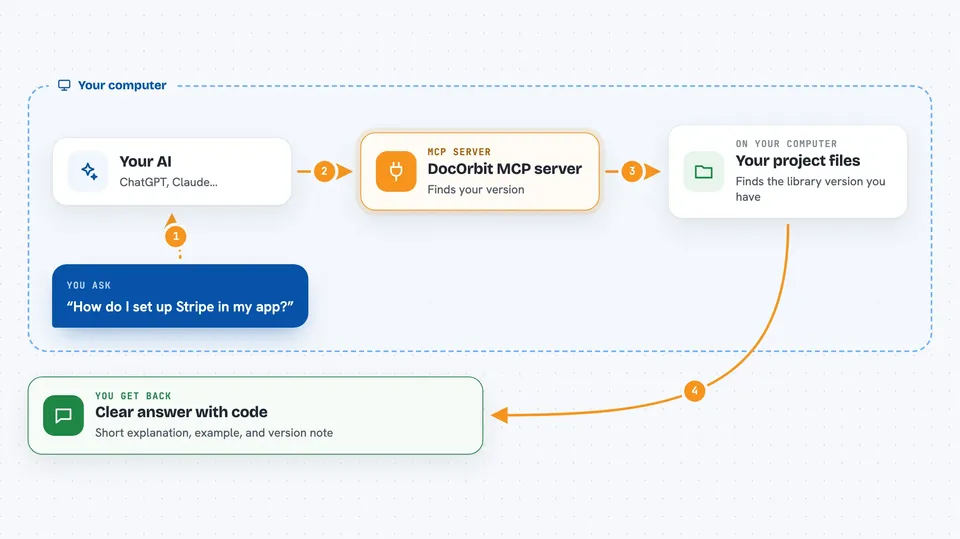
You ask your AI a question about a library, like how to set up Stripe or use Next.js route params. Your AI calls DocOrbit, which looks at your project files to see which version you have. DocOrbit then fetches the matching documentation, trims it down to just the useful parts, and hands it back. Your AI writes code using that context, and can ask DocOrbit to check the code against the docs before saving it.
 Click to zoom
What you can do with it
- Pull in official docs for a library by giving its URL
- Match documentation to the exact version in your project
- Get a short, focused answer for a specific coding task
- Check generated code against the docs before you run it
- Spot deprecated methods and common pitfalls
- Compare two versions of documentation to see what changed
- Export a docs map or agent instructions file for your project
Try asking your AI
- “I want to set up Stripe in my app, the docs link is https://docs.stripe.com/payments/checkout, use docorbit to set it up”
- “How do I access dynamic route params in a Next.js 14 route handler? Use docorbit.”
- “Check this code against the docs before I save it: const { id } = await params;”
- “What changed in the Stripe API docs since last month? Use docorbit to diff them.”
What it gives back to you
You get back short, clean Markdown answers grounded in the actual documentation. It can also return lists of endpoints, code snippets, warnings about deprecated methods, and a verified or mismatch result when checking code. In the chat, this usually looks like a focused explanation with a small code example and a note about your version.
Before you start
What you need
- Node.js 22.5.0 or newer
- A coding agent that supports MCP, like Cursor, Claude Desktop, or Claude Code
- A project folder with a package file (like package.json) so DocOrbit can detect versions
Good to know
It reads files in your project folder and fetches pages from the web, so only point it at documentation you trust.
Install it with your AI
Add DocOrbit MCP server to your AI, no technical skills needed
You don't install anything by hand. You copy one prompt, paste it into an AI that can work on your computer, and it checks, installs and connects the server for you, asking you when it needs something.
Sign in to get the install prompt
Members get a ready-made prompt that lets the Claude desktop app check DocOrbit MCP server, install it and connect it for them, step by step. You don't need any technical skills: you copy, paste and answer a few questions. Your connected AI can also find and install any of the 4,609 MCP servers here for you.
Who it's for
Developers and technical teams who use AI coding assistants and want the assistant to follow the correct version of a library's documentation.




