MCP server · Security
Patch Tuesday MCP server
by jonnybottles
Ask your AI about Microsoft's monthly security updates, CVEs, KB fixes and what to patch first.

This is a helper that connects your AI assistant to Microsoft's official security update guide, the place where every Microsoft security fix is listed. Once it is connected, you can just ask questions in normal words about the monthly Patch Tuesday releases instead of clicking around a website. It is handy for anyone who has to keep Windows and Microsoft products patched, especially security analysts and system administrators.
What is an MCP server? The 30-second version
On its own, your AI can only chat with you using what it already learned. An MCP server is a small helper program that gives your AI a new skill, in this case a live connection to Microsoft's security update data. When you ask a question, your AI passes it to this helper, the helper fetches the real information from Microsoft's public update guide, and your AI explains the answer back to you. You do not need any account or password for this one, because the data it reads is public.
What this MCP server does
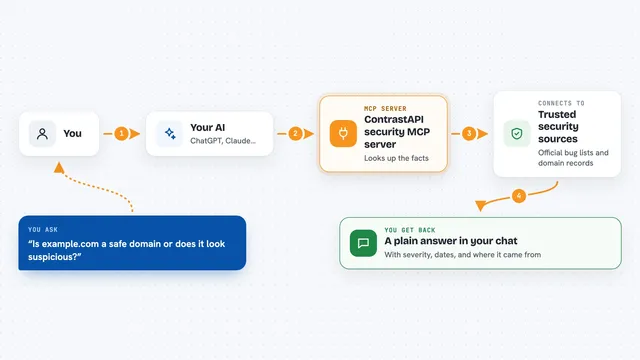
You ask your AI something like what did this month's Patch Tuesday fix. Your AI sends that question to this helper. The helper pulls the current monthly security release from Microsoft's public update guide and also adds extra context from two other public sources: exploit prediction scores and the list of vulnerabilities known to be exploited. Then it sorts everything so the most urgent items come first and hands the results back to your AI. Your AI turns that into a plain answer, a table, or a report you can read or share.
 Click to zoom
What you can do with it
- Summarize what a given month's Patch Tuesday fixed
- Look up any CVE and see the KB articles, affected products and severity
- Find which vulnerabilities are being exploited in the wild right now
- Check which CVEs are on the CISA known-exploited list and their due dates
- Filter a month by product, severity, or weakness type
- Check whether a KB has been replaced by a newer one
- Export a month's critical fixes as a Markdown report or CSV file
Try asking your AI
- “What did this month's Patch Tuesday fix?”
- “Tell me about CVE-2026-41108”
- “Which vulnerabilities does KB5094123 fix?”
- “Show me this month's Critical CVEs as a Markdown report”
What it gives back to you
You get answers in the chat: summaries, lists of CVEs with their severity and affected products, KB details, and links to Microsoft, NVD, EPSS and CISA pages. If you ask for a report, it can give you a Markdown briefing or a CSV table you can open in a spreadsheet. Results come back sorted most urgent first, so exploited and high-risk items appear at the top. Nothing is changed anywhere, it only reads and reports.
Before you start
What you need
- An MCP-compatible AI client such as Claude Desktop, Cursor, Claude Code or GitHub Copilot CLI
- Python 3.11 or newer if you run it yourself
- uv installed if you use the recommended uvx command
Good to know
It only reads public Microsoft data and does not change anything, but treat its output as a starting point and confirm important patching decisions against Microsoft's official update guide.
Install it with your AI
Add Patch Tuesday MCP server to your AI, no technical skills needed
You don't install anything by hand. You copy one prompt, paste it into an AI that can work on your computer, and it checks, installs and connects the server for you, asking you when it needs something.
Sign in to get the install prompt
Members get a ready-made prompt that lets the Claude desktop app check Patch Tuesday MCP server, install it and connect it for them, step by step. You don't need any technical skills: you copy, paste and answer a few questions. Your connected AI can also find and install any of the 4,361 MCP servers here for you.
Who it's for
Security analysts, system administrators and IT staff who triage Microsoft security updates every month.