
MCP server · Security
Tamperlens MCP server
by haruodev
Check if a document was edited, if its redactions held, and if it is safe for your AI to read.
Tamperlens is a checking service for documents. This helper connects it to your AI, so you can ask questions about a PDF, Word file, spreadsheet, slide deck or image before you trust it. It is handy for anyone who receives files from other people and wants to know what is really inside them.
What is an MCP server? The 30-second version
On its own, your AI can only chat with you. An MCP server is a small helper program that gives your AI a new skill or a connection to another service. This one connects your AI to Tamperlens, a document-checking service. Once it is set up, you can point your AI at a file and it will send the file to Tamperlens and bring the findings back to you.
What this MCP server does
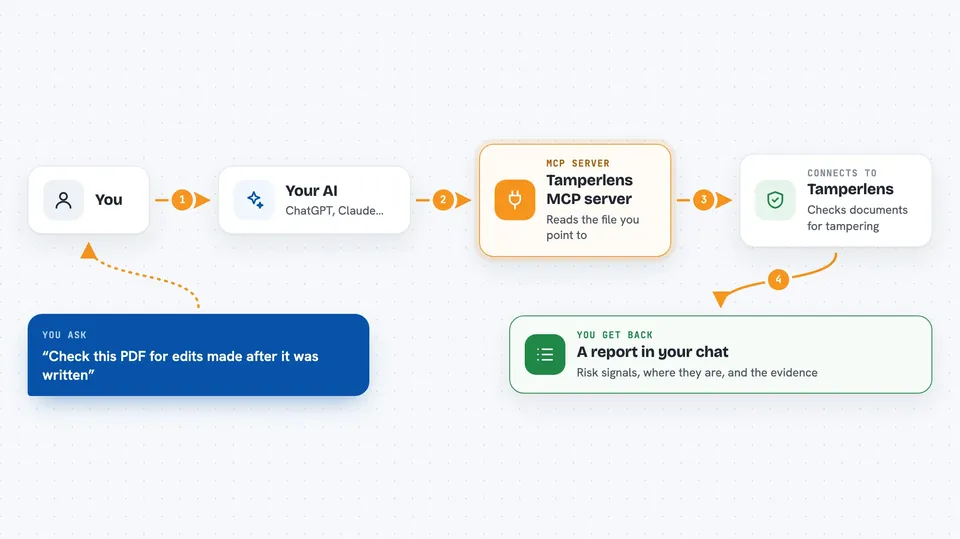
You tell your AI to look at a document, either by giving it a file path on your computer or a web address. Your AI passes that to this helper. The helper reads the file and sends its bytes to the Tamperlens service. Tamperlens examines the file and sends back a report. Your AI shows you that report in the chat, in plain words.
 Click to zoom
What you can do with it
- Check whether a PDF was edited after it was saved
- See whether a blacked-out section was really removed or just covered
- Compare a file against an original you already have
- Get a quick pre-flight summary before reading a large document
- Spot hidden text, macros and AI-generator traces in images
- Find out if a file contains text aimed at tricking an AI
Try asking your AI
- “Check this PDF for edits made after it was written: /Users/me/Downloads/contract.pdf”
- “Did the redactions in this file actually remove the text? /Users/me/Downloads/report.pdf”
- “Is this the same file as the one I saved last week? Compare /Users/me/Downloads/invoice.pdf with /Users/me/Downloads/invoice-original.pdf”
- “Give me a quick triage of this document before I read it: /Users/me/Downloads/proposal.docx”
What it gives back to you
You get a report in the chat: risk signals, where they were found, and the evidence behind them. It tells you things like whether revisions were added later, whether metadata disagrees with itself, and whether a redaction left text behind. It does not give a simple yes or no verdict, so you still decide what to do. If it finds text aimed at an AI, it tells you where it was and what kind of cue it is, but it does not repeat the sentence back.
Before you start
What you need
- Node.js installed on your computer (the helper runs through npx)
- The Claude desktop app or another AI tool that supports MCP servers
- Optional: a free Tamperlens API key from tamperlens.com/account for a higher monthly limit
Good to know
The helper can read any file path you give it and send its bytes to the Tamperlens service, so set TAMPERLENS_ALLOWED_DIRS to a folder you control and only use it with agents and inputs you trust.
Install it with your AI
Add Tamperlens MCP server to your AI, no technical skills needed
You don't install anything by hand. You copy one prompt, paste it into an AI that can work on your computer, and it checks, installs and connects the server for you, asking you when it needs something.
Sign in to get the install prompt
Members get a ready-made prompt that lets the Claude desktop app check Tamperlens MCP server, install it and connect it for them, step by step. You don't need any technical skills: you copy, paste and answer a few questions. Your connected AI can also find and install any of the 4,361 MCP servers here for you.
Who it's for
People who receive documents from others and need to check them first, such as lawyers, accountants, HR staff, journalists and anyone reviewing contracts or reports.




