MCP server · Developer tools
Localhost MCP server
by HasanJahidul
See what is running on your local ports, find forgotten dev servers, and stop them safely.
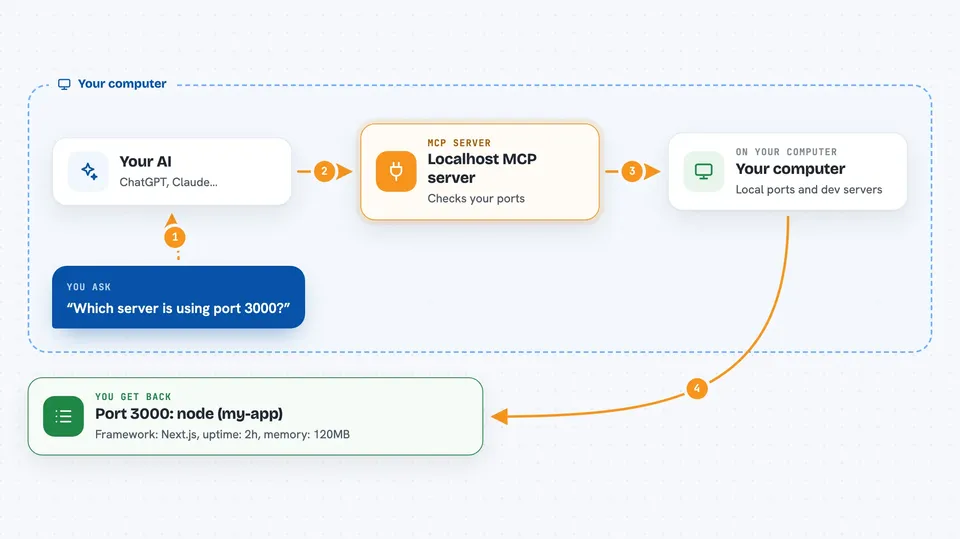
This is a small helper that lets your AI look at the development servers running on your own computer. It shows which program is holding each port, how long it has been running, and how much memory it uses. It is handy if you keep getting port errors or you suspect old servers are still running in the background.
What is an MCP server? The 30-second version
On its own, your AI can only chat. An MCP server is a small helper program that gives your AI a new skill or a connection to something, and here that something is your own computer's local dev servers. Once this helper is connected, your AI can ask your machine which ports are busy and which programs are behind them, and it can stop a server for you when you ask. You do not need to run any commands yourself; you just talk to your AI.
What this MCP server does
You ask your AI something like which server is using port 3000. Your AI passes that question to this helper, and the helper looks at your machine to see which program is listening on that port. It then reports back the program name, the project folder, the framework, how long it has been running, and how much memory it uses. If you ask it to stop a server, it first shows you what it would do, and only stops it when you confirm. It can also spot old forgotten servers and suggest free ports when one is busy.
 Click to zoom
What you can do with it
- List every dev server currently listening on your machine
- Check which program is holding a specific port
- Find forgotten or memory-heavy dev servers
- See why a port is busy and get nearby free alternatives
- Stop a dev server by its port or process number
- Preview a stop action before it actually happens
What it gives back to you
You get a clear list or a single answer in the chat, with the port number, the program name, the project folder, the framework, the uptime, and memory and CPU use. When you ask about a busy port, it also suggests a few free ports nearby. When you ask it to stop something, it first shows you what it would stop, then confirms once you say yes.
Before you start
What you need
- Node.js installed on your computer
- The localhost-mcp package installed (npm install -g localhost-mcp)
- An MCP-compatible AI client such as Claude Code
- macOS or Linux for full features (Windows only does a basic port scan)
Good to know
It can stop programs on your computer, so check what it plans to stop before you confirm, and never confirm a stop for something you did not start.
Install it with your AI
Add Localhost MCP server to your AI, no technical skills needed
You don't install anything by hand. You copy one prompt, paste it into an AI that can work on your computer, and it checks, installs and connects the server for you, asking you when it needs something.
Sign in to get the install prompt
Members get a ready-made prompt that lets the Claude desktop app check Localhost MCP server, install it and connect it for them, step by step. You don't need any technical skills: you copy, paste and answer a few questions. Your connected AI can also find and install any of the 4,609 MCP servers here for you.
Who it's for
Developers and anyone who runs local dev servers and keeps running into busy ports or forgotten background processes.