
MCP server · Research
HasData MCP server
by HasData
Lets your AI pull live data from Google, Amazon, Zillow, Yelp, YouTube and more, straight into your chat.
HasData is a helper that connects your AI to a big pile of websites and search engines. Once it is set up, you can ask your AI things like flight prices, Amazon reviews or job listings, and it goes and fetches the real data for you. It is handy for anyone who does research, shopping comparisons or market checks without wanting to click through dozens of tabs.
What is an MCP server? The 30-second version
On its own, your AI can only chat with you using what it already knows. An MCP server is a small helper program that gives your AI a new skill, in this case a connection to HasData. HasData is a service that gathers live information from sites like Google, Amazon and Zillow and hands it back in a tidy format. So when you ask your AI a question about one of those sites, it can call this helper and bring you back real, current answers.
What this MCP server does
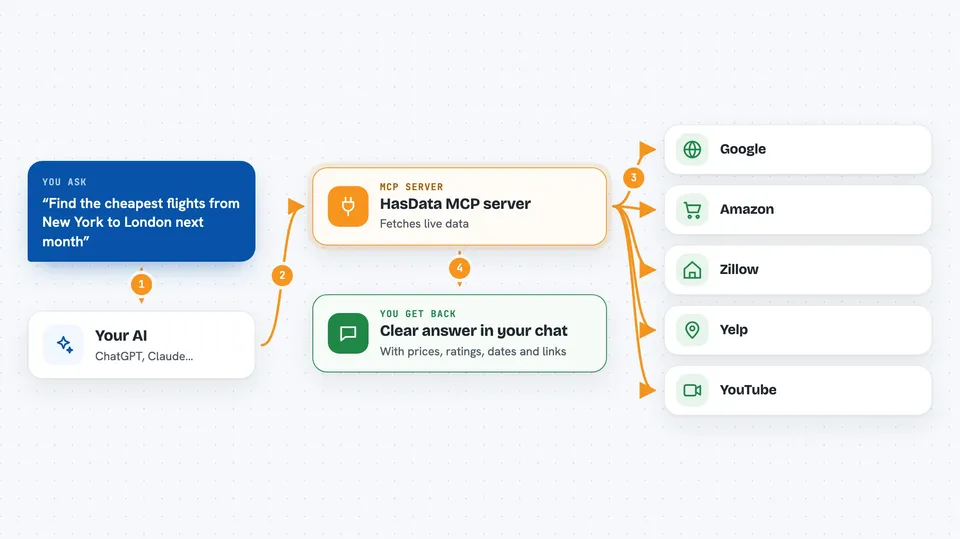
You ask your AI a question in normal words, like finding flights or checking prices. Your AI then uses this HasData helper to reach out to the right site, such as Google Flights or Amazon. HasData collects the page and turns it into clean, structured information instead of messy web code. Your AI reads that and writes you back a clear answer, a list or a short summary. You never write any scraping code or manage anything technical yourself.
 Click to zoom
What you can do with it
- Search Google, Bing or DuckDuckGo and get results back in your chat
- Compare prices and reviews on Amazon, Walmart or Shopify
- Find flights, hotels and Airbnb stays for your dates
- Look up restaurants, shops and places on Google Maps or Yelp
- Pull job listings from Indeed and Glassdoor
- Check Google Trends to see what people are searching for
- Read YouTube transcripts, TikTok posts and Instagram profiles
Try asking your AI
- “Find the cheapest flights from New York to London next month and compare them”
- “Show me the top-rated Italian restaurants in Chicago from Google Maps”
- “Pull the 5-star reviews for this Amazon product and summarize what people like”
- “What are people searching for around AI agents on Google Trends this week”
What it gives back to you
You get back a written answer in your chat, often with a list of items like flights, products, jobs or places. Each item usually has the key details, such as prices, ratings, dates or links. If you ask for a summary, your AI reads the data and gives you the highlights in a few sentences. It is all text in the conversation, nothing to download or open separately.
Before you start
What you need
- A HasData account (you can sign in with OAuth in the browser, or use an API key from your HasData dashboard)
- An MCP-compatible AI client, such as Claude Desktop, Claude.ai, Cursor or Cline
Good to know
It uses your HasData account and may use up your plan credits each time you ask for data, so keep an eye on your usage.
Install it with your AI
Add HasData MCP server to your AI, no technical skills needed
You don't install anything by hand. You copy one prompt, paste it into an AI that can work on your computer, and it checks, installs and connects the server for you, asking you when it needs something.
Sign in to get the install prompt
Members get a ready-made prompt that lets the Claude desktop app check HasData MCP server, install it and connect it for them, step by step. You don't need any technical skills: you copy, paste and answer a few questions. Your connected AI can also find and install any of the 4,361 MCP servers here for you.
Who it's for
Anyone who does online research, price checking, job hunting, travel planning or market watching and wants their AI to fetch live data for them.


