
MCP server · Developer tools
EvalView MCP server
by hidai25
Snapshot your AI agent's behavior and get alerted when it quietly changes.
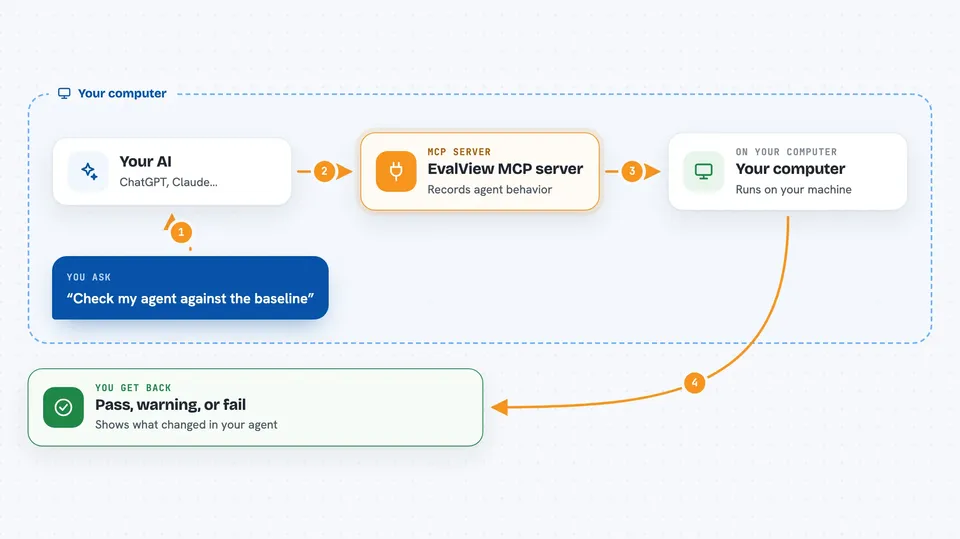
EvalView is a tool that records what your AI agent does today, then tells you when that behavior changes after an update. It is handy for anyone building or maintaining an AI agent who wants to catch surprises before users do. If you have ever changed one line and wondered what else broke, this is for you.
What is an MCP server? The 30-second version
On its own, your AI can only chat with you. An MCP server is a small helper program that gives your AI a new skill or a connection to another tool. This one connects your AI to EvalView, a testing tool for AI agents. Once connected, you can ask your AI to take a snapshot of your agent's behavior or check it against a saved baseline, and it will run EvalView for you.
What this MCP server does
You ask your AI to snapshot your agent, and it runs EvalView to record the tools your agent calls, in what order, and with what output. Later, after you change something, you ask it to check, and EvalView compares the new behavior to the saved baseline. It tells you if the tools changed, the order changed, or the output quality dropped. You get a clear pass, warning, or fail for each test, right in the chat.
 Click to zoom
What you can do with it
- Record a baseline snapshot of your agent's current behavior
- Check your agent against the baseline after a change
- See which tools were called differently or in a different order
- Spot when output quality drops compared to the baseline
- Accept a new behavior as the updated baseline when it is correct
- Run a quick demo to see how it works without setting up your own agent
Try asking your AI
- “Take a snapshot of my agent's behavior so we have a baseline”
- “Check my agent against the baseline and tell me what changed”
- “Did the refund flow change after my last edit?”
- “Show me the diff for the billing dispute test”
What it gives back to you
You get a short report for each test: passed, tools changed, or regression. It shows which tools were called differently and in what order, plus any drop in output quality. If you asked for a diff, you see the before and after side by side. The whole thing appears as a simple list in your chat.
Before you start
What you need
- Python installed on your computer
- The evalview package installed (pip install evalview)
- An AI agent or HTTP endpoint you want to test
Good to know
Running checks can call your agent, which may cost money if your agent uses a paid AI service.
Install it with your AI
Add EvalView MCP server to your AI, no technical skills needed
You don't install anything by hand. You copy one prompt, paste it into an AI that can work on your computer, and it checks, installs and connects the server for you, asking you when it needs something.
Sign in to get the install prompt
Members get a ready-made prompt that lets the Claude desktop app check EvalView MCP server, install it and connect it for them, step by step. You don't need any technical skills: you copy, paste and answer a few questions. Your connected AI can also find and install any of the 4,609 MCP servers here for you.
Who it's for
Developers and testers who build or maintain AI agents and want to catch behavior changes before they reach users.



