MCP server · Developer tools
Higress OPS MCP server
Lets your AI read and change settings on a Higress gateway for you, in plain chat.

This is a helper that connects your AI assistant to Higress, a tool that many teams use to direct and protect the traffic coming into their websites and apps. Once it is set up, you can ask your AI to look at how things are configured or to make changes, instead of clicking around a web console yourself. It is handy for people who run or support a Higress setup and want to get small jobs done faster.
What is an MCP server? The 30-second version
On its own, your AI can only chat with you. An MCP server is a small helper program that gives your AI a new skill or a connection to another app. This one connects your AI to Higress, so it can look things up there or make changes when you ask. You stay in the conversation, and the helper does the actual talking to Higress behind the scenes.
What this MCP server does
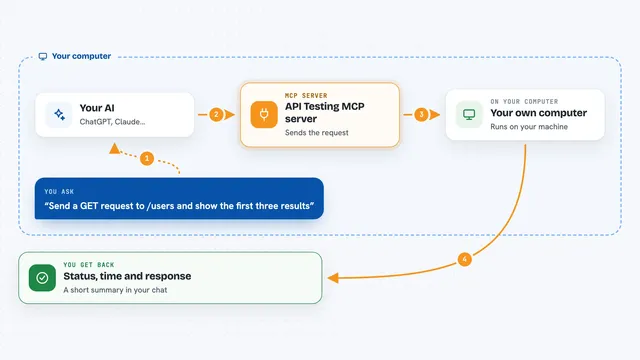
You type a request in plain words, like asking what routes are set up or asking to add a new one. Your AI passes that request to this helper program running on your computer. The helper then talks to your Higress console and asks it for the information or makes the change. The answer comes back to your AI, which explains it to you in the chat. For changes that could affect your live setup, the helper asks you to confirm before it acts.
 Click to zoom
What you can do with it
- Look up the routes currently set up on your Higress gateway
- Add a new route so traffic goes to the right place
- Update an existing route when something needs to change
- Check and change service sources that Higress pulls from
- View and update the request blocking plugin settings
- Ask general questions about how your gateway is configured
Try asking your AI
- “Show me all the routes currently configured on my Higress gateway”
- “Add a route that sends requests for /shop to my shop service”
- “What service sources are set up right now?”
- “Update the request blocking plugin so it blocks this IP address”
What it gives back to you
You get answers in the chat, usually as a list or a short summary. For example, it might list your routes with their names and paths, or confirm that a change was made. If something went wrong, it tells you what the problem was. You do not get files or downloads, just readable text in the conversation.
Before you start
What you need
- A Higress setup you can reach, with its console address
- Login details or a key for your Higress console, filled into the .env file
- Python and the uv tool installed on your computer
- The .env file copied from .env.example and filled in
Good to know
Some actions can change or delete your live gateway settings, so read the confirmation prompts carefully before you say yes.
Install it with your AI
Add Higress OPS MCP server to your AI, no technical skills needed
You don't install anything by hand. You copy one prompt, paste it into an AI that can work on your computer, and it checks, installs and connects the server for you, asking you when it needs something.
Sign in to get the install prompt
Members get a ready-made prompt that lets the Claude desktop app check Higress OPS MCP server, install it and connect it for them, step by step. You don't need any technical skills: you copy, paste and answer a few questions. Your connected AI can also find and install any of the 4,609 MCP servers here for you.
Who it's for
People who run or support a Higress gateway, like platform engineers, DevOps folks, and IT staff who handle web traffic.