
MCP server · Research
Himalayas Remote Jobs MCP server
Lets your AI search remote jobs, check salaries, find candidates, and track your applications.
This is a helper that connects your AI assistant to Himalayas, a website full of remote job listings. Once it is set up, you can just chat with your AI and ask it to find jobs, look up salaries, or research companies. It is handy for anyone job hunting, hiring, or just curious about remote work.
What is an MCP server? The 30-second version
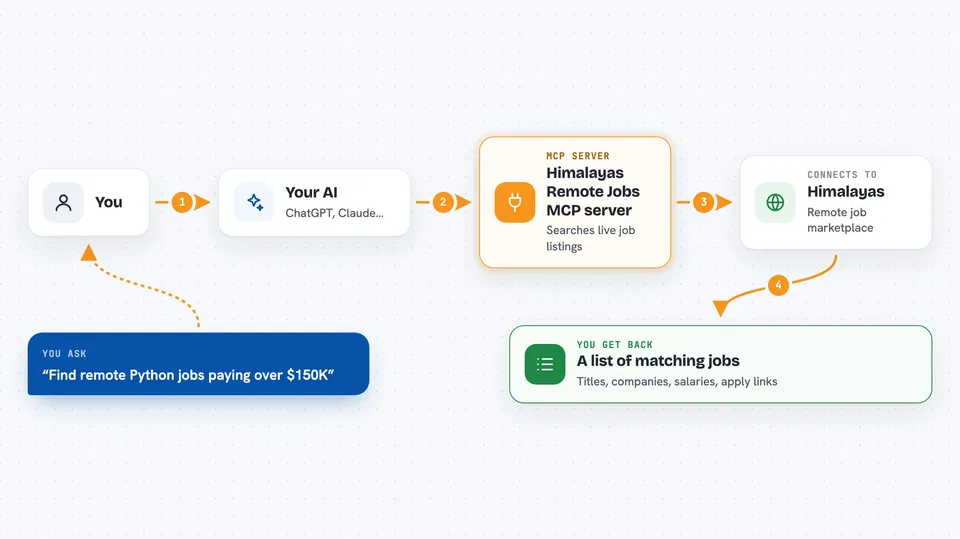
On its own, your AI can only chat with you using what it already knows. An MCP server is a small helper program that gives your AI a new skill, like a connection to a website or app. This one connects your AI to Himalayas, the remote jobs marketplace, so it can look up live job listings, salary numbers, and company details for you. When you ask a question, your AI passes it to this helper, and the helper fetches the answer from Himalayas.
What this MCP server does
You ask your AI something like find remote Python jobs paying over $150K. Your AI sends that request to the Himalayas helper. The helper searches the Himalayas marketplace in real time and sends back matching jobs. Your AI then shows you a tidy list with job titles, companies, salaries, and links to apply. You never have to open a website or fill in a search form yourself.
 Click to zoom
What you can do with it
- Search over 100,000 remote job listings by title, salary, country, and skills
- Check salary benchmarks for a role by title, seniority, and country
- Research companies by tech stack, benefits, and open positions
- Find remote candidates by skills, country, and job search status
- Save jobs to a simple application tracker and move them through stages
- Update your Himalayas profile, work experience, and job search status
- Post a remote job listing by describing the role in plain words
Try asking your AI
- “Find remote React developer jobs in Canada paying over $120K”
- “What is the average salary for a senior product manager?”
- “Show me companies that use Python and offer unlimited PTO”
- “Save this job to my application tracker and mark it as applied”
What it gives back to you
You get back lists of jobs, companies, or candidates with details like salary ranges, locations, and links. Salary questions come back as numbers, usually minimum, median, and maximum in US dollars. If you save a job or update your profile, the AI confirms the change it made. Everything shows up right in your chat window, like a normal reply.
Before you start
What you need
- An AI assistant that supports MCP servers, like Claude Desktop, Cursor, or VS Code
- Node.js installed on your computer (the setup uses a small tool called npx)
- A free Himalayas account if you want to save jobs, track applications, or manage a profile
Good to know
Some tools can post or delete job listings and update your profile, so double-check before you say yes to a change.
Install it with your AI
Add Himalayas Remote Jobs MCP server to your AI, no technical skills needed
You don't install anything by hand. You copy one prompt, paste it into an AI that can work on your computer, and it checks, installs and connects the server for you, asking you when it needs something.
Sign in to get the install prompt
Members get a ready-made prompt that lets the Claude desktop app check Himalayas Remote Jobs MCP server, install it and connect it for them, step by step. You don't need any technical skills: you copy, paste and answer a few questions. Your connected AI can also find and install any of the 4,361 MCP servers here for you.
Who it's for
Job seekers looking for remote work, recruiters searching for candidates, and anyone researching remote companies or salaries.


