MCP server · Design tools
Mermaid Diagram MCP server
by hustcc
Let your AI turn plain words into Mermaid diagrams and charts you can save or share.
This is a small helper that lets your AI draw diagrams for you. You describe what you want in normal words, and it produces a Mermaid diagram, which is a way of drawing flowcharts, timelines and charts from text. It is handy for anyone who needs a quick picture of a process, a plan or a set of steps without opening a drawing app.
What is an MCP server? The 30-second version
On its own, your AI can only chat and write text back to you. An MCP server is a small helper program that gives your AI one extra skill. This helper gives your AI the skill of making Mermaid diagrams, so when you ask for a flowchart or a timeline, the AI can actually build it instead of just describing it. You connect it once, and after that you just ask in plain words.
What this MCP server does
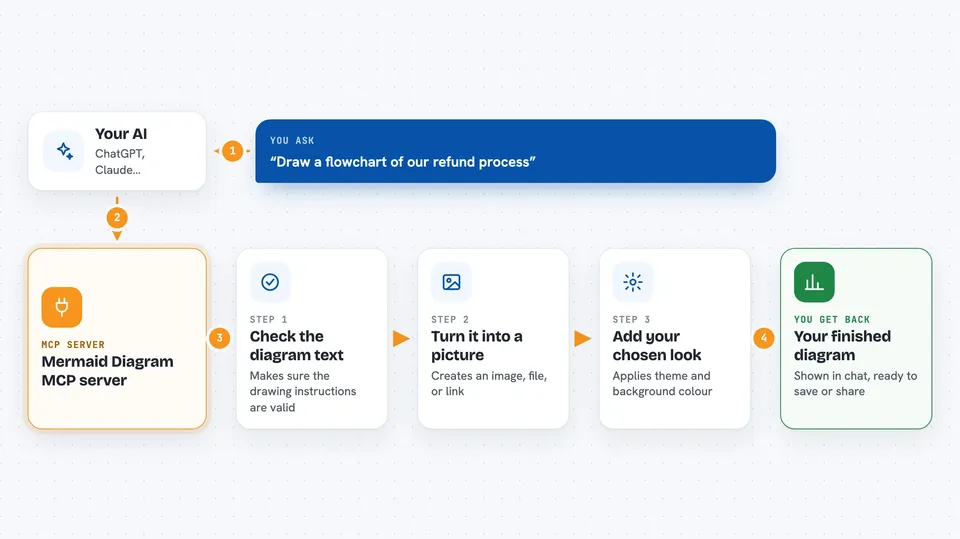
You ask your AI for a diagram, for example a flowchart of your approval process. The AI writes the Mermaid text for that diagram and hands it to this helper. The helper checks the Mermaid text is valid, then turns it into the format you asked for, such as an image, a file, or a shareable link. It can also apply a background colour and a theme so the diagram matches the look you want. You get the finished diagram back in the chat, ready to use or share.
 Click to zoom
What you can do with it
- Turn a written process into a flowchart
- Draw a timeline of project milestones
- Create a pie chart or bar chart from numbers you give it
- Make a sequence diagram of who talks to whom and when
- Save the diagram as a PNG file on your computer
- Get a shareable link to the diagram
- Choose a theme and background colour for the diagram
Try asking your AI
- “Draw a flowchart for our customer refund process from request to payment”
- “Make a timeline of our product launch from January to June”
- “Create a pie chart showing our support tickets by category”
- “Turn this list of steps into a diagram and save it as a PNG file”
What it gives back to you
You get the diagram itself, shown in the chat as an image or as a link you can open. Depending on what you ask for, it can also save a PNG file to your computer or give you the Mermaid text so you can edit it later. If the diagram text has a mistake, the helper tells the AI so it can fix it and try again.
Before you start
What you need
- The Claude desktop app or another app that supports MCP servers
- Node.js installed on your computer (the free program that runs npx)
Good to know
It only creates diagrams, so it will not change or delete anything of yours, but the shareable links it makes are public on the internet.
Install it with your AI
Add Mermaid Diagram MCP server to your AI, no technical skills needed
You don't install anything by hand. You copy one prompt, paste it into an AI that can work on your computer, and it checks, installs and connects the server for you, asking you when it needs something.
Sign in to get the install prompt
Members get a ready-made prompt that lets the Claude desktop app check Mermaid Diagram MCP server, install it and connect it for them, step by step. You don't need any technical skills: you copy, paste and answer a few questions. Your connected AI can also find and install any of the 4,361 MCP servers here for you.
Who it's for
Anyone who needs quick diagrams, flowcharts or charts for work, such as project managers, analysts, teachers and team leads.