MCP server · Security
q-ring MCP server
by I4cTime
Keep your API keys in your computer's built-in password vault and let your AI use them safely.
q-ring is a small helper that stores your passwords and API keys in the password vault that already comes with your computer (like the one your Mac or Windows uses to remember passwords). It lets your AI coding assistant look up a key when it needs one, without ever showing the secret in the chat. It is handy for anyone who uses AI tools to write code and is tired of pasting keys into plain text files.
What is an MCP server? The 30-second version
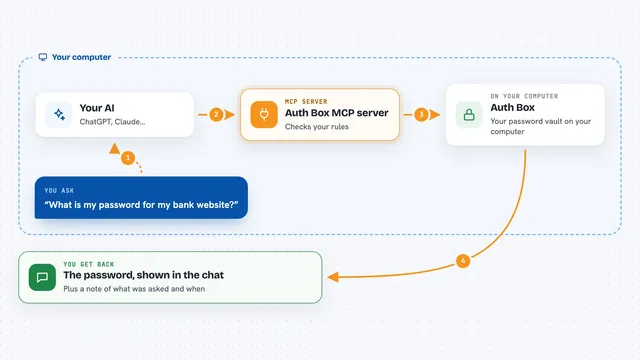
On its own, your AI can only chat. An MCP server is a small helper program that gives your AI a new skill or a connection to an app or service. This one connects your AI to q-ring, which is a safe place on your own computer where your secret keys live. When you ask your AI to do something that needs a key, the AI asks this helper, the helper checks the rules, and the key is used without ever being shown in the chat.
What this MCP server does
You ask your AI to do something that needs a secret, like run a command or check a key. The AI sends that request to the q-ring helper. The helper looks up the secret in your computer's password vault. It checks whether the request is allowed by the rules you set. Then it either uses the secret for you or gives you back a safe answer, and it writes down what happened in a log so you can see it later.
What you can do with it
- Store API keys in your computer's password vault instead of a text file
- Let your AI look up a key without showing it in the chat
- Block your AI from reading a secret if the rules say no
- Hide secrets in the AI's output so they don't leak
- Keep a tamper-proof log of every time a secret was used
- Generate strong random passwords and keys
- Import keys from a .env file in one go
Try asking your AI
- “Use my OpenAI key to check if it still works.”
- “List the names of all my stored secrets, but not the values.”
- “Generate a new strong password and save it as DB_PASSWORD.”
- “Show me the audit log for the last ten times my API key was read.”
What it gives back to you
You get answers in the chat, like a list of secret names (never the values), a yes or no about whether a key is valid, or a new password. If your AI tried to use a secret, you might see a short note that it was used, but the secret itself stays hidden. You can also ask for the audit log, which shows a list of events with times and key names.
Before you start
What you need
- Node.js 18 or newer (the program runs on it)
- A computer with a built-in password vault (macOS Keychain, Windows Credential Vault, or Linux Secret Service)
- The q-ring program installed on your computer
Good to know
This tool can read and change your stored secrets, so only connect it to AI assistants you trust and set up rules to limit what it can access.
Install it with your AI
Add q-ring MCP server to your AI, no technical skills needed
You don't install anything by hand. You copy one prompt, paste it into an AI that can work on your computer, and it checks, installs and connects the server for you, asking you when it needs something.
Sign in to get the install prompt
Members get a ready-made prompt that lets the Claude desktop app check q-ring MCP server, install it and connect it for them, step by step. You don't need any technical skills: you copy, paste and answer a few questions. Your connected AI can also find and install any of the 4,960 MCP servers here for you.
Who it's for
Developers and anyone who uses AI coding assistants and wants to keep their API keys out of plain text files.