
MCP server · Security
q-ring MCP server
by I4cTime
Lets your AI store, fetch, and manage your app passwords and API keys safely in your computer's own keychain.
q-ring is a small helper that keeps your secret passwords and API keys in the secure vault that already comes with your computer, like the Mac Keychain or Windows Credential Vault. It also plugs into AI coding tools such as Cursor, Kiro, and Claude Code, so your AI can look up a key or save a new one when you ask. It is handy if you keep pasting keys into plain text files and want a safer, tidier way.
What is an MCP server? The 30-second version
On its own, your AI can only chat. It cannot reach into your computer or your apps. An MCP server is a small helper program that gives your AI one new skill. Here, q-ring is that helper: it connects your AI to your computer's built-in password vault, so the AI can store, find, and manage your secret keys for you.
What this MCP server does
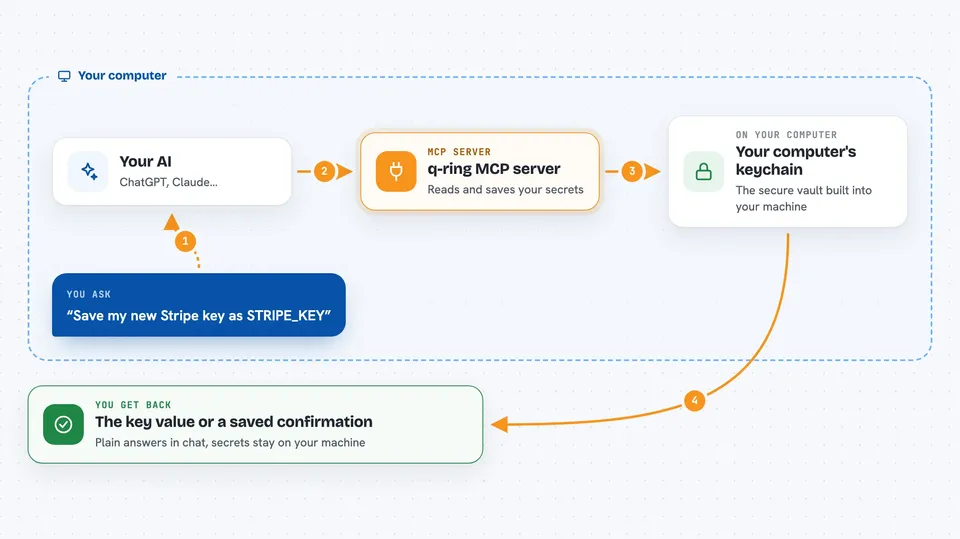
You ask your AI something like "save this key" or "what is my OpenAI key?". The AI passes that request to q-ring. q-ring then talks to your computer's own secure vault, where the real value lives. It sends back just the answer you need, like the key value or a confirmation that it was saved. Your secrets never sit in a plain text file unless you explicitly export them.
 Click to zoom
What you can do with it
- Save a new API key or password into your computer's secure vault
- Look up a saved secret when you need it
- List all your saved key names without showing the values
- Generate a strong random password or API key and save it
- Set a secret to expire after a certain time
- Import secrets from a .env file in bulk
- Check which secrets are missing or expired for a project
Try asking your AI
- “Save my new Stripe key sk_live_abc123 as STRIPE_KEY”
- “What is the value of my OPENAI_API_KEY?”
- “List all the secrets I have saved”
- “Generate a strong password and save it as DB_PASSWORD”
What it gives back to you
You get back plain answers in the chat. If you ask for a key, the AI shows you the value. If you save one, it confirms it was stored. If you list your secrets, you see the names only, never the values. It can also show you a health report or a list of expired keys.
Before you start
What you need
- The q-ring command line tool installed on your computer
- An AI coding tool that supports MCP, like Cursor, Kiro, or Claude Code
Good to know
This tool can read, change, and delete your saved secrets, so only connect it to AI tools you trust and be careful about asking it to export or share keys.
Install it with your AI
Add q-ring MCP server to your AI, no technical skills needed
You don't install anything by hand. You copy one prompt, paste it into an AI that can work on your computer, and it checks, installs and connects the server for you, asking you when it needs something.
Sign in to get the install prompt
Members get a ready-made prompt that lets the Claude desktop app check q-ring MCP server, install it and connect it for them, step by step. You don't need any technical skills: you copy, paste and answer a few questions. Your connected AI can also find and install any of the 4,361 MCP servers here for you.
Who it's for
Developers and anyone who uses AI coding tools and wants a safer way to handle API keys and passwords.





