
MCP server · Developer tools
SonarQube MCP server
by igorolv
Lets your AI read your SonarQube code issues and security hotspots so it can help you fix them.
This is a small helper program that connects your AI assistant to your own SonarQube server. SonarQube is the tool that scans your code and lists problems like bugs and security warnings. If your team runs SonarQube on its own machines, this lets your AI read those findings and help you fix them.
What is an MCP server? The 30-second version
On its own, your AI can only chat with you. An MCP server is a small helper program that gives your AI a new skill or a connection to another app. This one connects your AI to your SonarQube server, so when you ask about your code problems, the AI can go look them up there. It only reads; it never changes anything in SonarQube.
What this MCP server does
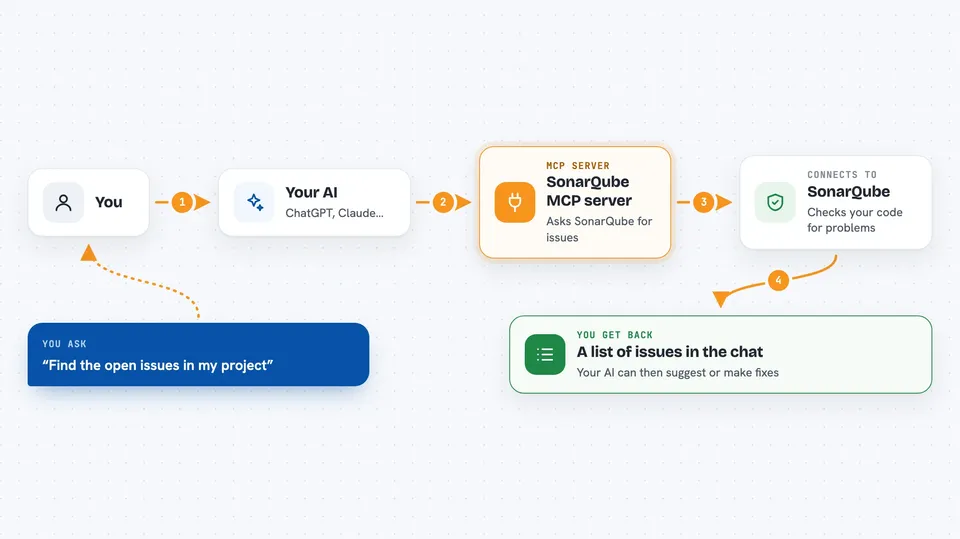
You ask your AI something like find the open issues in my project. The AI uses this helper to ask your SonarQube server for the list. SonarQube sends back the issues, the files and lines where they appear, and the rule explanations. The AI then shows you a summary or edits the code on your computer to fix them. It can also pull the exact lines of code SonarQube looked at, which is handy when you do not have the project open locally.
 Click to zoom
What you can do with it
- List the open issues in a SonarQube project
- See which file and line each issue is on
- Read the explanation of a Sonar rule
- Fetch the code snippet around an issue
- List security hotspots that need a manual review
- Get a summary of issues by severity, type, or author
- Check issues on a specific branch or pull request
Try asking your AI
- “List the open issues in project my-app and group them by severity”
- “Show me the details of rule java:S1234 and what it means”
- “Get the code snippet around issue AXk3... so I can see the exact lines”
- “Are there any security hotspots to review in project my-app on branch develop”
What it gives back to you
You get back plain lists and summaries in the chat: issue titles, severities, file paths, line numbers, and rule explanations. For snippets, you see the actual lines of code around the problem. Everything is read-only, so nothing in SonarQube changes. Your AI can then use that to suggest or make fixes on your computer.
Before you start
What you need
- A self-hosted SonarQube Community Build 26.4 or newer
- The web address of your SonarQube server
- A SonarQube user token (a kind of password you create in your account settings)
- Java 25 or newer installed on your computer
Good to know
It only reads from SonarQube, so it cannot change or delete anything there, but the code fixes your AI suggests or makes happen on your own computer, so review them before saving.
Install it with your AI
Add SonarQube MCP server to your AI, no technical skills needed
You don't install anything by hand. You copy one prompt, paste it into an AI that can work on your computer, and it checks, installs and connects the server for you, asking you when it needs something.
Sign in to get the install prompt
Members get a ready-made prompt that lets the Claude desktop app check SonarQube MCP server, install it and connect it for them, step by step. You don't need any technical skills: you copy, paste and answer a few questions. Your connected AI can also find and install any of the 4,609 MCP servers here for you.
Who it's for
Developers and teams who run their own SonarQube server and want their AI assistant to help fix the code issues it finds.




