
MCP server · Social media
VK MCP server
by ilyautov
Lets your AI read and manage VK communities, posts, messages, shop items, ads and stats for you.
This is a small helper that connects your AI assistant to VK, the big Russian social network. Once it is set up, you can ask your AI in plain words to look at your community posts, shop items, ads or customer messages, and it will do the fetching and changing for you. It is handy if you run a VK community or shop and want less clicking around.
What is an MCP server? The 30-second version
On its own, your AI can only chat with you. An MCP server is a small helper program that gives your AI a new skill or a connection to an app or service. This one connects your AI to VK, so it can look things up there or make changes when you ask. You keep the helper running on your own computer, and your AI talks to it instead of you clicking through VK by hand.
What this MCP server does
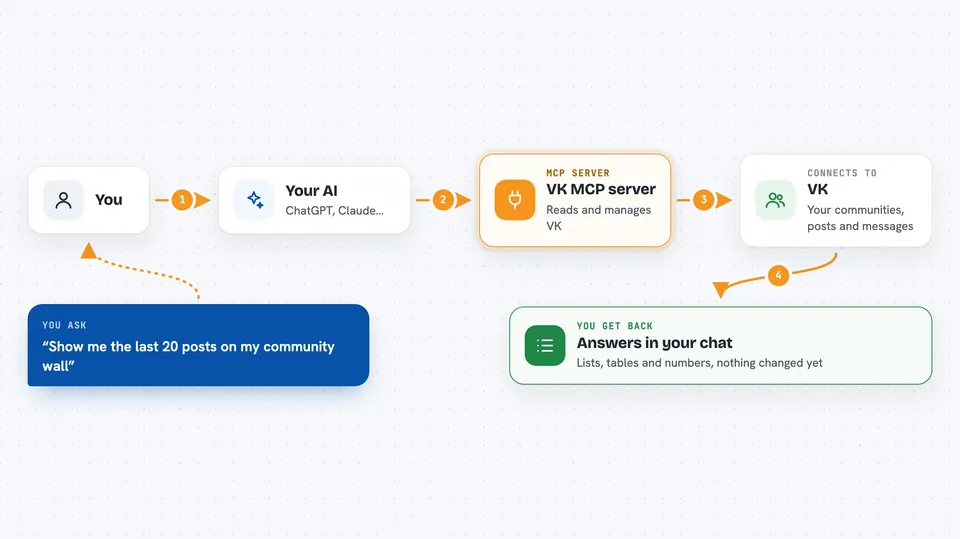
You ask your AI something like show me the posts on my community wall. The AI picks the right VK action from a built-in list, using plain words to search. The helper then talks to VK on your behalf and brings the answer back. If the action only reads data, it goes ahead right away. If it writes or deletes something, it stops and asks you to confirm first.
 Click to zoom
What you can do with it
- List posts on a community wall or a user wall
- Pull together shop items and orders into a table
- Check community and post statistics for a period
- Collect ad campaign spend and performance numbers
- Go through unread customer messages and draft replies
- Look up community members and user details
- Read lead form submissions
Try asking your AI
- “Show me the last 20 posts on my community wall”
- “Make a table of my shop items and recent orders”
- “What did my community stats look like last month”
- “Summarize my unread customer messages and suggest replies”
What it gives back to you
You get answers in the chat: lists of posts, items, orders, messages or numbers, often as a table or a short summary. For stats and ads, you get figures for the period you asked about. When the AI makes a change, it tells you what it did. Nothing is written or deleted until you confirm.
Before you start
What you need
- Python 3.10 or newer
- A VK app service key or a community token with the rights you need (market, messages, ads, stats). You get it from dev.vk.com.
- The Claude desktop app if you want the no-terminal install
Good to know
Some actions write or permanently delete things on VK, so read the confirmation prompt carefully before you say yes.
Install it with your AI
Add VK MCP server to your AI, no technical skills needed
You don't install anything by hand. You copy one prompt, paste it into an AI that can work on your computer, and it checks, installs and connects the server for you, asking you when it needs something.
Sign in to get the install prompt
Members get a ready-made prompt that lets the Claude desktop app check VK MCP server, install it and connect it for them, step by step. You don't need any technical skills: you copy, paste and answer a few questions. Your connected AI can also find and install any of the 4,361 MCP servers here for you.
Who it's for
People who run VK communities, shops or ads and want their AI to handle the routine checking and posting.





