
MCP server · Developer tools
Zuul CI MCP server
by imatza-rh
Ask your AI about Zuul CI builds, failures, logs and pipeline status in plain words.
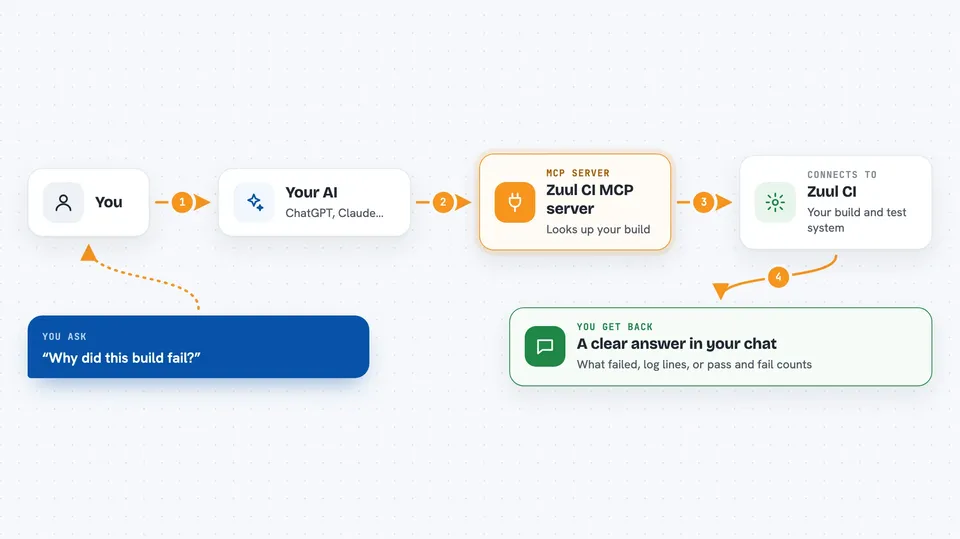
This is a helper that connects your AI assistant to Zuul, a system that runs automated tests on code changes. Instead of clicking around the Zuul web pages to find out why a build failed, you just ask a question in the chat. It is handy for anyone who works with code that goes through Zuul, even if you are not a CI expert.
What is an MCP server? The 30-second version
On its own, your AI can only chat with you. An MCP server is a small helper program that gives your AI a new skill or a connection to another service. This one connects your AI to Zuul CI, so when you ask about a build or a pipeline, the AI can go and look it up for you. You do not need to understand how it works under the hood; you just talk to your AI like normal.
What this MCP server does
You ask your AI a question about a Zuul build, a job, or a pipeline. The AI passes that question to this helper, which talks to your Zuul server for you. The helper pulls back the details, like which task failed, what the error was, or how long a job has been running. Then the AI turns that into a clear answer in your chat. You can also paste a build link and ask what went wrong.
 Click to zoom
What you can do with it
- Find out why a specific build failed, with the exact task and error message
- Search inside build log files for words like error, failed or timeout
- Check whether a job is flaky by looking at its recent pass and fail history
- See live pipeline status, what is queued and how long jobs have left
- Look up a job's configuration and which jobs depend on it
- Check nodepool nodes, labels and semaphores when jobs are waiting
- Read test results from JUnit XML files with pass, fail and skip counts
Try asking your AI
- “Why did this build fail? Here is the link: https://zuul.example.com/t/tenant/build/abc123”
- “Search the log of that build for timeout errors and show me the lines around them”
- “Is the job called periodic-tripleo-ci-centos-9 flaky over the last few weeks?”
- “What is currently running in the gate pipeline for my project?”
- “Show me the configuration of the job deploy-to-production”
What it gives back to you
You get answers in the chat, not raw files. That can be a short summary of what failed, a list of builds or jobs, a set of log lines around an error, or numbers like pass and fail rates. For test results you get counts and the names of failing tests. If something goes wrong, you get a plain error message instead of a crash.
Before you start
What you need
- The web address of your Zuul server (the URL you use in your browser)
- The name of your tenant in Zuul, if your setup uses tenants
- An account or token for Zuul if your instance requires login
- A tool called uvx, which comes with the uv Python tool
Good to know
By default it only reads things, but if you turn off read-only mode it can also change pipelines, like removing a change from a queue, so be careful with those actions.
Install it with your AI
Add Zuul CI MCP server to your AI, no technical skills needed
You don't install anything by hand. You copy one prompt, paste it into an AI that can work on your computer, and it checks, installs and connects the server for you, asking you when it needs something.
Sign in to get the install prompt
Members get a ready-made prompt that lets the Claude desktop app check Zuul CI MCP server, install it and connect it for them, step by step. You don't need any technical skills: you copy, paste and answer a few questions. Your connected AI can also find and install any of the 4,609 MCP servers here for you.
Who it's for
Developers, release engineers and anyone who deals with Zuul CI builds and wants faster answers without clicking through the web interface.



