MCP server · Design tools
CoDesign MCP server
by imgly
Your AI can create, edit and export branded designs like social posts, flyers and print PDFs.
CoDesign is a design helper that plugs into your AI assistant. You describe what you want in plain words, and the AI builds or edits the actual design file for you. It is handy for anyone who makes social posts, flyers, slides or business cards and would rather not open a design app for every small change.
What is an MCP server? The 30-second version
On its own, your AI can only chat with you. An MCP server is a small helper program that gives your AI a new skill. This one connects your AI to a real design engine, so it can lay out pages, restyle things and export finished files. You stay in the chat and steer, and the helper does the design work behind the scenes.
What this MCP server does
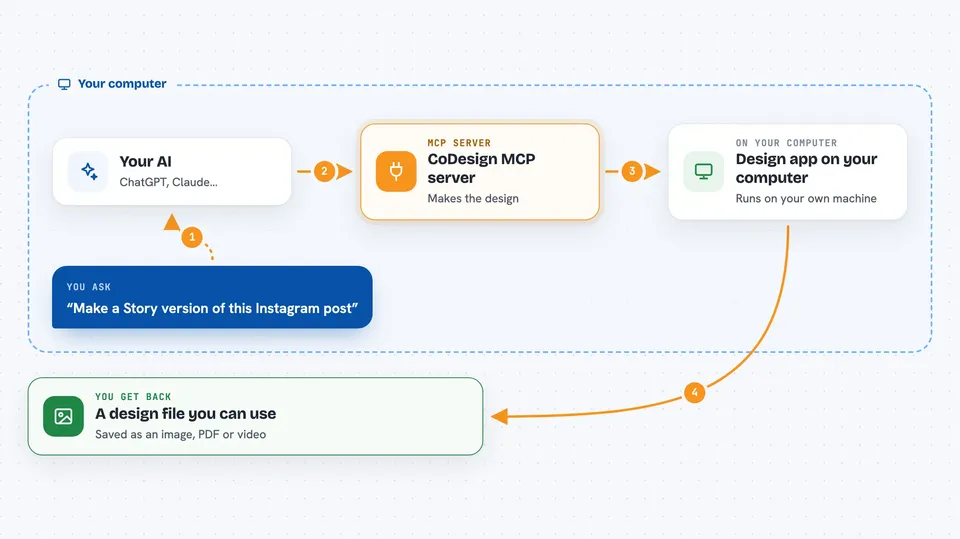
You ask your AI for a design, in normal language. The AI passes your request to this helper, which runs a real design engine on your computer. The engine opens or creates the design, makes the changes, and can show you a preview. When you are happy, it exports the result as an image, a PDF, or another file you can use.
 Click to zoom
What you can do with it
- Resize one design into versions for Instagram, Stories, LinkedIn and X
- Turn a flat product photo into editable layers on your brand background
- Import a PDF or PSD and restyle it with your brand kit
- Generate one card per row from a CSV file
- Prepare a flyer as an A4 print PDF with bleed and CMYK
- Translate a poster and re-fit the layout so nothing overflows
- Make App Store and Play Store graphics from your screen captures
Try asking your AI
- “Take this Instagram post and make the Story, LinkedIn and X versions.”
- “Import this datasheet.pdf, restyle it with our brand kit, and export A4 and web versions.”
- “One speaker card per row in speakers.csv, same template, all editable.”
- “Turn this flyer into an A4 print PDF with 3 mm bleed and CMYK.”
What it gives back to you
You get back a preview inside the chat so you can see how it looks. When you ask for a file, it saves an exported image, PDF or video to your computer and tells you where it went. It can also list the designs you have open and the changes it made, so you can keep track.
Before you start
What you need
- Node.js version 22.15 or newer installed on your computer
- An AI host that supports MCP, such as Claude Code, Codex, Cursor or Gemini CLI
- A free IMG.LY sign-in only if you want to make a flat image editable
Good to know
It can change and overwrite your design files, so keep a copy of anything important before letting it edit.
Install it with your AI
Add CoDesign MCP server to your AI, no technical skills needed
You don't install anything by hand. You copy one prompt, paste it into an AI that can work on your computer, and it checks, installs and connects the server for you, asking you when it needs something.
Sign in to get the install prompt
Members get a ready-made prompt that lets the Claude desktop app check CoDesign MCP server, install it and connect it for them, step by step. You don't need any technical skills: you copy, paste and answer a few questions. Your connected AI can also find and install any of the 4,361 MCP servers here for you.
Who it's for
People who make marketing or brand materials, like social media managers, designers, marketers and small business owners.