
MCP server · Developer tools
Overseer Neovim MCP server
Lets your AI start and manage long-running commands like dev servers inside your Neovim task list.
This is a small helper that connects your AI coding assistant to overseer.nvim, the task list plugin inside Neovim. It lets the AI start, watch, restart, and stop long-running commands such as dev servers and file watchers as real tasks you can see and control yourself. It is handy for developers who run an AI agent inside Neovim and want its background processes to show up in the same place as their own.
What is an MCP server? The 30-second version
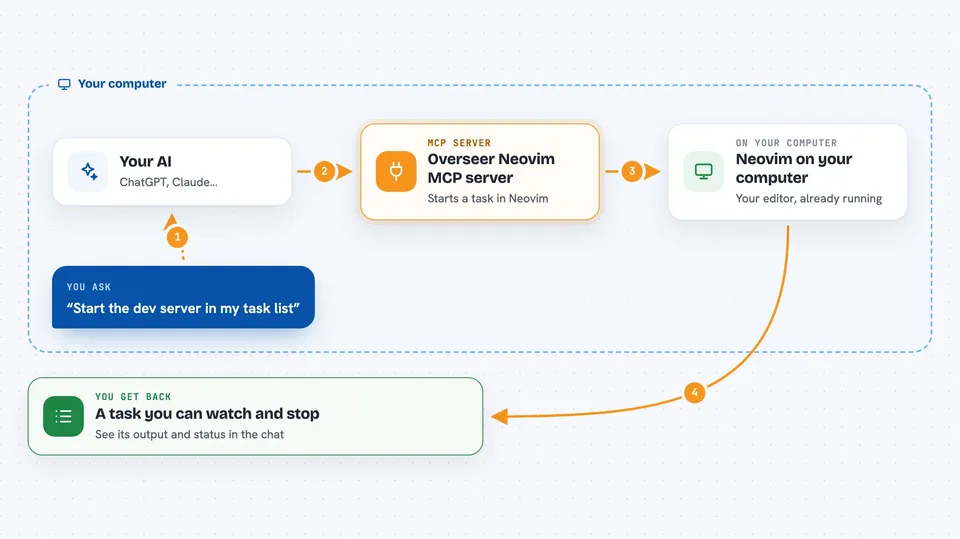
On its own, your AI can only chat and write text. An MCP server is a small helper program that gives your AI a new skill or a connection to another tool. This one connects your AI to overseer.nvim, the task manager inside Neovim, so the AI can start and manage tasks there for you. You ask in plain words, and the helper passes the request along to Neovim.
What this MCP server does
You ask your AI to start a dev server or a watcher. The AI uses this helper instead of its own shell. The helper talks to overseer.nvim inside your running Neovim and creates a real task. That task then shows up in your task list, where you can watch its output and stop it yourself. The AI can also list tasks, read their output, restart them, or remove them when you ask.
 Click to zoom
What you can do with it
- Start a long-running command like a dev server as a task in your list
- List all tasks with their names, status, exit codes, and commands
- Read the output of a task, waiting until a specific line appears
- Restart a task by its id or by part of its name
- Stop a running task you no longer need
- Remove a finished task from the list
- Look up available task templates in your project
Try asking your AI
- “Start the dev server in overseer”
- “Show me the tasks that are running right now”
- “Tail the output of the dev task until it says ready”
- “Stop the watcher task”
What it gives back to you
You get back plain answers in the chat: a list of tasks with their status and details, or the recent output of one task. When the AI starts, stops, or removes a task, it tells you what it did. Output blocks also show a cursor number so the AI can fetch only new lines next time.
Before you start
What you need
- Neovim with the overseer.nvim plugin installed
- Node.js version 22 or newer
- An MCP client running inside a Neovim terminal buffer
Good to know
It can stop or remove tasks, and it refuses to stop a running task you started yourself unless you clearly ask it to force it.
Install it with your AI
Add Overseer Neovim MCP server to your AI, no technical skills needed
You don't install anything by hand. You copy one prompt, paste it into an AI that can work on your computer, and it checks, installs and connects the server for you, asking you when it needs something.
Sign in to get the install prompt
Members get a ready-made prompt that lets the Claude desktop app check Overseer Neovim MCP server, install it and connect it for them, step by step. You don't need any technical skills: you copy, paste and answer a few questions. Your connected AI can also find and install any of the 4,609 MCP servers here for you.
Who it's for
Developers who use Neovim with overseer.nvim and run an AI coding agent inside it.




