
MCP server · Analytics
RankCLI SEO MCP server
by integrallis
Ask your AI to check a web page's SEO, speed, and AI-search readiness, and get plain answers back.
This is a small helper that lets your AI look at a web page and tell you how well it is set up for search engines and for AI tools like ChatGPT. It is handy if you write or manage website pages and want a quick check without learning a whole SEO tool. You do not need an account or a key, and nothing is sent to the company's servers.
What is an MCP server? The 30-second version
On its own, your AI can only chat with you. An MCP server is a small helper program that gives your AI a new skill or a connection to something outside the chat. This one gives your AI the skill of reading a web page's HTML and checking its SEO and AI-search signals. Once it is connected, you just ask in normal words and the AI uses this helper behind the scenes.
What this MCP server does
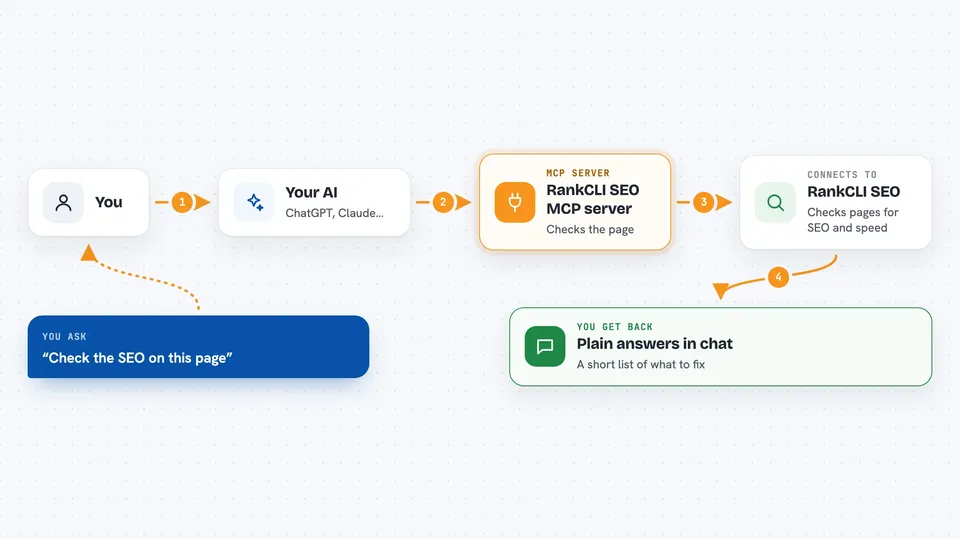
You ask your AI something like run an SEO check on this page. Your AI passes the page's HTML or robots.txt to this helper. The helper looks at things like page speed signals, structured data, security headers, mobile setup, images, and internal links. It also checks whether AI crawlers like GPTBot or ClaudeBot are allowed in. Then your AI explains the results back to you in the chat.
 Click to zoom
What you can do with it
- Run a full SEO check on a page you paste in
- See whether AI crawlers are allowed or blocked in robots.txt
- Generate an AI-friendly robots.txt file
- Check structured data (the hidden labels search engines read)
- Grade your security headers and HTTPS setup
- Review image alt text, sizes, and lazy loading
- Spot weak internal links and orphan pages
Try asking your AI
- “Run an SEO audit on this page and tell me the top three things to fix”
- “Is my robots.txt letting GPTBot and ClaudeBot in?”
- “Check the structured data on this page and tell me if anything is missing”
- “Look at my images and tell me which ones need better alt text”
What it gives back to you
You get a written summary in the chat, not a file to download. It lists findings like which headers are missing, which images lack alt text, or which AI crawlers are blocked. Some tools also hand back ready-to-use text, such as a robots.txt draft or a structured data template. Your AI turns all of that into plain sentences you can act on.
Before you start
What you need
- The Claude desktop app, Claude Code, Cursor, or another app that supports MCP servers
- Node.js installed on your computer (the free program that runs this helper)
- The page's HTML or its robots.txt, which your AI host can usually fetch for you
Good to know
It only reads the HTML or robots.txt you or your AI host give it, so results depend on that page being fetched correctly, and it does not crawl your whole site on its own.
Install it with your AI
Add RankCLI SEO MCP server to your AI, no technical skills needed
You don't install anything by hand. You copy one prompt, paste it into an AI that can work on your computer, and it checks, installs and connects the server for you, asking you when it needs something.
Sign in to get the install prompt
Members get a ready-made prompt that lets the Claude desktop app check RankCLI SEO MCP server, install it and connect it for them, step by step. You don't need any technical skills: you copy, paste and answer a few questions. Your connected AI can also find and install any of the 4,361 MCP servers here for you.
Who it's for
Anyone who writes or manages website pages and wants a quick, free SEO and AI-search check without a paid tool.





